


New Participant
October 27, 2020
Question

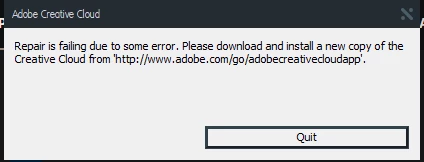
CC Desktop App endless loading screen and ends with error
  • October 27, 2020
  • 2 replies
  • 357 views

I have downloaded the creative cloud app for the 5th or 6th time now (from the official site), but for some reason, CC is not working on my computer and asks me every time to re-download it. Please let me know what wrong settings do I have that the CC wouldn't work.

This topic has been closed for replies.

2 replies

Jeffrey_A_Wright
Community Manager
Community Manager
October 27, 2020

Rishab and Steph, please see https://helpx.adobe.com/creative-cloud/kb/creative-cloud-missing-damaged.html which discusses how to correct this error. Please update this public forum discussion if you have any questions.

StephMLCullen
New Participant
October 27, 2020

Hi Jeff, thank you for responding. I ran through all solutions and I'm still receiving the error. Solution 4, reinstalling with an admin account worked for a brief moment. It was beautiful, but then I restarted my computer and the error has returned.

Jeffrey_A_Wright
Community Manager
Community Manager
October 27, 2020

Ok, thanks for the update, Steph. For your next steps, please download and run the CC Log Collector Tool from http://helpx.adobe.com/creative-cloud/kb/cc-log-collector.html.  Once the logs are uploaded, you can then begin a chat session at https://helpx.adobe.com/contact.html so that the current cause of the error can be identified and resolved.

StephMLCullen
New Participant
October 27, 2020

I receive the same error:

I have unistalled, deleted OOBE files, and reinstalled consistently for a week and CC simply won't load.


The error started on Tuesday, 10/20/20. I had a couple days last week where the install did work and I was able to utilize my desktop app, but it hasn't loaded properly since Friday, 10/23/20.