


jacksonfilm
Participating Frequently
October 16, 2019
Answered

CC Installer: JavaScript is disabled. Please enable JavaScript and try to sign in again.

  • October 16, 2019
  • 8 replies
  • 64235 views

I'm currently unable to get Creative Cloud Installer to get past logging in with this error:

JavaScript is disabled. Please enable JavaScript and try to sign in again.
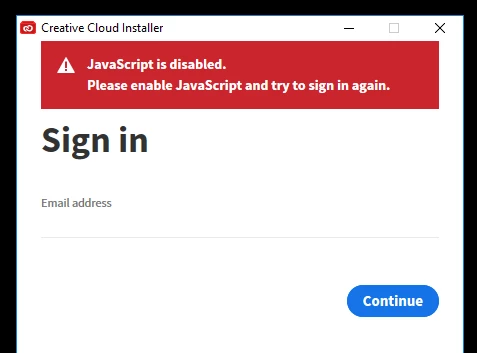
 

I believe I have the latest Java installed and running well on my fully updated Windows 10 on all my browsers. So I'm a bit stuck.


This is possibly connected to my original problem whereby Premiere, After Effects and Lightroom were unable to connect to Adobe for verifiying my account, so basically locking me out. Photoshop and other apps still worked fine. So I'm attempting to do a fresh install of everything, but am now stuck at the very first step!


    Correct answer nicolep44011495

    https://helpx.adobe.com/x-productkb/multi/enable-javascript.html


    Someone below found this and I had checked this link earlier but I was checking Chrome and Firefox, since those are the ones I use. However, even if you don't use IE, follow those instructions and I bet that will work for you - it did for me.

    8 replies

    Participant
    July 19, 2021

    Thank you so much, worked perfectly, gret advice and knowledge.

    Participant
    June 7, 2021

    Me too. Shame that you have to turn off all your security for this simple install. Seems like I've enter the MS Windows Hell....again.


    nicolep44011495
    nicolep44011495Correct answer
    Participant
    August 29, 2020

    https://helpx.adobe.com/x-productkb/multi/enable-javascript.html


    Someone below found this and I had checked this link earlier but I was checking Chrome and Firefox, since those are the ones I use. However, even if you don't use IE, follow those instructions and I bet that will work for you - it did for me.

    Participant
    November 24, 2020

    So I launched IE, went through the sequence above to enable scripting, then set IE as my default browser.  Bingo!

    Participant
    August 28, 2020

    Found a solution.


    Just had this problem and thought I post my solution in case anyone finds this thread and needs help. I had to enable JavaScript in the Internet Explorer browser settings. I have no idea why Adobe goes through Explorer. I have Edge, Chrome and Firefox installed, but it didnt work until I enabled it in Explorer. 


    The instructions of how to enalbe it is here: https://support.microsoft.com/en-us/help/3135465/how-to-enable-javascript-in-windows

    nicolep44011495
    Participant
    August 29, 2020

    Thank you SO MUCH! I've just spent and hour trying to find this answer and your link fixed it! I can't believe that it looks for IE to have javascript enabled. It's ridiculous but thank you for finding the answer!!

    Participant
    April 7, 2020

    This reply is quite a few months removed from the initial problem, but I had the same Javascript Disabled message when trying to run Premiere Pro. After a few attempts to correct the issue from what was suggested in the other Replies, I thought about other programs I had recently downloaded (on a Windows 10).  I had installed Rush a few days ago. I uninstall Rush, restarted computer. I ran Adobe CC and had to sign in with my credentials for the first time since installing Adobe CC a number of months ago. Once that was done, Premiere Pro started without the Javascript Disabled message. Is there a correlation? Don't know, but the problem was resolved.

    jw42140154
    Participant
    March 5, 2020

    WTF!
    I just waisted three hours of my life.
    (oh well, three hours of my boss...)

    Having tried all fancy Adobe Creative Cloud uninstaller-tools and sh** to finally get to the javascript-screen.

    I do have Brave, Firefox, Chrome, Edge and Explorer on my computer. And there is 1 that i don't use. That one is also the one that has the most strict safety rules applied. For some reason M$ wants us to use Edge (you know, with the gossip homepage) instead of Internet Explorer. IMHO that one is the most vulnerable browser of all modern browser *which is a joke in itself*

    But, the Adobe Cloud uses that MSIE for registering. (though it tries to use Chrome (which is *not* my default browser) for the normal installation). And it uses MSIE for verification at startin up any adobe-app.


    Now i've set my MSIE to security level "I'm bending over, please use the vaseline i've supplied and come over" and Adobe finally lets me install their software.

    I'm an Adobe fanboy, but this is ridiculous!

    Thanks to this thread i've found out what the problem was as other errors where without defining Javascript as the problem.

    Thanks adobe....

    .. back to the drawingboard perhaps??

    Participant
    June 8, 2021

    LOL Well done! Thank you.


    In MS Windows OS 10, in the search bar, search and open Internet Options -> Select the Security Tab -> Drop the level to "Medium High".


    Note the attached image of the Internet Options is call Internet Properties, search for Internet Options in the task bar.


    Worked after that.

    AL
    June 8, 2021

    Oh, my goodness! Thank you so much aaronlg1!!! That worked for me. I've been trying to figure this out all day.

    Participant
    November 22, 2019

    Same problem here. Spent an hour on the phone with Adobe support today. Clearly explained the problem at the start; they insisted on taking over my computer and painfully slowly going through all the steps I had done earlier in the day, only to get to this spot. They tried updating Windows at that point, which took quite a while and they finally said "Call us back when it's updated."
    Of course it finished updating as soon as they hung up, but it's an hour+ wait for a call back. And, when I tried installing CC, I once again ended up at this "Javascript is disabled" prompt.

    Adobe, when will you quit messing around with your own special installer and just go with the standards??? 😞


    Participant
    December 16, 2019

    Hi, 


    Did anybody find a solution for this? I have had the same thing happen today and I cannot find a solution. All of my browsers are enabled. I cannot even uninstall the programs due to the same error appearing over and over again. 

    jacksonfilm
    Participating Frequently
    December 16, 2019

    I think we fixed this by turning off all the ad blockers I had on my browser. 

    Nancy OShea
    Community Expert
    Community Expert
    October 16, 2019

    JAVA is not JavaScript.  2 entirely different things.  JavaScript must be enabled in your browser -- Chrome, Firefox, MS Edge, Safari, etc...  See link below.

    https://helpx.adobe.com/x-productkb/multi/enable-javascript.html


    Nancy O'Shea— Product User & Community Expert
    Participant
    November 16, 2019

    This doesnt work. Im having the same issue and adjusting all the broswer settings didnt do anything.


    Plus this is a seperate wndow completely unrelated to any interenet browser so Im not sure how this solution would ever work.


    Does anyone else have any other ideas?