OK. Thanks anyway. I will be waiting for the Mac users.
Run the Adobe Cleaner tool and if listed remove Adobe Creative Cloud app.
Use the Creative Cloud Cleaner Tool to solve installation problems
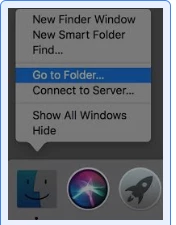
Restart Mac .
Step 1)
1) Right click on Finder icon and select "Go-To Folder " option.
2) You will get a text box, type-in below command and then hit 'Return' key.( Do not miss ~ symbol)
~/library
3)Then navigate to Application Support>Adobe.
Open Adobe folder and trash folders named AAMUpdater and OOBE.
Step 2)
1) Right click on Finder icon and select "Go-To Folder" option.
2) You will get a text box, type-in below command and then hit 'Return' key.
/library
3)Then navigate to Application Support>Adobe.
Open Adobe folder and trash folders named AAMUpdater ,Adobe Application Manager and OOBE.
Step 3)
Make sure there are no Adobe Application Manager , Adobe Creative Cloud folder under Applications and Utilities. If present Trash it.
Step 4)
Try to reinstall Adobe Creative Cloud application and check.
If above steps did not work , if possible enable Root user account and try to install Adobe Creative Cloud app .
How to enable the root user on your Mac or change your root password - Apple Support
Let me know if you need further assistance .



 AdChoices