


Participating Frequently
November 28, 2017
Answered

CS3 Master Collection component install failed

  • November 28, 2017
  • 2 replies
  • 3273 views

So I got a new computer and had to re-install my CS3 Master Suite on it, after speaking with adobe support, we were able to download what I needed and get a new serial key.  Everything opened and was working fine, but now twice already, when I go to open Premier or Photoshop, After Effects, etc...I would get the error that the licensing has stopped working.  I uninstall everything and repeat the process, and it usually works.  Now I am getting "component install failed" at the installing portion.  I uninstalled everything, ran the Cleaner tool and got rid of everything and still getting the same result.  Adobe is telling me that they no longer support CS3 and referred me to this forum.  Please Please Please help!  And just a note, dunno if it matters but I did notice something strange that the last 2 times when I did this, it asked me to enter the serial key to get a new one, I entered the serial key and it gave me the same exact one and says its new.  Maybe there is something to this?

[Title edited for question clarity and future forum search... Mod]
    This topic has been closed for replies.
    Correct answer kglad

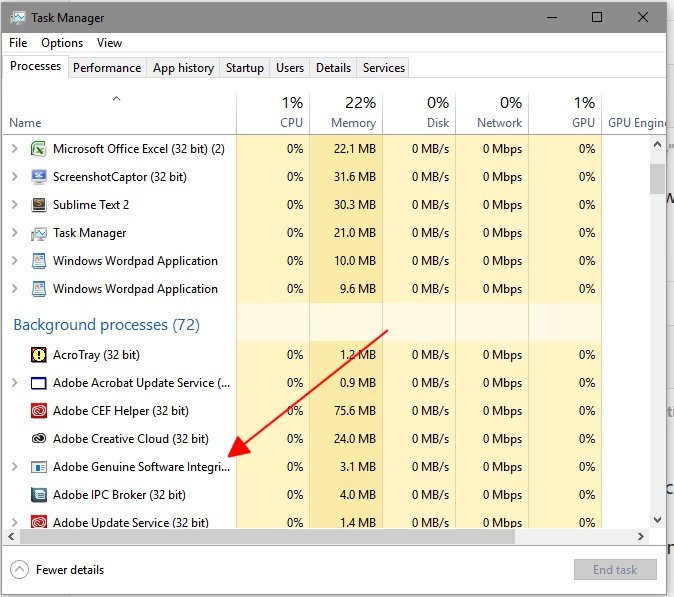
    Understood.  Some of this stuff is a little over my head so I do apologize, but can you instruct me on how to close that so I can proceed with the rest?


    recheck your task manager:

    2 replies

    John T Smith
    Adobe Expert
    November 28, 2017

    What is your operating system?

    CS3 is old and has not been and will not be updated to be compatible with current operating systems

    Participating Frequently
    November 29, 2017

    I'm on a 64 bit Radeon computer, windows 11....as I mentioned I had done this process before and everything was working just fine but this third time it wont

    kglad
    Adobe Expert
    November 29, 2017

    make sure all your adobe programs are closed and enable viewing of hidden files when trying to delete cache.db file, :  https://helpx.adobe.com/creative-cloud/kb/configuration-error.html

    kglad
    Adobe Expert
    November 28, 2017

    uninstall cs3 (using the uninstaller)

    clean per http://helpx.adobe.com/creative-suite/kb/cs5-cleaner-tool-installation-problems.html

    remove the cache.db file from Program Files (x86)/Common Files/Adobe/Adobe PCD/cache/

    restart your computer

    follow the steps here to install cs3, https://helpx.adobe.com/creative-suite/kb/activation-fails-cs3-acrobat-8.html

    if that fails read this, https://forums.adobe.com/thread/2385900

    [moved from Installing, Updating, & Subscribing to Acrobat to Downloading, Installing, Setting Up]

    Participating Frequently
    November 29, 2017

    for some reason it will not let me delete the cache file