


Participating Frequently
June 19, 2013
Answered

CS6 gone from Creative Cloud, i need it

  • June 19, 2013
  • 3 replies
  • 21393 views

I am about to roll out half my users to the creative cloud and wanted to have them all on CS6 because the other half are on the 'disk' version of CS6 already. (want them all on same version).

I have just gone to create a 'Creative Cloud Package' and the applications i need are now are all CC (i need illustrator, photoshop and indesign), is there anywhere on 'the cloud' where i can download CS6 versions because going to the individual products pages doesnt even seem to give me an option of CS6 anymore.

Creating a 'Creative Cloud Package' would be the ideal route too as I'd also prefer to not download all 3 of the applications 11 times.
This topic has been closed for replies.
Correct answer Sumit Singh7733893

Brilliant thankyou, fingers crossed i'll be able to create a package that the applications can be activated by cloud accounts


They can still have CS6 application as a part of their download.

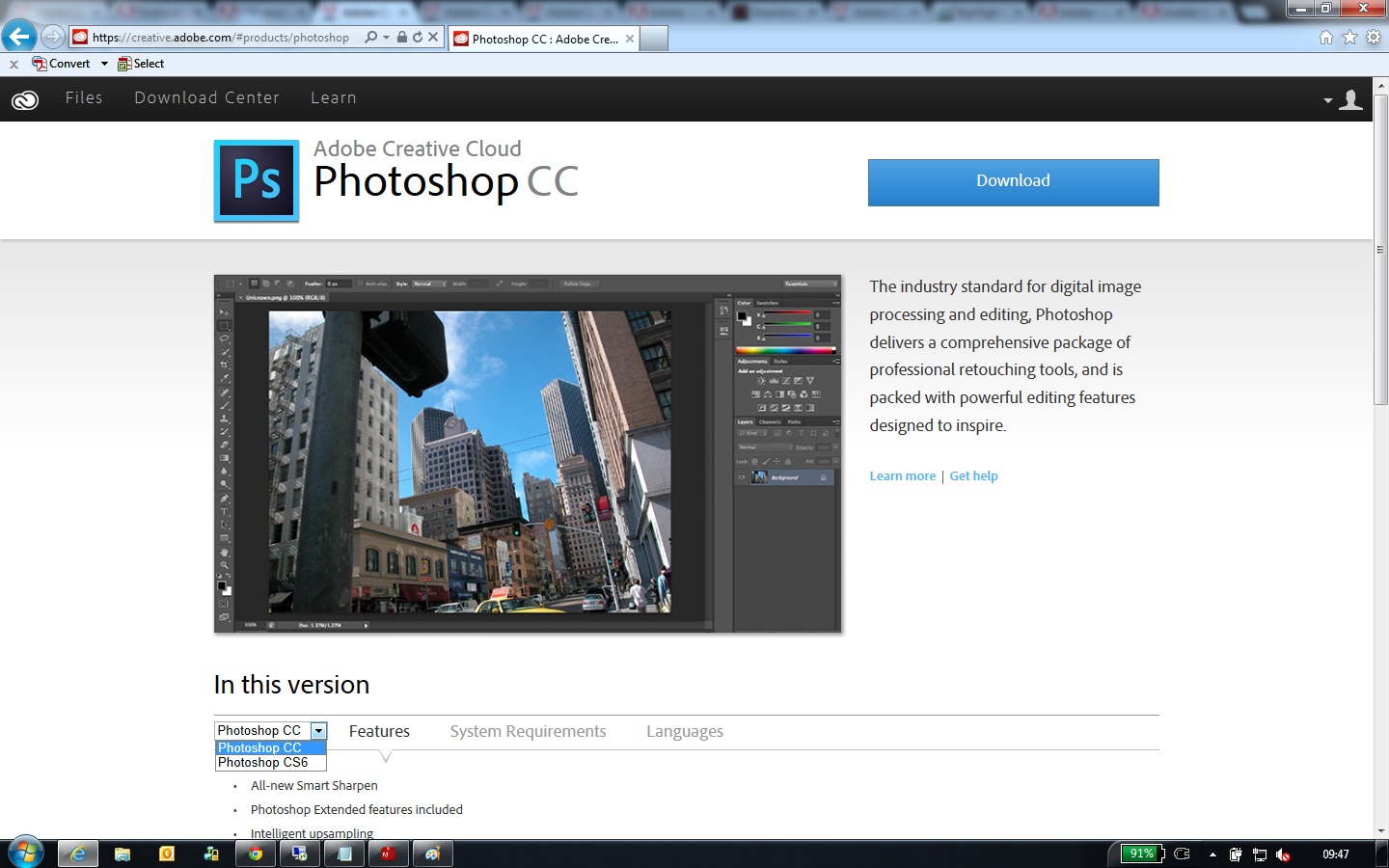
on download page www.creative.adobe.com they need to select CS6 application from drop down.

CS6 download.jpg

For information on how to install the CS6 version of the software please see Download previous versions of Adobe Creative applications -http://helpx.adobe.com/creative-cloud/kb/download-previous-versions-cr eative-applications.html

3 replies

New Participant
October 6, 2013

go to your cc area where you have your cloud files  go to the down load tab  click on program you want to download   there is dropdown box that will let you download previous verson

Participating Frequently
June 20, 2013

Your initial question isn't very clear. Do you WANT the Creative Cloud? You do not have to get CC to get CS6! You can get CS6 from within the cloud, or separate from it. Don't think you have to get CS6 from a Cloud subscription.

TC-JDAuthor
Participating Frequently
June 20, 2013

Sorry, i knew i'd end up causing confusion (i always do)

What i want is......

to create an install package using the 'Creative Cloud Packager' that i can roll out to my users. They need to have CS6 applications however there is only the option to download CC applications (which i dont want). Is there anywhere/way i can download several CS6 applications ONCE then use cloud accounts to activate them

I hope this clears it up a little.

Participating Frequently
June 20, 2013

OK. I felt like you just wanted CS6 apps but thought that you could only get them from the "Cloud". If there are other things/reasons you need/want CC, then I see your point and how you're trying to save yourself a headache. I just want you and anyone else to be clear that it isn't necessary to order CC to access CS6 apps.

Otherwise, from what I've read around here on the threads, it seems like what you want isn't going to be doable. From what it sounds like, Adobe has really screwed up their implementation of downloads. I guess they have an abundance of bandwidth to waste.

Hope you find a solution though. Man, it sounds like a real big hassle.

bforta@adobe.com
Adobe Employee
Adobe Employee
June 19, 2013

Yeah, we buried them a bit, sorry. But, go to the specific product pages in Creative Cloud (like this Photoshop page or this Illustrator page), and you'll see a drop down select box (right below the big image) where you can change from CC version to CS6 version. Then you'll be able to download the CS6 version.

--- Ben

Inspiring
June 19, 2013

Ben Forta wrote:

Yeah, we buried them a bit, sorry.

It's nice to see someone actually admit this "tactic" used by Adobe to make everything else besides the CC so obscure and hard to find.