


Participant
September 26, 2015
Question

Error 87 on windows 10

  • September 26, 2015
  • 4 replies
  • 2175 views

I have just attempted to install Adobe CC Cloud on my desktop pc operating with windows 10.

I keep getting this error message:
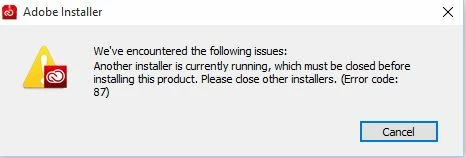
I dont have any other installers running, have attempted to delete the download and re-try and have also restarted my computer and attempted again, still no luck.

I have received the same response using internet explorer and google chrome.

Any suggestions on how to fix this so i can start using my programs

This topic has been closed for replies.

4 replies

shawnc12466939
Participant
October 12, 2015

I tried all of the above (restarting, RAM clean, Adobe CC cleanup tool, etc., and the only thing that finally worked was Task Manager: End Task on all Windows Installer tasks, except the msiexec.exe task, which will neither End nor Stop (but it doesn't seem to interfere with CC installer).  Good luck!

Best,

Shawn

RahulTyagi_
Community Manager
Community Manager
October 16, 2015

In that case, Please contact customer care regarding this issue : Contact Customer Care

Regards,
Rahul Tyagi

Known Participant
September 27, 2015

I'm having the same issue; the only CC process is the one I'm trying to use to update.  If I 'end process' on the only two CC items (Adobe CEF Helper and Creative Cloud), the CC update restarts and then spins (no response).  I've also tried to go through the SysConf in Windows control panel (unchecking Load Systems and rechecking).  That hasn't worked either. 

RahulTyagi_
Community Manager
Community Manager
September 27, 2015

Hi Cindy,

You can try the steps mentioned on the following Webpage : https://helpx.adobe.com/creative-cloud/kb/creative-cloud-desktop-application-failed.html

OR

You can contact customer care regarding this issue : Contact Customer Care

Regards,

Rahul

RahulTyagi_
Community Manager
Community Manager
September 26, 2015

Hi Kyle,

As suggested by Keith, I would recommend you to Close any instance of CC or windows installer from the task manager, that might be interrupting the installation process.

Regards,

Rahul

kglad
Community Expert
Community Expert
September 26, 2015

open your task manager and look for a cc process that you can terminate.