Exit
  • Global community
    • Language:
      • Deutsch
      • English
      • Español
      • Français
      • Português
  • 日本語コミュニティ
  • 한국 커뮤니티
1

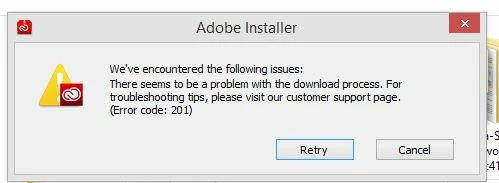
Error code 201 when updating the creative cloud app to the 2015 version on PC.

Community Beginner ,
Jun 16, 2015 Jun 16, 2015

When trying to update to the new CC version, I got this:

Therefore, I am not able to open my CC application, neither update it. I am stuck.

Does anyone have a solution for this?

I appreciate it!

error.JPG

TOPICS
Creative Cloud
3.8K
Translate
Report
Community guidelines
Be kind and respectful, give credit to the original source of content, and search for duplicates before posting. Learn more
community guidelines

correct answers 1 Correct answer

LEGEND , Jun 16, 2015 Jun 16, 2015

Tips :

1)

Disable Anti-Virus and Firewall temporarily .

2)

If you are using Wireless/ Wifi Internet , try with Ethernet wired connection .

3)

Make sure LAN settings is set to detect settings Automatically :

  • Open Control Panel and then click on the option "Network and Internet" .
  • Click on Internet options, click on 'Connections' tab.
  • In the 'Connections' tab, select 'LAN' settings, you will be able to view the Local area network settings box.
  • Check the box-"Automatically Detect Settings" and then "uncheck"
...
Translate
LEGEND ,
Jun 16, 2015 Jun 16, 2015

Tips :

1)

Disable Anti-Virus and Firewall temporarily .

2)

If you are using Wireless/ Wifi Internet , try with Ethernet wired connection .

3)

Make sure LAN settings is set to detect settings Automatically :

  • Open Control Panel and then click on the option "Network and Internet" .
  • Click on Internet options, click on 'Connections' tab.
  • In the 'Connections' tab, select 'LAN' settings, you will be able to view the Local area network settings box.
  • Check the box-"Automatically Detect Settings" and then "uncheck" all the other check boxes like 'Use automatic configuration script', 'Use a proxy server' , Bypass proxy server' ,then click on ok button .
  • Click on "LAN settings" button again , make sure "Automatically Detect Settings" is the only option selected, keep the LAN properties window open.

Then try to update again .

still same???  time for step 4

--------------------------------------------------------------------------------------------------------------------------------------------------------------------------------------------------------------------------------

4) You may uninstall Adobe Creative Cloud application .

Creative Cloud Help | Uninstall the Creative Cloud desktop app

  Then try with solution provided in the below link :

https://forums.adobe.com/thread/1851555

5) If all steps fails , time for direct installer to get into action

Step 1)

Click on the below link and open Photoshop Elements download link.

Do not close the page , simply keep it open.

Download Photoshop Elements products | 13, 12, 11, 10

Then click on below link and download direct Installer file  mentioned in step 2.

It will directly starts installation process right away.

Step 2)

http://trials2.adobe.com/AdobeProducts/KCCC/1/win32/ACCCx3_1_1_110.zip

Extract Zip first, then run Setup.exe file.

Translate
Report
Community guidelines
Be kind and respectful, give credit to the original source of content, and search for duplicates before posting. Learn more
community guidelines
Community Beginner ,
Jun 16, 2015 Jun 16, 2015

Thank you very much, Mister!
Will try that, and let you know!

Translate
Report
Community guidelines
Be kind and respectful, give credit to the original source of content, and search for duplicates before posting. Learn more
community guidelines
LEGEND ,
Jun 16, 2015 Jun 16, 2015

Sure , let me know if you face any difficulties. 

Translate
Report
Community guidelines
Be kind and respectful, give credit to the original source of content, and search for duplicates before posting. Learn more
community guidelines
Community Beginner ,
Jun 20, 2015 Jun 20, 2015

Nah, it didn't work.

I can't uninstall Creative Cloud App because the system wouldn't let me, it says the other applications depend on it.

I can't try to do a manual installation over the existing one, because the download process can't be complete.

WTF, Adobe!??

Translate
Report
Community guidelines
Be kind and respectful, give credit to the original source of content, and search for duplicates before posting. Learn more
community guidelines
LEGEND ,
Jun 20, 2015 Jun 20, 2015

Uninstall Adobe Creative Cloud using CC uninstaller :

https://helpx.adobe.com/creative-cloud/help/uninstall-creative-cloud-desktop-app.html

Once you had uninstall Adobe Creative Cloud follow below above steps and check .

Still you get error 201??

Follow below steps :

Step 1)

Click on the below link and open Photoshop Elements download link.

Note: We are not downloading anything from the Photoshop Elements page.

Do not close the page , simply keep it open.

Download Photoshop Elements products | 13, 12, 11, 10

Then click on below link and download direct Installer file  mentioned in step 2.

It will directly starts installation process right away.

Step 2)

http://trials2.adobe.com/AdobeProducts/KCCC/1/win32/ACCCx3_1_1_110.zip

Extract Zip first, then run Setup.exe file.

Translate
Report
Community guidelines
Be kind and respectful, give credit to the original source of content, and search for duplicates before posting. Learn more
community guidelines
Community Beginner ,
Aug 03, 2015 Aug 03, 2015

Oh my god, too many steps to solve a simple problem, god save us!

Translate
Report
Community guidelines
Be kind and respectful, give credit to the original source of content, and search for duplicates before posting. Learn more
community guidelines
LEGEND ,
Aug 03, 2015 Aug 03, 2015
Translate
Report
Community guidelines
Be kind and respectful, give credit to the original source of content, and search for duplicates before posting. Learn more
community guidelines
LEGEND ,
Aug 04, 2015 Aug 04, 2015
Translate
Report
Community guidelines
Be kind and respectful, give credit to the original source of content, and search for duplicates before posting. Learn more
community guidelines
New Here ,
Sep 01, 2016 Sep 01, 2016

http://trials2.adobe.com/AdobeProducts/KCCC/1/win32/ACCCx3_8_0_310.zip

when that link will be available is it possible to ask Adobe Support team?

Translate
Report
Community guidelines
Be kind and respectful, give credit to the original source of content, and search for duplicates before posting. Learn more
community guidelines
New Here ,
Sep 01, 2016 Sep 01, 2016

2016-09-01_1103_001.png

Haha! Adobe, contact me please. Your products is not working after "cheating" and several hours of wasted time.

Translate
Report
Community guidelines
Be kind and respectful, give credit to the original source of content, and search for duplicates before posting. Learn more
community guidelines
New Here ,
Sep 01, 2016 Sep 01, 2016
Translate
Report
Community guidelines
Be kind and respectful, give credit to the original source of content, and search for duplicates before posting. Learn more
community guidelines
New Here ,
Apr 12, 2017 Apr 12, 2017
LATEST

thanks its  working yaaaaaaho

Translate
Report
Community guidelines
Be kind and respectful, give credit to the original source of content, and search for duplicates before posting. Learn more
community guidelines