


New Participant
June 18, 2016
Answered

Fehlercode 201 bei Installationsversuch Creative Cloud auf MAC OS 10.10.5

  • June 18, 2016
  • 4 replies
  • 8884 views

Hallo,

ich finde im Supportbereich keine Lösung für dieses bestimmt simple Problem.

Ich wurde gewarnt, dass Updates nicht durchgeprüft werden konnten und folgte dem Rat des Supports: Deinstallation per Creative Cloud Uninstaller und danach neu Installation per CreativeCloudInstaller. Deinstallation funktionierte, aber die Neuinstallation brach mit Fehlercode 201 ab.

Firewalls, Anti-Viren-Programme, Router, DSL-Leitung, WiFi und Cable-Netzwerk habe ich gescheckt und funktioniert reibungslos bei allen anderen Programmen. Deaktivierung der Firewalls MacOS X und Innego Net- und Virus Barrier brachten nichts...Immer wieder kam diese Meldung:
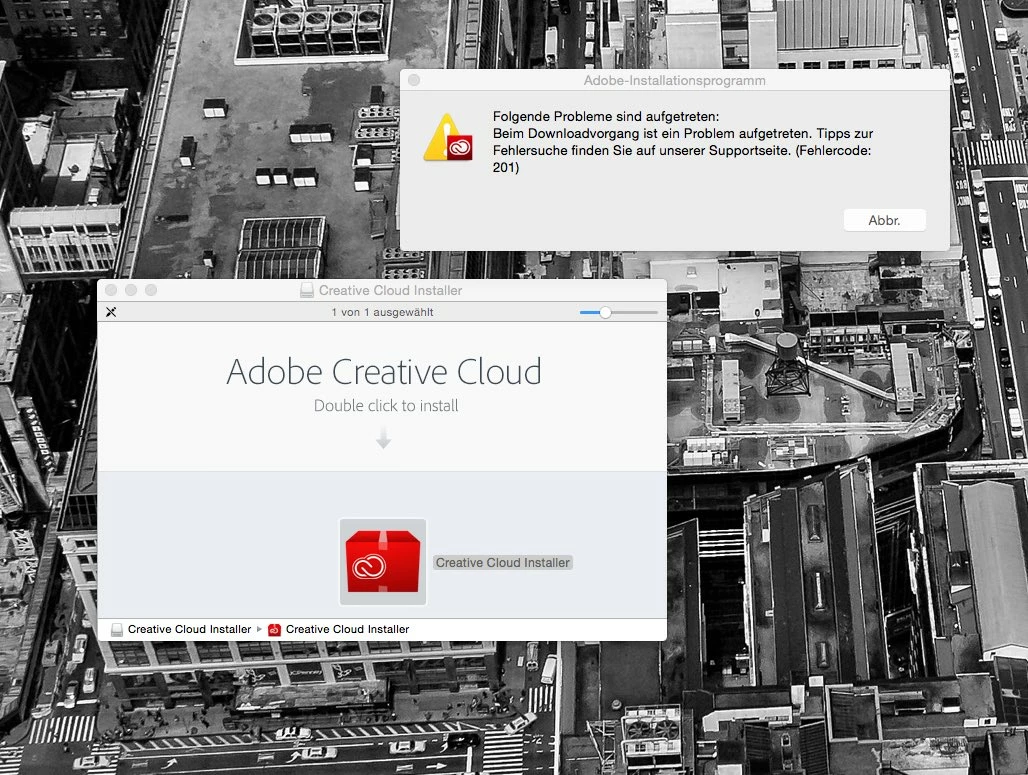
Auf meinem MacBook Air gibt es keine Probleme. Also ich bin am Ende mit meinem Latein...Hilfeeeee 😉

Viele Grüße und Danke im Voraus

Michael

This topic has been closed for replies.
Correct answer Atul_Saini

Could you please try solution 3 on https://forums.adobe.com/thread/2167334 and share the results?

Awaiting your response.

Thanks.

4 replies

New Participant
June 23, 2016

This did not help at all

CelloZug
Known Participant
June 23, 2016

Leider bringen auch die schnödigen Antworten mit Verweis auf Links seitens Adobe nichts. Sehr schade. Und mangels Alternativen langsam gefährlich für unser witschaftliches Schaffen...

Atul_Saini
Community Manager
Atul_SainiCommunity ManagerCorrect answer
Community Manager
June 23, 2016

Could you please try solution 3 on https://forums.adobe.com/thread/2167334 and share the results?

Awaiting your response.

Thanks.

New Participant
June 24, 2016

Hi there,

Solution 3 worked.

Why didn't anyone from Adobe provide the direct download link for CC 2016 until now? This is an easy quick fix without  analyzing install logs on my Mac. I want to use Photoshop / Lightroom and not repair stuff....Every single Programm works, updates and makes my day productive. Every single one, except Adobe stuff. I hope this is temporarily.

After all investigation, I think your servers are unstable.

Well thanks anyway.

Michael Paffen

PS.: Ah I almost forgot to mention: Now the Update to Photoshop 2015.5 does't work....Oh man....What now?

Atul_Saini
Community Manager
Community Manager
June 21, 2016

Moving the discussion to Creative Cloud Download & Install

CelloZug
Known Participant
June 21, 2016

MacOs 10.10.5, all updates, new iMac

Atul_Saini
Community Manager
Community Manager
June 22, 2016

Hi Cellozug,

Thanks for providing your machine information in advance, I would request you to try the steps mentioned on this link for "Error 201": Troubleshoot Adobe Creative Cloud download, install, and update issues​.

You are welcome to update the discussion in case you need further assistance.

Thanks.

Ned Murphy
Brainiac
June 18, 2016
CelloZug
Known Participant
June 21, 2016

Help! We can no longer work. The download of the CC-cloud application does not work, even after rebooting, CC-De-installation and Adobe Cleaner app! Error 201 / download does not start. Is a quick fix from Adobe to be expected? In the support area, there is no solution ...