

Participant
December 4, 2014
Answered

How do I uninstall when the uninstaller doesn't work?

  • December 4, 2014
  • 3 replies
  • 3753 views

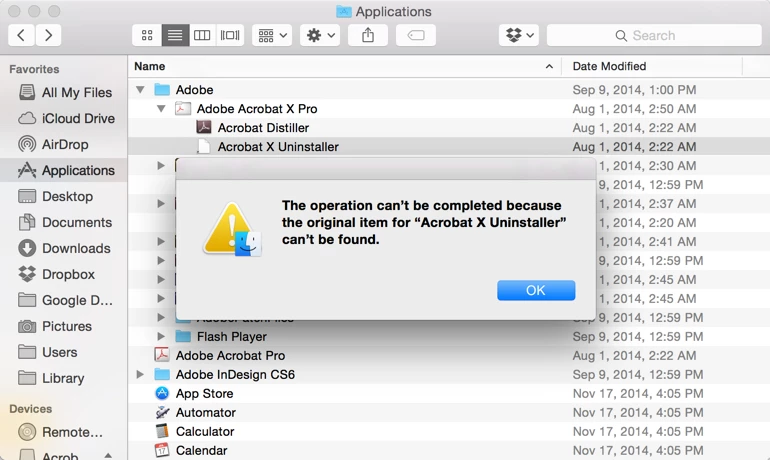
I get this when I try to uninstall Acrobat X Pro so that I can reinstall so that I can get the update that always gives me a 1301 error and won't update.  This is a complete mess.

    This topic has been closed for replies.
    Correct answer heidelcedric

    The majority of Mac applications can be uninstalled just by unceremoniously moving them to the Trash (as long as they are not running at the time, of course). Just drag Adobe Acrobat X Pro to Trash, make sure your mac is still running properly and then empty the bin.


    Of course, it is always recommended that you use the uninstall application when available, but since it is not working this method is fine!

    3 replies

    kglad
    Community Expert
    Community Expert
    December 4, 2014

    do not follow the message 2 suggestion unless it's a last resort.

    before doing that, follow the suggestion in message 1.

    in either case, if acrobat was part of a suite, clean after uninstalling -  Use the CC Cleaner Tool to solve installation problems | CC, CS3-CS6

    kevlawrAuthor
    Participant
    December 16, 2014

    So that worked all fine and dandy two weeks ago when I was getting a 1301 error when trying to install and update.  Since then, there has been a new update.  So I follow the same thing that you proposed before.  This time I have to type in my serial key.  So I copy and paste it in (the correct one, I know there is one for PC and one for Mac. I have a Mac) and it says "This serial number is not valid for this product".  I'm confused and frustrated now.  I've always had Acrobat X Pro as part of CS6.

    kglad
    Community Expert
    Community Expert
    December 16, 2014

    what worked two weeks ago?

    heidelcedricCorrect answer
    Participant
    December 4, 2014

    The majority of Mac applications can be uninstalled just by unceremoniously moving them to the Trash (as long as they are not running at the time, of course). Just drag Adobe Acrobat X Pro to Trash, make sure your mac is still running properly and then empty the bin.


    Of course, it is always recommended that you use the uninstall application when available, but since it is not working this method is fine!

    kglad
    Community Expert
    Community Expert
    December 4, 2014

    reinstall over your current installation.  that will, hopefully, restore your uninstaller so you can properly uninstall.

    Downloads available:

    Download and installation help for Adobe links

    Download and installation help for Prodesigntools links are listed on most linked pages.  They are critical; especially steps 1, 2 and 3.  If you click a link that does not have those steps listed, open a second window using the Lightroom 3 link to see those 'Important Instructions'.

    window using the Lightroom 3 link to see those 'Important Instructions'.