


Inspiring
October 3, 2018
Question

How do you stop Adobe spam?

  • October 3, 2018
  • 4 replies
  • 3201 views

Hey everyone!

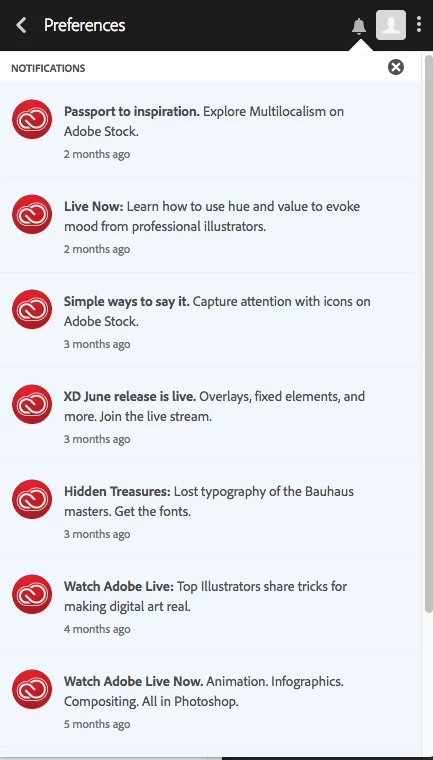
I have all notifications turned off in my account and yet I continue to get the red dot icon notifying me of new spam from Adobe. I made sure that "marketing" notifications are turned off too.


So how do we get Adobe to stop spamming its paying customers?

Thanks!
Scot
This topic has been closed for replies.

4 replies

junkboxdesign
New Participant
January 22, 2022

I am having a similar issue with lewd PDFs being added to my Samsung Adobe app and they are not able to even be deleted! How do I stop this from happening or at the very least, how do I make the files have the ability to be deleted.


Nancy OShea
Community Expert
January 23, 2022

This is NOT an Adobe problem.  Security begins with you!


Nancy O'Shea— Product User & Community Expert
junkboxdesign
New Participant
January 23, 2022

It is an Adobe problem because the PDFs are inside my Adobe Cloud files and there is not option to delete file or block sender...

Participating Frequently
April 2, 2019

I have the same problem. In my case, I want to see that notification dot when there is an update available to one of that apps I have installed so that I can update. But I don't want to see notifications about marketing stuff. In Creative Cloud preferences I have unchecked all the boxes that seem to be relevant to notifications, but still I keep getting notified about marketing messages. This is very annoying, because every time I see that red dot I click into it expecting to see an update for my apps. But more often it is just a marketing message wasting my time. How do I disable that?

UPDATE:

According to this thread, it is Adobe's policy NOT to let customers mute notifications about their spam.

Re: How to disable ads notifications in Creative Cloud App?

Nancy OShea
Community Expert
April 2, 2019

To toggle Notifications, go to Preferences > General.  See screenshot.

Nancy O'Shea— Product User & Community Expert
Participating Frequently
April 3, 2019

Thanks for the reply. I've had that setting turned off as well as all of the "Show OS Notifications" settings, but it didn't work. However, I just spoke with an Adobe customer service rep who suggested that re-installing the Creative Cloud desktop app would fix the issue. I did that, and I'll have to wait and see if it will actually block future notifications.

tallscotAuthor
Inspiring
November 6, 2018

Hey, thanks for the reply.

There is an icon in the OS X menu bar at the top and there is a bright red dot when I have a notification. So no, I'm not seeking it out. It's showing up on my screen in front of me, notifying me that Adobe spammed me with a pitch for me to use Portfolio, for example.

Ned Murphy
Brainiac
October 3, 2018

Are you seeking out these notifications or are they popping up while working with the products?