


Participant
January 17, 2017
Answered

how to reinstall adobe creative cloud and illustrator cc 2017

  • January 17, 2017
  • 1 reply
  • 17087 views

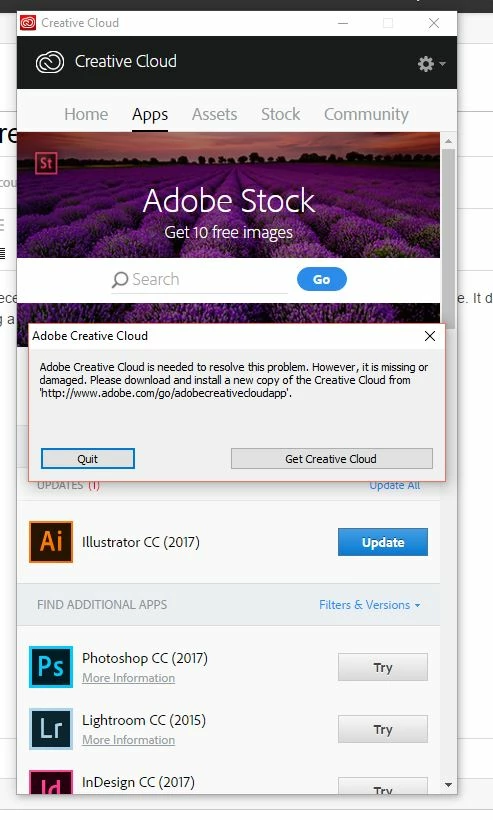
Hi, I am new to the adobe cc subscriptions. I recently bought Illustrator 2017 from the adobe subscriptions website page. It downloaded creative cloud and illustrator which I installed. After installation I kept getting a corruption message in creative cloud whenever it opened. (see below). I have searched and searched. How do I reinstall creative cloud and reinstall illustrator without buying it again. I am on windows 10. Your help would be appreciated. Thanks!
This topic has been closed for replies.
Correct answer Ned Murphy

Uninstall and use the Cleaner Tool before trying to reinstall.  Use the Creative Cloud Cleaner Tool to solve installation problems

Download/install the desktop application, sign in, install the subscription application(s).

https://helpx.adobe.com/creative-cloud/help/download-install-app.html

Creative Cloud for desktop

https://helpx.adobe.com/creative-cloud/help/creative-cloud-desktop.html

Sign out, Sign in | Creative Cloud desktop app

http://helpx.adobe.com/creative-cloud/kb/sign-in-out-creative-cloud-desktop-app.html

Install, update,

http://helpx.adobe.com/creative-cloud/help/install-apps.html

or uninstall apps

https://helpx.adobe.com/creative-cloud/help/uninstall-remove-app.html

1 reply

Ned Murphy
Ned MurphyCorrect answer
Legend
January 17, 2017
Participant
January 18, 2017

Hi, Thanks for your help.

Questions:

1) Do I quit completely from the CC desktop app with the illustrator app still installed, 1st before doing the uninstall steps. It's unclear from the instruction as they are kind of vague.

2) Do I need to unistall Illustrator 1st from my control panel (add or remove programs) in windows, before uninstalling the creative cloud desktop app from the control panel.

Bani Verma
Community Manager
Community Manager
January 25, 2017

Hi Patsyflower,

You may not uninstall Illustrator from your machine as the issue is related to Adobe Creative Cloud desktop app, please completely quit the desktop app by clicking on settings wheel in the top right corner and select quit, after that follow the instructions given in the following help document to uninstall Adobe Creative Cloud desktop app Uninstall the Adobe Creative Cloud desktop application.

Let us know if this helps.