



rupertgreenwood
Participating Frequently
November 23, 2018
Answered

How to stop auto checking of apps in Adobe Creative Cloud 4.7.0.400

  • November 23, 2018
  • 3 replies
  • 3186 views

I am staring a new discussion since my last one gained no traction and failed to answer my question.

As you an see the check box for "Always keep Creative Cloud desktop up to date" is NOT checked...

and I STILL receive updates for Photoshop and all other apps...
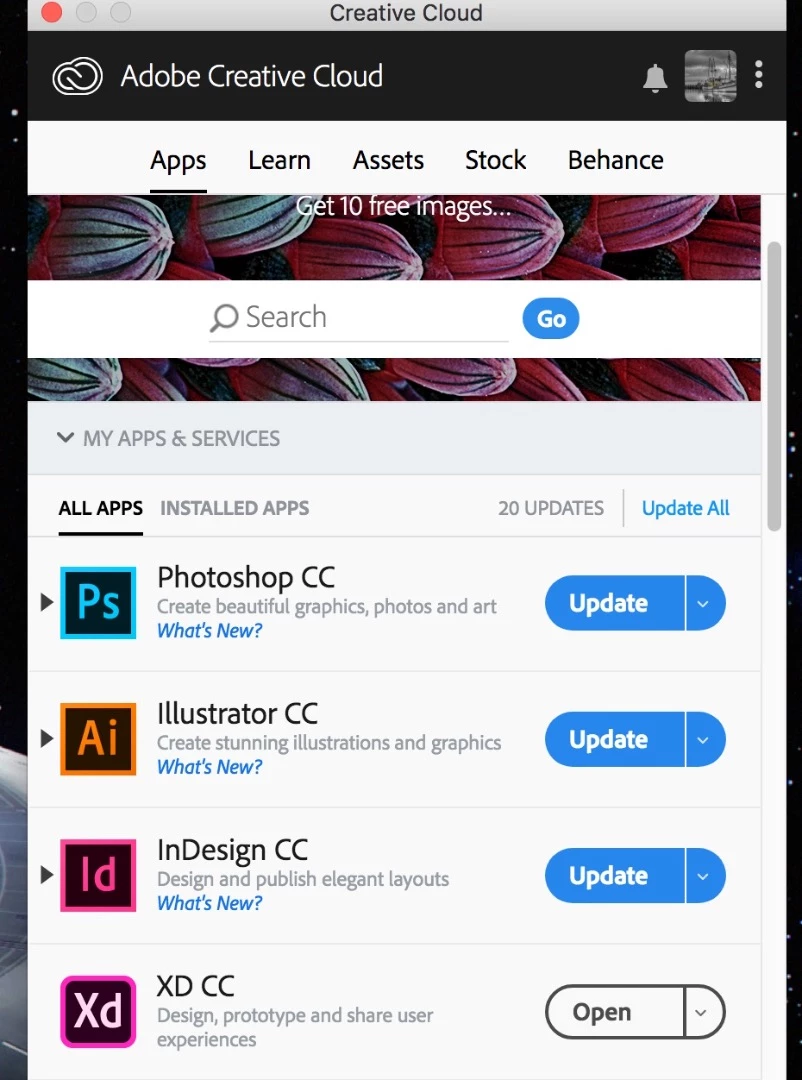
There has been some suggestion for disabling updates by creating a file "AdobeUpdaterAdminPrefs.dat". This DOES NOT work. How can I stop receiving app updates. Someone must know something.

Thank you in advance.

This topic has been closed for replies.
Correct answer arij2010

This process will disable future updates search but if the CC desktop has already found some updates ,making this change will not disable the updates already found .

I don't know why you want to disable this updates but you can also hide the Apps menu completely :

https://helpx.adobe.com/creative-cloud/kb/apps-tab-missing.html

3 replies

It's moon
Inspiring
February 5, 2020
arij2010
arij2010Correct answer
Inspiring
November 26, 2018

This process will disable future updates search but if the CC desktop has already found some updates ,making this change will not disable the updates already found .

I don't know why you want to disable this updates but you can also hide the Apps menu completely :

https://helpx.adobe.com/creative-cloud/kb/apps-tab-missing.html

kglad
Community Expert
Community Expert
November 23, 2018

you'd need to uninstall the cc desktop app.  it's probably not worthwhile.

rupertgreenwood
Participating Frequently
November 24, 2018

Now why would uninstalling CC desktop allow me to stop updates????

kglad
Community Expert
Community Expert
November 24, 2018

it's generating the update notices.