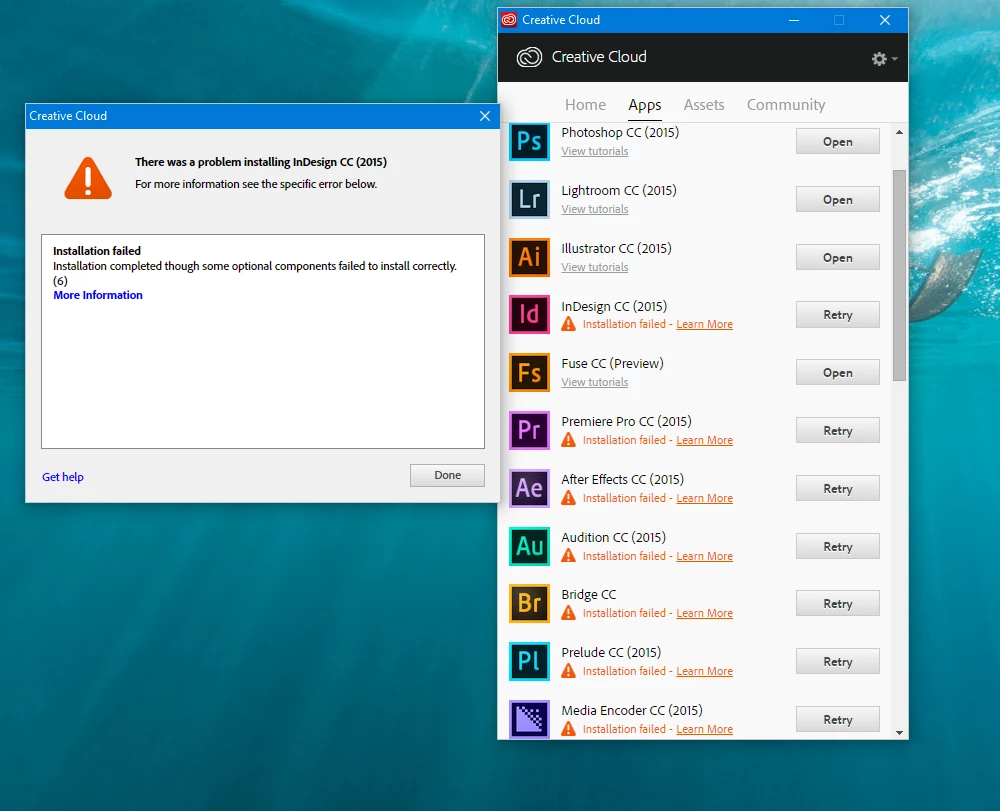
Exit Code: 6
Please see specific errors below for troubleshooting. For example, ERROR: DW003, DW071 ...
-------------------------------------- Summary --------------------------------------
- 0 fatal error(s), 12 error(s)
----------- Payload: Microsoft Visual C++ 2008 Redistributable Package (x64) 9.0.30729.5677 {512B6D21-18F9-11E2-93C1-00215AEA26C9} -----------
ERROR: DW071:
ERROR: DW003: Third party payload installer vcredist_x64.exe failed with exit code: 1638
ERROR: Failed to install Microsoft Visual C++ 2008 Redistributable Package (x64). Please try installing it by double clicking on the executable at
"C:\Users\Miad-\AppData\Local\Temp\{2512E480-5DE5-4110-84EB-B2181E669701}\Prelude_4_LS20\Adobe Prelude CC 2015\payloads\Microsoft VC 2008 Redist (x64)\vcredist_x64.exe",
or download and install the latest Microsoft Visual C++ 2008 Redistributable Package (x64) from Microsoft website - www.microsoft.com
----------- Payload: Microsoft Visual C++ 2008 Redistributable Package (x86) 9.0.30729.5677 {539B5BB0-18F9-11E2-BBBC-00215AEA26C9} -----------
ERROR: DW071:
ERROR: DW003: Third party payload installer vcredist_x86.exe failed with exit code: 1638
ERROR: Failed to install Microsoft Visual C++ 2008 Redistributable Package (x86). Please try installing it by double clicking on the executable at
"C:\Users\Miad-\AppData\Local\Temp\{2512E480-5DE5-4110-84EB-B2181E669701}\Prelude_4_LS20\Adobe Prelude CC 2015\payloads\Microsoft VC 2008 Redist (x86)\vcredist_x86.exe",
or download and install the latest Microsoft Visual C++ 2008 Redistributable Package (x86) from Microsoft website - www.microsoft.com
----------- Payload: Microsoft Visual C++ 2010 Redistributable Package (x64) 10.0.40219.325 {54B0C34F-18F9-11E2-BC1D-00215AEA26C9} -----------
ERROR: DW071:
ERROR: DW003: Third party payload installer vcredist_x64.exe failed with exit code: 1638
ERROR: Failed to repair Microsoft Visual C++ 2010 Redistributable Package (x64). Please try repairing it by double clicking on the executable at
"C:\Users\Miad-\AppData\Local\Temp\{2512E480-5DE5-4110-84EB-B2181E669701}\Prelude_4_LS20\Adobe Prelude CC 2015\payloads\Microsoft VC 2010 Redist (x64)\vcredist_x64.exe",
or download and install the latest Microsoft Visual C++ 2010 Redistributable Package (x64) from Microsoft website - www.microsoft.com
----------- Payload: Microsoft Visual C++ 2010 Redistributable Package (x86) 10.0.40219.325 {55B82130-18F9-11E2-8D43-00215AEA26C9} -----------
ERROR: DW071:
ERROR: DW003: Third party payload installer vcredist_x86.exe failed with exit code: 1638
ERROR: Failed to repair Microsoft Visual C++ 2010 Redistributable Package (x86). Please try repairing it by double clicking on the executable at "C:\Users\Miad-\AppData\Local\Temp\{2512E480-5DE5-4110-84EB-B2181E669701}\Prelude_4_LS20\Adobe Prelude CC 2015\payloads\Microsoft VC 2010 Redist (x86)\vcredist_x86.exe",
or download and install the latest Microsoft Visual C++ 2010 Redistributable Package (x86) from Microsoft website - www.microsoft.com
-------------------------------------------------------------------------------------
Open Control Panel > Program & Features.
Locate Microsoft Visual C++ Redistributable Packages mentioned in the error description. repair all version.
you may also uninstall and reinstall them. if you cannot repair .
If you wish to uninstall and reinstall , here's the download links.
Microsoft Visual C++ 2008 Redistributable Package (x64).
https://download.microsoft.com/download/d/2/4/d242c3fb-da5a-4542-ad66-f9661d0a8d19/vcredist_x64.exe
Microsoft Visual C++ 2008 Redistributable Package (x86).
https://download.microsoft.com/download/1/1/1/1116b75a-9ec3-481a-a3c8-1777b5381140/vcredist_x86.exe
Microsoft Visual C++ 2010 Redistributable Package (x64).
https://download.microsoft.com/download/3/2/2/3224B87F-CFA0-4E70-BDA3-3DE650EFEBA5/vcredist_x64.exe
Microsoft Visual C++ 2010 Redistributable Package (x86).
https://download.microsoft.com/download/5/B/C/5BC5DBB3-652D-4DCE-B14A-475AB85EEF6E/vcredist_x86.exe




 AdChoices