


Participant
May 13, 2012
Answered

Installing Photoshop CS5 Extended from a disk

  • May 13, 2012
  • 1 reply
  • 1847 views

I am trying to install my Photoshop CS5 Extended for Windows on my computer from my student and teacher edition disk, however, when I put the disk into the drive, it doesn't autostart the installation process. I looked through the instructions, it says to use startup.exe to get the installation going, but there isn't such a file anywhere on the disk. How am I supposed to install my program?

    This topic has been closed for replies.
    Correct answer Manish-Sharma

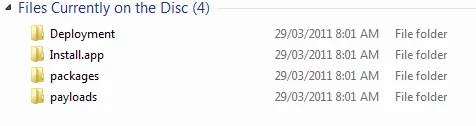
    I open up the Adobe Photoshop C55.1 folder and

    Also sorry for asking, but what is a OS?


    Thought so , you are running the Mac DVD on the Windows , sorry but you have got the wrong disk, its for Mac however you are on windows , its not gonna work.

    Get the DVD replaced with the new serial number and thenyou will be adle to install on your windows computer.

    1 reply

    Mylenium
    Legend
    May 13, 2012

    It probably means setup.exe and that is in the Install sub-folder. Anyway, it would appear that files are hidden on your system due to user settings, so first make sure to reveal them by adjusting your Explorer settings.

    Mylenium

    rythiaAuthor
    Participant
    May 13, 2012

    How do I adjust my Explorer settings?

    Manish-SharmaCorrect answer
    Inspiring
    May 15, 2012

    I open up the Adobe Photoshop C55.1 folder and

    Also sorry for asking, but what is a OS?


    Thought so , you are running the Mac DVD on the Windows , sorry but you have got the wrong disk, its for Mac however you are on windows , its not gonna work.

    Get the DVD replaced with the new serial number and thenyou will be adle to install on your windows computer.