


PrawiSucia
Participating Frequently
November 11, 2017
Question

Large hidden files in CRLogs folder

  • November 11, 2017
  • 10 replies
  • 39123 views

The path is: C:Users/Username/AppData/Roaming/Adobe/CRLogs

This CRLogs folder takes up 31GB of my hard drive.

Inside the folder :
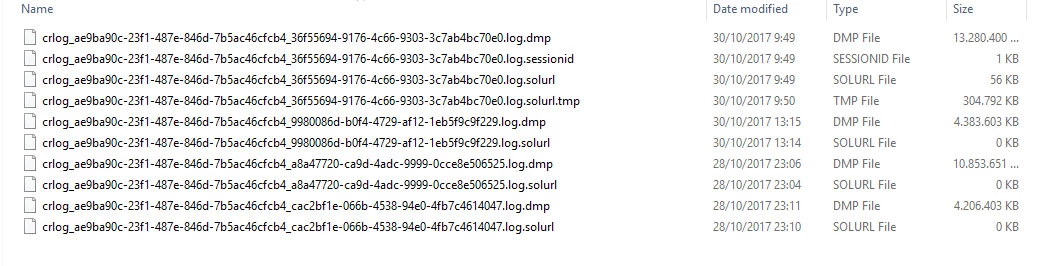
What are those files?

Is it save to delete those?

Because I'm running out of space in C.

10 replies

New Participant
April 3, 2025

Me in 2025 wondering why my C drive keeps getting full....  wow! Adobe fix this issue finally, I was loosing my mind searching why that happens!

kglad
Community Expert
April 3, 2025

just delete unneeded files.

Randy_1953
Participating Frequently
June 3, 2023

I found the same large file clogging my C-drive.  I deleted it and PS 24.5.0 seems to work fine.

kglad
Community Expert
June 3, 2023

my folder occupies less than 5 kb


so not all of us have a problem with this.


New Participant
June 17, 2022

We are in 2022 and it looks like adobe will never solve this problem. even if it seems as simple as just deleting a file

Participating Frequently
March 28, 2019

2019.

The problem still exists. Somehow, when rendering in AE it keeps dumping these logs. As soon as the drive gets full though, AE crashes. Largest log file I had was 50 GB, and there were like 6 of them.

New Participant
December 7, 2018

Hello guys.

This question is old and labeled as "assumed answered".

But I want to clear the field for users who still looking for the answer or upcoming solution searchers.

First of all, yes you can delete those files

As far as I know, Adobe should delete this file after sending it to themselves anyway.

This files created because on your Adobe account's privacy settings, sharing app and machine statistics options are on by default.

https://account.adobe.com/privacy

You should uncheck the two options if you don't want to Adobe creating this large files anymore or sharing your statistics.

Flies away...

New Participant
March 14, 2019

I unchecked the options but it's still makeing those large files. I am not sure, however, the privacy settings are where my issues are stemming from as the files that are clogging up my C drive are FULL Files. I have done everything I can think of to try and fix the issue: switched all my caches to my D drive, cleared my caches, etc. Yet, within five minutes of my ae being open the app suspends itself and causes my memory usage to skyrocket to 97%.

New Participant
March 14, 2019

I even tried to cut the CRlogs and paste it into my D Drive so that it would fill my D Drive instead as i has much more space but, as I suspected it to do, it just recreates the file in my C Dive.

Known Participant
January 12, 2018

Is there any official response from Adobe on this? Google isn't really turning up much of use.

New Participant
January 13, 2018

Same here! My programs keep on writing those files and I now have to delete them every month in order to have enough space on my SSD to run my system stable... This can't be usual - must be a bug. Any comments on how to fix that or what the solution could be @Adobe?

Participating Frequently
January 26, 2018

And same here. They took up 130 GB of space on my C drive. Moved them to a temporary external hard drive, deleted from my C Drive. Things operate normally.

New Participant
December 11, 2017

Just found these files cleaning my SSD, decided to move them to an external drive to see what happens. Really interested in the reason for these files. They took up 42 GB!

Gonzo Gonzalez
New Participant
November 26, 2017

Hello PrawiSucia! Does it keep on working well, or did you encounter any new issues? Hallo NilsBest​, ich habe genau das gleiche Problem und mit dem Rendern ist es auch ein ganz schön zäher Spaziergang :-S  Hast du irgendetwas rausgefunden?

Since a few days I've been running out of space on my SSD, too and After Effects keeps on repeating that cache-space notice, that comes, when assigning more gigs than there's left on the Volume. Usually that error notification stops after cleaning the cache & temp files [usually I got it set up to 27 GB and it would never complain, as long as I keep everything else tidied up], but now it seems that something (44.6 GB) remains accumulated in a subfolder [Appdata/Roaming/Adobe/CRLogs].

Im going to delete those files hoping it might solve the prob. However it'd feel better if there was someone from Adobe around to bring some light into those shallow folders...

New Participant
November 26, 2017

Hey gonzaloa41244531, ja das kommt mir sehr bekannt vor. Bei mir hat es wirklich wie schon oben beschrieben geholfen „Ok, I just deleted the lot of them, plus all the files in my Local/Temp folder... After Effects runs fine after doing so!“(sebj6287548 13.11.2017 02:06) Und Probleme sind bei mir auch nicht aufgetreten. Wenn du ganz sicher gehen willst, kannst du sie ja erst mal wo anders hin verschieben. Falls es dann zu Problemen kommen sollte, kannst du sie einfach wieder an dem ursprünglichen Ort wieder einfügen.

Aber wie gesagt ich habe sie direkt gelöscht und es ergaben sich bei mir keine Probleme.

So I think deleting these CRLogs is ok, because I did it and all the programs run fine again. I have finished my project without any more problems.

But if you will be save, maybe transfer them to  another location. If something now does not work anymore you could retransfer them back to there old location and it should work fine again. And if it work's fine you could delete them.

New Participant
November 12, 2017

Hey guy's,

I also discovered this files today. They also filled up my hole C drive. But it takes 43,6 GB of my hard drive.

And of cause I'm running out of space too.

I found this big files, by searching the reason, why my Aftereffects project does not render in the last day's.

I have chanced all locations for all types of cache files in the past on another hard drives (like F).

Every time i try to render my project, a window from Windows 10 pops up after a few hours and says, you don't have enough space on C.

But It does not render to C and it shouldn't do anything on my C disc. After that my Ae crashes every time.

Yesterday i have erased a couple of files on my C disc. So i have got up to 10GB back for use. But after a few more render hours the same problem pop's up again. But now i have the half file rendert to my E disc and my C disc have only 500MB left. My E disc have over 600GB free space left.

I have rendered the file as a tiff data, because i tried to see if it would crash on the same frames. But every time i render it out, it  stops at another frame then before.

I also use every Program in the version of CC18.

It seams to me, that it would be an issue from CC18, because in the past it worked fine. And i don't have had any problems with not enough disc space on C in the past.

So please tell me someone if i could delete this crasy huge files with out problems!?

And why does they create them selfe on C with out my permission?

How could i stop the creating of this huge files?

Could this really be my problem for crashing Ae or does Ae crash first and then my C disc run's full?

I would send you a picture of it, if you wont, but i'm from Germany, so i think the picture will not help you at all. Windows runs on my system in Germany, but all adobe apps run in english.

Sorry for my bad writing skills, i'm better in understanding english then writing it my self.

November 13, 2017

I've just found this folder is taking up 71GB of space on my SSD, and I'm having really bad stability issues with After Effects CC 2018 due to the lack of space.

Did you find out whether its safe to delete these or not?

Thanks!

PrawiSucia
Participating Frequently
November 13, 2017

I can open up Premiere, and my last project with no problems, and Photoshop opens up without any problems, too.

Adobe needs to do something about these files taking up so much room!


Whoaa.. thanks so much for trying that. Now I can assume that it's safe to delete those files.

Participating Frequently
November 11, 2017

I just discovered this file today as well, and am wondering if this is something new with CC18.