


- Home
- Download & Install
- Discussions
- My creative cloud app wont install
- My creative cloud app wont install

Copy link to clipboard
Copied
I have followed instructions given on forum after members have complained of similar issues but to no avail. I have quit everything, logged out etc and but its almost like the app is on a constant loop with no result. I click download and it goes back to same page - click again and it may go to instructions on how but never begins.


 1 Correct answer

nicola, I experienced the same situation you did and only through much combing of the forums did I hit upon the direct link to the DMG download: http://ccmdls.adobe.com/AdobeProducts/PHSP/14/osx10/AAMmetadataLS20/CreativeCloudInstaller.dmg
I never could get it to autoupdate but it installed when I did this. Go figure.

 112
Replies
112
112
Replies
112


Copy link to clipboard
Copied
Please try with different browser.
Copy link to clipboard
Copied
safari wont download creative cloud?
Copy link to clipboard
Copied
Access Denied
You don't have permission to access "http://ccmdls.adobe.com/AdobeProducts/ILST/17/osx10-64/AAMmetadataLS20/CreativeCloudInstaller.dmg" on this server.
Reference #18.89fe19b8.1371530539.12577187
Keep recieving this msg

Copy link to clipboard
Copied
KatMenze, Many users are getting this error. We are looking into your issue. Will update you soon.

Copy link to clipboard
Copied
Same result on Safari, Firefox, and Chrome.
Copy link to clipboard
Copied
Sometimes creates a new tab to the same page, sometimes
Access Denied
You don't have permission to access "http://ccmdls.adobe.com/AdobeProducts/KBRG/6/osx10/AAMmetadataLS20/CreativeCloudInstaller.dmg" on this server.
Reference #18.fdde54b8.1371530984.6e19f73

Copy link to clipboard
Copied
Same exact thing here, error message and all. Just spent 45 minutes on the phone with tech support and was left with this summary "sorry. just wait until tomorrow and try again"
I have never had any issues with downloading anything from Adobe before. Application Manager always worked. I cannot get anything to download.

Copy link to clipboard
Copied
Getting the same screen over and over as well as sometimes the ACCESS DENIED screen. I have tried Safari, Chrome and Firefox to no avail,
Copy link to clipboard
Copied
exactly
Copy link to clipboard
Copied
I was about to call tech support - pre forum - U-96. Whilst, I am sorry you spent the 45min on the phone - I am glad I am not the only one in same position.
Copy link to clipboard
Copied
As with other users - same thing happened on Chrome. Same loop - hit download then opens same page. Did this 5 times.
Copy link to clipboard
Copied
Error varies with where you tried to download from
You don't have permission to access "http://ccmdls.adobe.com/AdobeProducts/PHSP/14/osx10/AAMmetadataLS20/CreativeCloudInstaller.dmg" on this server.
Reference #18.fdde54b8.1371531203.6e80336
Copy link to clipboard
Copied
OK, well here is a copy and paste from my browser:
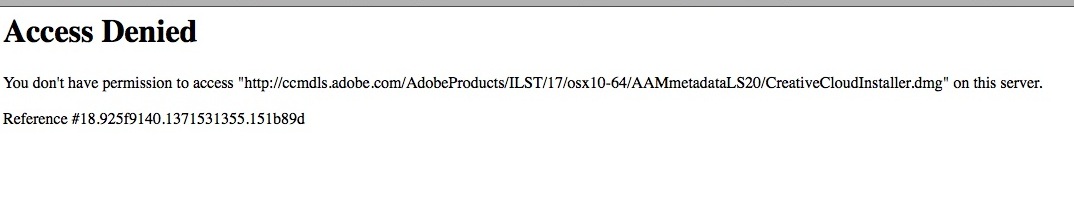
https://ccmdls.adobe.com/AdobeProducts/ILST/17/osx10-64/AAMmetadataLS20/CreativeCloudInstaller.dmg
Copy link to clipboard
Copied
OK, part of the URL is for the product we are trying to download.
And part is trying to load the CreativeCloudInstaller file relative to that product URL.
Did someone misconfigure the URLs? Is there supposed to be a (missing) link to the installer inside each product's directory?
Copy link to clipboard
Copied
Chris, I'm sure you know this but just in case...
There is no "application Manager" type app to download. I was told that it would download as soon as you try and download anything else.
Copy link to clipboard
Copied
The replacement for the "Adobe Application Manager" is "Creative Cloud".
Yes, it should download automatically even when you try to download another app - but there is a separate download page for it as well (which is also not working).
Anyway, the CC release team is aware of this problem and attempting to fix it now.

Copy link to clipboard
Copied
Well I went and downloaded the installer from Lightroom link to my desktop, and now I have the new Adobe Application Manager working.
http://ccmdl.adobe.com/AdobeProducts/LTRM/5/win32/AAMmetadataLS11/AdobeApplicationManager.exe
edit: Had to cancel the lightroom download, but now my AE CC is downloading.

Copy link to clipboard
Copied
justinjohnson76, your link seems to be working right now. Atleast as a temporary fix until adobe sorts this out. Thanks for sharing.
Copy link to clipboard
Copied
Seems to be working now after installing from the link above. The apps are downloading from the apps and services page.
Copy link to clipboard
Copied
Thank you Adobe, whatever you did to fix the issue. Seems fine here on my end. Hopefully for everyone else too 

Copy link to clipboard
Copied
Please supply another link for us OS X users who are getting the same "Access Denied!"
Copy link to clipboard
Copied
Unfortunatly I do not have a Mac, but try installing Lightroom, which should re-install the Adobe Application Manager.
Copy link to clipboard
Copied
You're right justin. It did intiate the AAM installer. Interesting.
"It" = Lightroom download
Copy link to clipboard
Copied
That's only for Windows users.
Glad it's working for you guys though.


Find more inspiration, events, and resources on the new Adobe Community
Explore Now
 AdChoices