


diegog61555833
Participant
November 28, 2016
Question

"Adobe Creative Cloud is needed to resolve this problem" Looping Windows 10

  • November 28, 2016
  • 1 reply
  • 291 views

Was trying to re-install Photoshop, Premiere, and etc. I go to download the creative cloud desktop app ever thing was loading, as so as the progress finished it disappears and new dialog box opens.
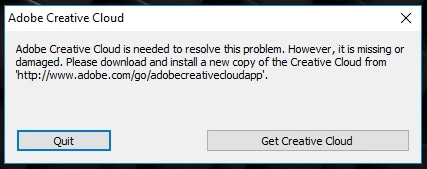
I click get Creative Cloud re-download and same box shows up again. I've seen another one with similar issue but it was for Mac, which was helpful tell it got to the Mac OS.

This topic has been closed for replies.

1 reply

kglad
Community Expert
Community Expert
November 28, 2016

uninstall all your cc programs, https://helpx.adobe.com/creative-cloud/help/uninstall-remove-app.html

uninstall the cc desktop app, https://helpx.adobe.com/creative-cloud/help/uninstall-creative-cloud-desktop-app.html

clean per http://www.adobe.com/support/contact/cscleanertool.html

restart your computer

reinstall the cc desktop app, https://creative.adobe.com/products/creative-cloud

use the desktop app to install your apps and trials.

diegog61555833
Participant
November 28, 2016

Uninstall all cc programs: Can't don't have any cause of that dialog box that keeps popping up.

Uninstall CC desktop app: Tried but on the last dialog box it gave me this. I tried to uninstall it the same way you would with the apps but nothing happened the load wheel flickered once next to the mouse cursor and nothing. Tried to do it multiple time nothing.

Restarted computer and dialog box pops up.

Used the Cleaner tool from the link said it was successful.

After that restart and get shown same pop up.

I go to find this log it mentioned for the cloud cleaner cant find appData, but CC still on computer.