


Participant
November 30, 2022
Answered

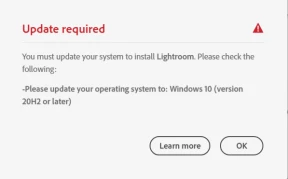
"Update required" prompt, but I have Windows 11

  • November 30, 2022
  • 1 reply
  • 2248 views

I get the following dialog box in the Creative Cloud Desktop telling me I need to upgrade to Windows 11, but Windows 11 is installed on my laptop.

Creative Cloud version 5.5.0.617

System: Windows 11 Home Edition

Version 10.0.22000 Build 22000
 

This topic has been closed for replies.
Correct answer kglad

Compatibility mode is unchecked, still not working.


ok, then there's a cc desktop app problem.


try to repair
https://helpx.adobe.com/download-install/kb/creative-cloud-install-stuck.html

if that fails go ahead and uninstall using the correct uninstaller from https://helpx.adobe.com/creative-cloud/help/uninstall-creative-cloud-desktop-app.html#sa_src=web-messaging and then reinstall

if that fails, do a clean cc install following each applicable step:

uninstall every cc app including preferences, https://helpx.adobe.com/creative-cloud/help/uninstall-remove-app.html

then uninstall the cc desktop app, again using the correct uninstaller, https://helpx.adobe.com/creative-cloud/help/uninstall-creative-cloud-desktop-app.html#sa_src=web-messaging

clean your computer of cc files per http://www.adobe.com/support/contact/cscleanertool.html

check for, and if available, update your os

repair all ms visual c++ versions that can be repaired.

update your ms visual c++, if it can be updated

restart your computer (don't skip this)

reinstall the cc desktop app using the "alternative download links" at the bottom of the page at https://helpx.adobe.com/download-install/kb/creative-cloud-desktop-app-download.html

use the desktop app to install your cc programs/trials

1 reply

Participant
November 30, 2022

Sorry, it says I need to upgrade to Windows 10 or later, I have 11. Same story.

kglad
Community Expert
Community Expert
December 1, 2022

reset the cc desktop app: make sure it's in the foreground, then press:

Win: Ctrl + Alt + R
Mac: Cmd + Opt + R


watch for running in convertibility mode.

Participant
December 1, 2022

Thank you for the response! Unfortunately, that did not work.

Just for fun I tried disabling my antivirus platform, that also did not work. Will try deleting and downloading again, though I think I've already done that.


Not a single app on the page is "compatible," more or less. For whatever reason, my 64 bit Windows 11 system is not recognizable as such.