juniorv4195568
Participant
July 8, 2018
Answered

Starting CC Creates folder "GPUCache" on Desktop

  • July 8, 2018
  • 10 replies
  • 49604 views

Hi,

When I start CC it creates a folder named GPUCache on my desktop. I like to keep things organized and I'd rather not have folders on my desktop. Is there a way to change the folder location?

Thank you in advance

This topic has been closed for replies.
Correct answer kumar_rohit

Thanks for reporting this. Below are quick steps to stop creation of "GPUCache folder on desktop" when launching Creative Cloud:

  1. Open Creative Cloud "preferences" and click "Quit" button.
  2. Delete "Adobe Creative Cloud" shortcut & "GPUCache" folder from desktop.
  3. Open folder location: "C:\Program Files (x86)\Adobe\Adobe Creative Cloud\ACC" and right click on "Creative Cloud.exe".
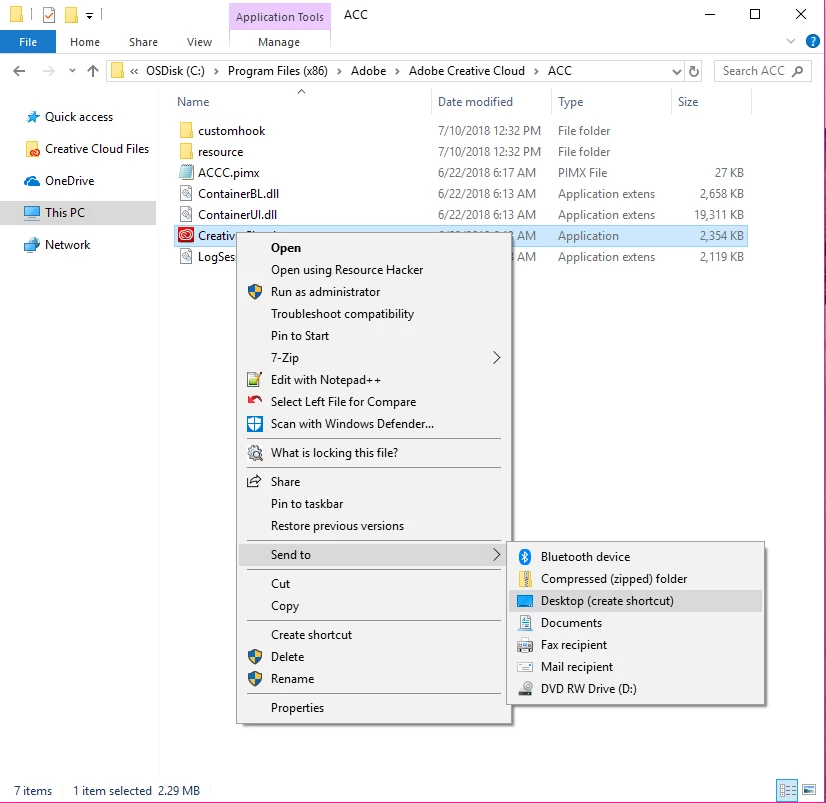
  4. In the context menu select "Send to" and then select "Desktop (create shortcut)".
  5. It will create a new shortcut for "Creative Cloud.exe" on desktop.
  6. Launch Creative Cloud from desktop shortcut.
  7. GPUCache folder will not be created again.

Do let us know in case you face any issues with these steps.

10 replies

Participant
November 14, 2022

Hello,


I dont nor have I ever had Creative Cloud. I run WIn10 and got updated on Fri to version 21H2. After reboot have the GPU Cache folder. I only run Adobe Elements 15. This is a tablet and I doubt could run Creative Cloud. Plus i hate the subscription model. When I type "Adobe" in my start menu I see "AdobeGCLaunchEvent.DB". Following the folder location noted, C:\Users\Public\Documents\AdobeGCData. I see to .db and 1 log files. THis is a very odd thing. I deleted the GPUCache folder and renamed the files. Elements still launches fine. Very odd behavior not seen until the latest Windows update. I dont know if it will recur after reboot.

kglad
Community Expert
Community Expert
November 14, 2022

it's especially "odd" if you think it has anything to do with a windows update.

Participant
November 14, 2022
Its ot sop much that I think it did. THe only thing I have update lately is
windows.

Very odd behavior to be sure. I will update the thread after I reboot.

Jason
Participant
May 15, 2020

I don't have Creative Cloud on my computer. Yet I have this new folder GPUCache on my desktop soon after the latest Microsoft update. Is it OK to delete this folder?

Inspiring
May 13, 2020

I have the latest version of CC installed (as of 5/13/20), and there is no "Quit" option under CC Preferences.  Can these instructions be updated?  Thanks.

denisc96593184
Participating Frequently
October 11, 2018

This is happening to me as I open up PDF files using Adobe Acrobat Pro DC on SHAREPOINT. 

Think about that for a second.  Acrobat is creating a GPUCache folder *ON SHAREPOINT* to store whatever this junk is. 

The folder contains 5 files, so that's 6 items being created in SharePoint for no reason whatsoever, and accessing this content will be SLOW because it's going back and forth over WebDAV for files that are between 8 KB and 265 KB just to open a PDF - and with Office 365 limited to 5,000 items in a library, having every PDF file chew up an extra 6 items just because "Adobe" is not acceptable.

This is madness!!  This isn't just annoying folders being created, this is totally broken.

Participant
October 26, 2018

We are noticing this as well in our production environment.

We are a publication company, and have several departments working with applications from Adobe Acrobat pro, InDesign, InCopy, Illustrator, etc.  We have a group that specifically makes layout templates for the production teams based on their requirements. Sometimes users get lazy and rather than launching the applications from their desktop, they go to the network location where the files are stored, and double click on the file to launch.  This is when we are noticing the GPUCache folders being created in the file storage area. Fixing the launcher will not resolve this, as this is bypassing the launcher all together. As this is being created on a network share, the files in this folder could potentially slow down the application as it has to read/write across the network.  The other problem is that it is using valuable space on the SAN.

Participant
August 23, 2018

This seems like something Adobe should be patching.  Do you expect everyone to jump through all those hoops you laid out to "fix" the issue?  It's nonsense.  Just make it an update patch!

Adobe Employee
August 23, 2018

A patch is already released for same. Download installer using direct links from here: Download Creative Cloud desktop app

SG...
Adobe Employee
Adobe Employee
August 31, 2018

Patch is not live the site you posted listed the last update as July 16th and the issue is still occurring. Even checking inside the creative cloud app says no updates.


Hi,

Can you check on the version you have installed?

Release notes for the Adobe Creative Cloud desktop app

And note whether you have 'Always keep Creative Cloud up to date' checked on.

regards,

steve

August 18, 2018

The Correct Answerby kumar_rohit fixed it!! THANKS!

Participant
July 26, 2018

Same problem, and now fixed.

kumar_rohitCorrect answer
Adobe Employee
July 10, 2018

Thanks for reporting this. Below are quick steps to stop creation of "GPUCache folder on desktop" when launching Creative Cloud:

  1. Open Creative Cloud "preferences" and click "Quit" button.
  2. Delete "Adobe Creative Cloud" shortcut & "GPUCache" folder from desktop.
  3. Open folder location: "C:\Program Files (x86)\Adobe\Adobe Creative Cloud\ACC" and right click on "Creative Cloud.exe".
  4. In the context menu select "Send to" and then select "Desktop (create shortcut)".
  5. It will create a new shortcut for "Creative Cloud.exe" on desktop.
  6. Launch Creative Cloud from desktop shortcut.
  7. GPUCache folder will not be created again.

Do let us know in case you face any issues with these steps.

CristianC25
Known Participant
July 10, 2018

Hello!

I have followed these steps and it worked. It is fixed for me. Thank you!

All the best!

Cris.

SG...
Adobe Employee
Adobe Employee
July 9, 2018

Hi,

What OS are you using? Can you confirm that you have Creative Cloud desktop application 4.6.0.384 installed (Release notes for the Adobe Creative Cloud desktop app ).

Also do you have any Third party firewall software installed?

regards,

steve

juniorv4195568
Participant
July 9, 2018

Hi Steve,

I'm using windows 10 and I can confirm I have the latest version of CC (4.6.0.384) installed. The problem first occurred after the latest update. I do not have any third party firewall software installed.

Regards,

Junior

Known Participant
July 9, 2018

I have the same issue too and I also don't want that folder showing on my desktop.

Participating Frequently
July 9, 2018

I too have this same problem, and it just started happening. This is NOT acceptable behavior for an application. Adobe needs to resolve this issue.
