


martina27275356
Participant
August 26, 2016
Answered

Trouble installing CS4 Master Collection

  • August 26, 2016
  • 1 reply
  • 1146 views

I am in the process of trying to transfer my CS4 Master Collection to my new computer, but I no longer have the installer so I had to download one from Download Adobe Creative Suite 4 products

I download both file 1 and 2 for Windows and save it in a folder on my desktop. Once the installers are downloaded I try to launch file 1 and I get this error
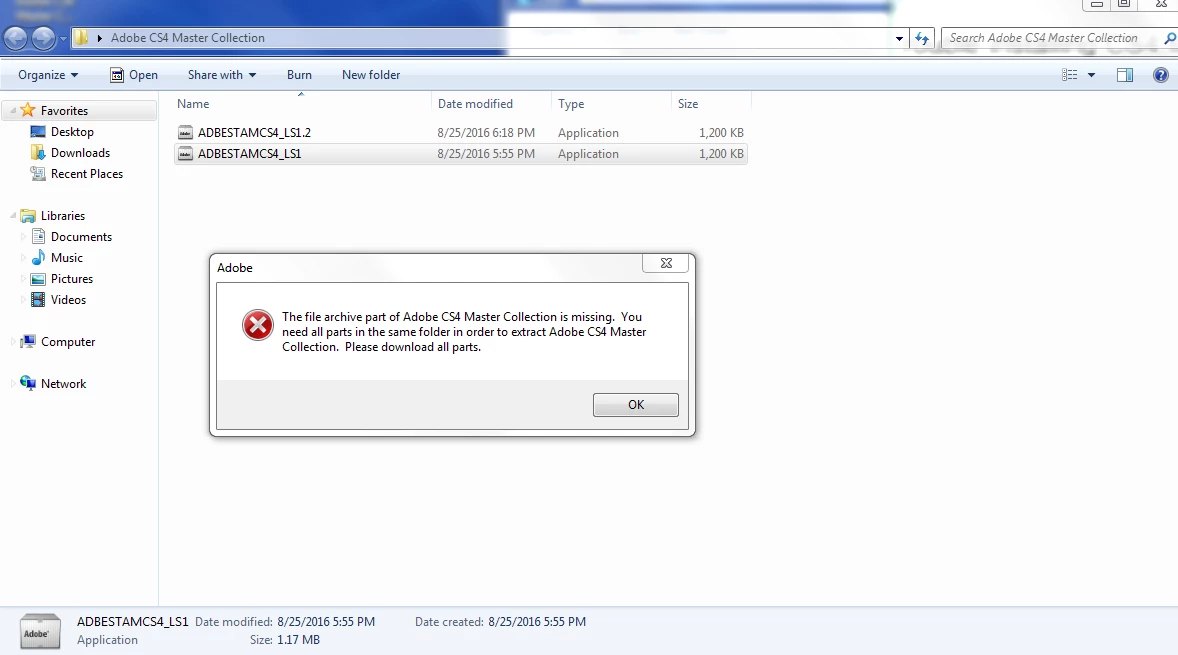
I have tried extracting the files using WinZip and 7Zip, but it only creates a folder with 10 blank files.

I have the same problem when trying to run file 2.

I am using a windows 7 computer.

I also have my serial number in hand, but I no longer have my installer for CS4 Master Collection.

This topic has been closed for replies.
Correct answer gener7

I do see the problem, and part of it is that file extensions are turned off in Windows 7 where you cannot see the 1.2 MB file is an .exe and the other file is a 5.4 GB .7z that the .exe opens to create the installer.

If extensions are turned off, both files have the same name and you don't know what they are.

Turn on File Extensions

Displaying the File Extension in Windows Vista and Windows 7

  • Click the Start menu. ...
  • Type "folder options" (without the quotes). ...
  • A dialog box with the title "Folder Options" will appear. ...
  • Click to uncheck the box for "Hide extensions for known file types".
  • Click the "OK" button at the bottom of the dialog box.

1 reply

gener7
Community Expert
gener7Community ExpertCorrect answer
Community Expert
August 26, 2016

I do see the problem, and part of it is that file extensions are turned off in Windows 7 where you cannot see the 1.2 MB file is an .exe and the other file is a 5.4 GB .7z that the .exe opens to create the installer.

If extensions are turned off, both files have the same name and you don't know what they are.

Turn on File Extensions

Displaying the File Extension in Windows Vista and Windows 7

  • Click the Start menu. ...
  • Type "folder options" (without the quotes). ...
  • A dialog box with the title "Folder Options" will appear. ...
  • Click to uncheck the box for "Hide extensions for known file types".
  • Click the "OK" button at the bottom of the dialog box.
martina27275356
Participant
August 26, 2016

Thank you for the quick response!

I have done what you said, but I am still getting the same error when I try to run the installer.

gener7
Community Expert
Community Expert
August 26, 2016

See the 5.4 GB link on the download page?

Click on it and download that.