


September 25, 2012
Answered

Unable to install Acrobat X Pro using the CS6 installation disk

  • September 25, 2012
  • 1 reply
  • 2688 views

Hi,

I am not able to install the acrobat x pro to my notebook computer (window 7).

Is it that my computer still got the Acrobat 9 Pro previously installed from CS5 disk? But the program is corrupted and cannot run, neither can it be uninstalled from my computer.

If I use the new serial no obtained from X Pro to the 9 Pro, will it finally that I will continue to use the old 9 Pro version instead of the new version? Or it will hurt the program?

Any advice to me?

Thanks.

hkjhht
    This topic has been closed for replies.
    Correct answer Manish-Sharma

    Hi Jeff,

    Thanks and I worked out what you have advised with the Acrobat Cleaner, the computer said the Acrobat Pro 9 was deleted, but still I cannot install the new Acrobat Pro X. ???

    Oh I got a bit upset, it's using lot of my time....

    Or do I need to delete the Reader also?

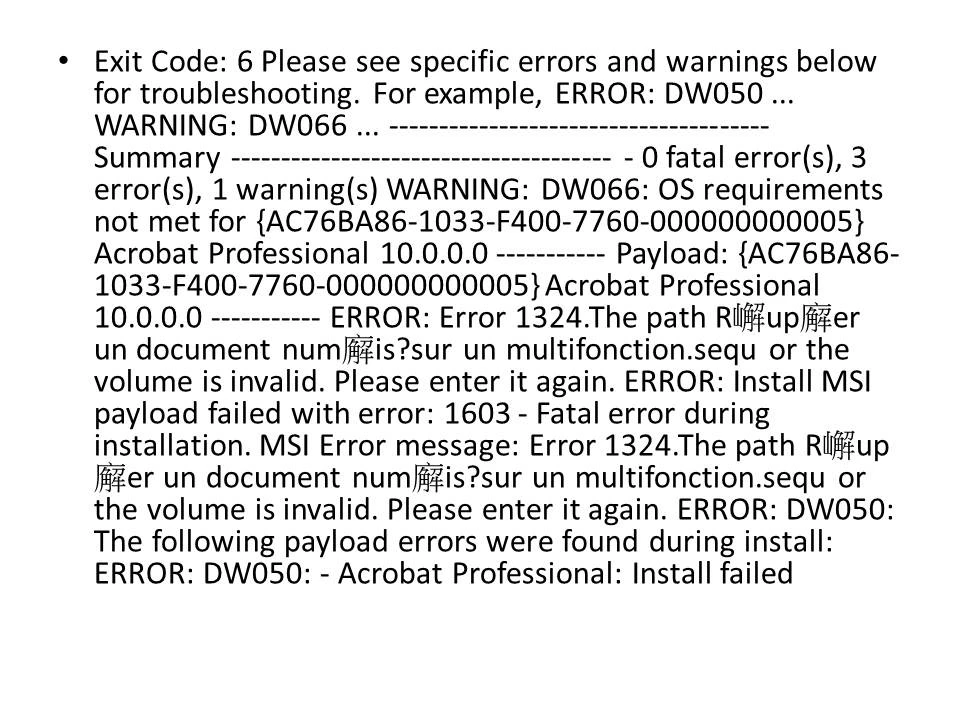
    The error message again as below:-


    Any further help? Thanks in advance.

    hkjhht


    The error is because of the system locale set for your computer, follow the below steps and then check :-

    Click the Start and then choose the Control Panel option.

    Click the Clock, Language, and Region, and then clicking Regional and Language Options.

    Click the Administrative, and click Change system locale at Lanaguae for non-Unicode programs.

    Select English (UK), and restart computer.

    Install Acrobat X, then change back your own language.

    1 reply

    Participating Frequently
    September 25, 2012

    When you run the installation file for CS6 do you get any error specific to Acrobat not being installed due to? If yes please let us know the details or the exact error message.

    Thanks
    Nikhil

    September 25, 2012

    yes, and it says like this:-


    hkjhht

    Jeffrey_A_Wright
    Community Manager
    Community Manager
    September 25, 2012

    Can you please try running the Acrobat Cleaner tool from http://labs.adobe.com/downloads/acrobatcleaner.html and then try reinstalling again.