Participant
February 8, 2019
Answered

Unable to install Photoshop v20.0.3

  • February 8, 2019
  • 2 replies
  • 2341 views

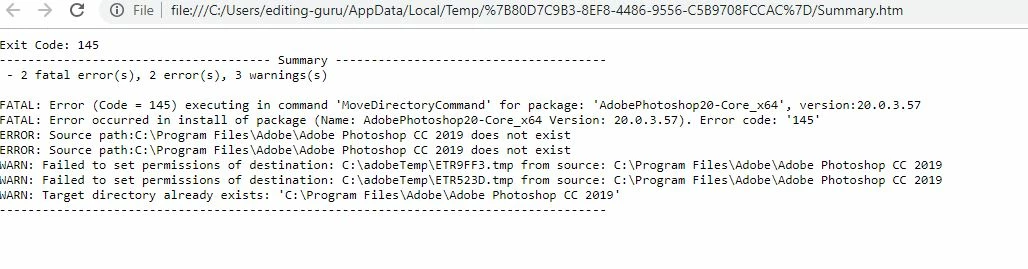
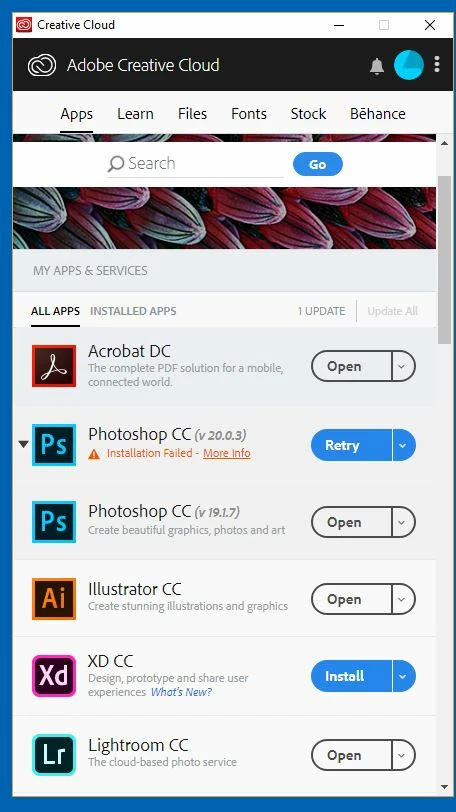
Tried to install photoshop CC latest version 20.0.3  - installation failed - File already exists at the install path.  Rename /delete and try again.  Ok - so I tried that - then adobe Photoshop CC 2019 folder denies me access - even when I open file explorer with administrator privileges.  I also tried to change permissions on the directory under 'security' and that blocked me as well.  So cant access or delete - so I'm stuck.   I also tried Adobe CC Cleaner tool - it did nothing.  I am using win 10 64 bit.  See screenshots.
This topic has been closed for replies.
Correct answer melissapiccone

this is a weird mistake, there is no update... Photoshop CC 2019 20.0.3 update y

2 replies

melissapiccone
Community Expert
melissapicconeCommunity ExpertCorrect answer
Community Expert
February 8, 2019

this is a weird mistake, there is no update... Photoshop CC 2019 20.0.3 update y

Melissa Piccone | Adobe Trainer | Online Courses Author | Fine Artist
kglad
Community Expert
Community Expert
February 8, 2019

uninstall everything cc including preferences, https://helpx.adobe.com/creative-cloud/help/uninstall-remove-app.html

then uninstall the cc desktop app, https://helpx.adobe.com/creative-cloud/help/uninstall-creative-cloud-desktop-app.html

clean your computer of cc files per http://www.adobe.com/support/contact/cscleanertool.html

restart your computer (don't skip this)

reinstall the cc desktop app, https://creative.adobe.com/products/creative-cloud.

if you're unable to install the cc desktop app at this stage, use an administrator account (solution 4 here, https://helpx.adobe.com/creative-cloud/kb/creative-cloud-missing-damaged.html)

use the desktop app to install your cc programs/trials