


July 31, 2017
Answered

Unable to reach Adobe servers.

  • July 31, 2017
  • 8 replies
  • 91658 views

Hello All,

I have a client that is using CC on Mac but when they attempt to load it they are presented with the following error screen:
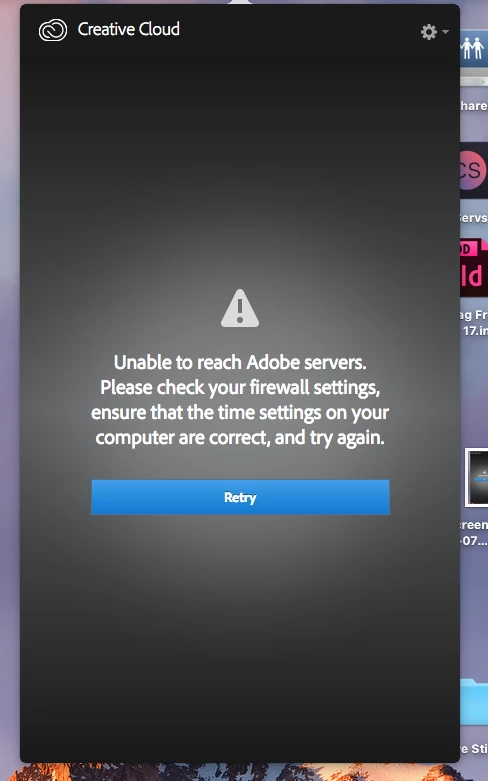
I'm not entirely sure that this is actually a firewall issue so any advice on troubleshooting this issue would be hugely appreciated!

Kind Regards,

This topic has been closed for replies.

8 replies

David__B
Adobe Employee
David__BCorrect answer
Adobe Employee
August 6, 2021
the_dudes
Inspiring
August 31, 2020

I encountered the same problem and was able to fix it by restarting my PC.

New Participant
August 11, 2020

I encountered the same problem and was able to fix it by downloading a fresh copy of the creative cloud app installer and installing it. 


พงษ์นาจบ37107059
New Participant
November 8, 2018

I installed a new window and it works normally.

Thank you very much

I was impressed in my effort to help.

And will continue to use.

^^

kunladap66547241
New Participant
November 3, 2018

it's work for me too Thanks so much!!!!!

New Participant
March 13, 2018

Windows Update troubleshooter worked like a charm for me. Spent a whole day working with Adobe support to try and get it running. They couldn't solve it, stumbled upon this and it was solved within an update and a restart, 15 min tops.

Participating Frequently
September 3, 2017

This worked for me!

I had this same issue for the last 4 days on my windows machine. I had to contact Microsoft to see what they could do. Come to find out I had some configuration issues on my computer that didn't allow adobe to connect. it might be possible to fix it through an update or by contacting apple. Here's our dialogue.

Thank you for contacting Microsoft Support, I am A*****How can I help you today?

My adobe creative cloud app won't connect to the server and I believe it may be an issue you all can help me with

I've tried adobe and comcast xfinity troubleshooting and nothing has worked so far

Thank you for letting me know.  I truly understand how important this is for you and I know that you need this issue resolved. Let's work together to get the best possible solution so you can get back on track. May I ask, when did you encounter this issue with Adobe Creative cloud?

It's been over the last couple of days I have been trying to fix it. I'm not sure how long this has been an issue but it's fairly new. I know I noticed it the other day because I was trying to save some presets from adobe premiere

I see, have you tried to contact Adobe regarding this issue?

Yes. We have tried every troubleshooting issue possible and we are all stumped. It has something to do with this computer's configuration or the machine itself. My laptop doesn't have an issue connecting to adobe creative cloud.

It's been gruesome man

Thank you for letting me know Jay. I truly understand how important this is for you and I know that you need this issue resolved. Let's work together to get the best possible solution so you can get back on track.

May I ask, is there any recent changes on your computer prior to this issue?

Not that I can think of. The last major change I had was a couple of months ago when I installed a new graphics card.

I see, how about recent Windows update?

No I don't think i have done that

I've been seeing the notifications. How can I check to see if I'm current?

Try to press Windows key + letter "i" on your keyboard then click on Update and Security 

From there you can check the update History

Try to check if there are recent Windows update prior to this issue

Ok im checking

Everything I'm seeing on here says failed to install dating back to august

I see, did you noticed any updates that was successfully installed ?

Everything says failed surprisingly

I see, can you please check the current version and build of your Windows 10, kindly press Windows key + letter R on your keyboard then type in: WINVER

A security issue has been identified in a Microsoft software product that could affect your system. You can help protect your system by installing this update from Microsoft. For a complete listing of the issues that are included in this update, see the associated Microsoft Knowledge Base article. After you install this update, you may have to restart your system.

That's the description in a lot of them

Version 1607 (OS Build 1*****)

2016 Copyright

Thank you. Before we start, Just a quick reminder, we provide mainstream/basic support for download, install, activation and application scenarios. Self-help tools and guides are also available for your assistance. We also have our premium support options which we'll talk about if there's a need or contact software developer. For now, let me make sure I exhaust my resources to quickly Resolve your issue and make you feel happy. How does that sound?

That sounds great

Alright. First, we'll run Windows update troubleshooter to make sure that the updates will properly install on your computer

Ok i'm running it now

Alright. After that you might need to restart your computer. If the issue persist after you install the updates. You might need to contact Adobe support again

By the way, as your reference, please do save this case number:1397027823 for this consultation visit.

Ok there are a bunch of errors that popped up here

DUDE SOMEHOW CREATIVE CLUOUD JUST POPPED UP!!!!

May I know what exactly came up on your screen

Lol as I was typing those errors it popped up! lol hold on one second man im so excited

Sure thing

Potential Windows Update Database erro detected | Not Fixed

The remote device or resource won't accept the connection | Detected

Some security settings are missing or have been changed | Fixed

Service Registration is missing or corrupt | Fixed

Windows Update Components Must be repaired | Fixed

That's all of them

Thank you. Try to check the Adobe before we restart the computer

OK Adobe is in full effect right now. It's back connected. It's open and automatically started downloading apps

kglad
Community Expert
Community Expert
July 31, 2017

confirm that you can connect to the secure adobe servers.

for help with that and other common secure adobe.com connection problems read, http://helpx.adobe.com/x-productkb/policy-pricing/activation-network-issues.html

August 1, 2017

Hi kglad,

The client says that the only part that did not work was it did not show a "Test Successful" message at the Activation Server part.

Kind Regards,

Ryan

kglad
Community Expert
Community Expert
August 1, 2017

they're not connecting.  did they check their hosts file?