



Scott Gerke
Participant
August 13, 2021
Question

Uninstalling PP 2019 if I have 2021

  • August 13, 2021
  • 2 replies
  • 271 views

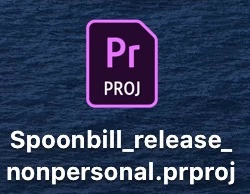
I've been using 2021 since it's release, but whenever I save a project, it shows the PP 2019 icon (see pic below).  I want to remove 2019, as well as 2020, and only have 2021 on my computer.  If I uninstall all the old versions, would it compromise the projects that were saved showing the old PP icons or if they were editing in the old versions? Thanks.
 

This topic has been closed for replies.

2 replies

Nancy OShea
Community Expert
Community Expert
August 13, 2021

That icon doesn't mean anything except that your operating system is associating those files with Premier software.  Feel free to re-associate the files to PP 2021 with Mac Finder or Win File Explorer. 


When you're sure you don't need old versions anymore, use your Creative Cloud Desktop App to remove them.


Hope that helps.


Nancy O'Shea— Product User & Community Expert
Scott Gerke
Participant
August 23, 2021

Thank you, Nancy.  I have reassociated all the files to PP 2021.  If that is all that needs to be done, I'll remove 2019.  Thank you so much for your help.

Govardhan.V
Participating Frequently
August 13, 2021

You may backup presets , project , plugins....etc and then try uninstalling old version to check.


Scott Gerke
Participant
August 23, 2021

Good call on all the backup stuff.  I've got it all backed up so now it's time to free up some storage.  Thanks for the reply 🙂