


Participant
July 1, 2013
Answered

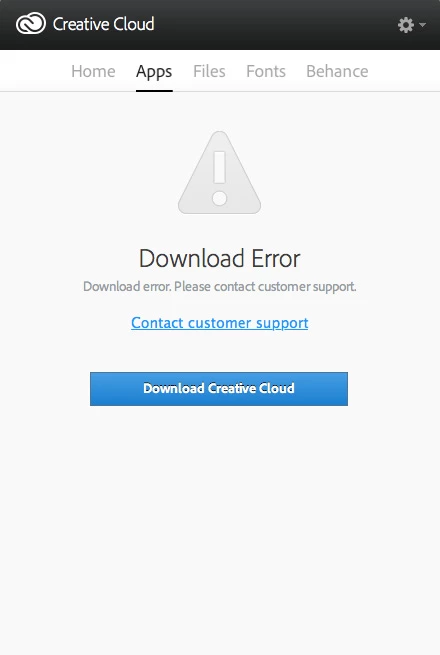
Creative Cloud "Download Error" message

  • July 1, 2013
  • 22 replies
  • 87965 views

When I go to the App section on the creative cloud manager I get the message "Download Error. Please Contact Customer Support."

Could somebody please help me fix this?

I have tried restarting my computer, signing in and out of creative cloud, and clearing the cache.

Thanks
This topic has been closed for replies.
Correct answer Sumit Singh7733893
  • Try to delete AAMupdater folder from

         ~/Library/Application Support/Adobe/

If above doesn't worked then perform below steps

  • Rename the opm.db file under

        ~/Library/Application Support/Adobe/OOBE

22 replies

Participant
August 1, 2014

This does not help me if i delete AAMUpdater folder, on Apps tab still is Download Error if i delete OOBE can not sign in Creative Cloud at all.

I had updated PS and Lightroom to the latex version yesterday and sins than Creative Cloud stop working.

What i have to do ?

Blaektec
Participant
July 3, 2014

Thanx. All your posts helped resolve this annoying problem.

Participant
June 29, 2014

Thank you guys... after read all the posts I finally got rid of the error issue...

Love you all... hehehe

simonives
Participant
June 5, 2014

Can confirm that this fix works on OS X Mavericks (both a MacBook Pro and an iMac).

Quick terminal fix is:

$ rm -rf ~/Library/Application Support/Adobe/AAMUpdater
$ killall Creative\ Cloud
$ open -a Creative\ Cloud

rbh911
Participant
June 19, 2014

Very weird error.  On my iMac running Mavericks, the Creative Cloud Updater updated Creative Cloud and Bridge CC, then installed Lightroom 5 without a problem - then gave me an error downloading PhotoShop CC (2014).  It did give me a "Retry" button, that did absolutely nothing but flash the "Waiting..." string and then go direct to the error state.

I followed the advice here to delete the ~/Library/Application Support/Adobe/AAMUpDater directory.  The directory was successfully deleted.  I shut down Creative Cloud, then restarted it.  I opened the "Apps" window and it said that  PhotoShop CC (2014) had already been updated and had a green checkmark next to it.  WTF??  So the error wasn't really that PSCC hadn't downloaded or installed, it was that the updating app couldn't refresh CC's Apps windows properly.  Or something.

Stupid situation if you ask me, and NOT something I'd expect to see just doing an update on premium priced products like PS and Lightroom.  The deleted directory was originally created and installed by Adobe's installation program, so I have to think this situation is Adobe's to fix.  Having people go into a Mac's terminal to issue advanced command line strings, or do strange crap like deleting hidden directories is a page right out of the Windows experience.  Mac users rightfully expect  to hit "Update", and then go right back to work without issue.  In many cases, Mac users ARE Mac users to eliminate the constant update and installation chaos they experienced when they were Windows users.

At any rate, my CC apps "appear" to be updated.  With this error popping up, I really have no idea what PS's status is.

Participant
April 16, 2014

I'm having the same problem. Did all of the above to try and solve it but the Download Error just doesn't want to leave me alone . I'm in desperate need of InDesign CC for a customer and I can't download it, not even on the website. Please help beceause I'm starting to get really annoyed (nothing personal of course!).

Participant
April 16, 2014

Hi OD Mike,

Just a quick point, I also tried to delete from the Library folder originally and it didn't work at all.

But then realised it was the wrong library folder and therefore the wrong 'AAMupdater' folder I had deleted.

But, after typing in '~/Library' into the 'Go > Go to folder' option from the top Apple menu bar, it took me to the right 'hidden' library location and then it worked. Hope this works for you too!

Participant
April 16, 2014

Hey LeeDaniels, You just made a friend for life! It works. Thank you very much for the help.

fruf
Participant
February 21, 2014

this error is so annyoing... Nothing of all the solutions worked for me (I'm using the latest Cloud app version on Mavericks). It is really an pain, because i cant install any more apps.

  • Try to delete AAMupdater folder from

         ~/Library/Application Support/Adobe/     

- didnt work


  • Delete the opm.db file under

        ~/Library/Application Support/Adobe/OOBE

this file doesnt exist and yes, hidden files are shown.

please fix it adobe!   i wasted more than enough time trying to find a workaround already.

Jeffrey_A_Wright
Community Manager
Community Manager
March 4, 2014

Please see Updates repeatedly applied | CC - http://helpx.adobe.com/creative-cloud/kb/updates-repeatedly-applied-cc .html which discusses how to resolve this error.

fruf
Participant
March 5, 2014

perfect, thanks jeff!

Participant
February 7, 2014

Additional information for Windows users. The following worked for me. If you are from Adobe reading this, I'll also offer a pointer to what the cause might be.

Solution: Run task manager. There was a suggestion in this thread to stop the creative cloud.exe App from running. I had to go one step deeper after closing the program (and not finding the .exe in the app list): Click on processes, and find the process named Adobe CreativeCloud, and forcibly ended that process.

Upon re-launching CC, everything was fine.

For Adobe devs: When I re-launched and started a download, Windows asked me to authorized the installation. Since my CC installer failed after the computer was on for quite a while (with CC running), I would suggest that the issue has to do with the storage of the Windows authentication credentials (or loss thereof) that initially were granted for installing apps.

Participant
December 11, 2013

We had the Download Error issue quite persistently at our office. Deleting the OOBE directory did not work nor did re-installing the CC Desktop. However, having done those, it was booting the Mac that finally cleared the connection problem.

December 12, 2013

Mikael... Thanks for the update.  I'm not sure that I follow the details, though.  Was rebooting alone enough?  Did you have to delete the directories AND reboot?  (Or reboot and reinstall?)  If so, what was the ordering?

Participating Frequently
January 30, 2014

ofer4,

see my response to Graemezee1 and it may help.

schonk72 wrote:

Graemezee1,

not sure if you saw the earlier comments in this thread, but several people seem to be confused by the path to take care of this. Most are going to the visible directory and not the hidden. The ~ indicates Hidden directory. To get to this, go to Finder, while holding down option key select Go menu at top and you should seee Library as an option on pull down menu (you won't see this if you don't hold down option key). This gets you to the hidden Library directory and you can try one or both of the things below:

Quit Creative Cloud ( on PCs, launch the Task Manager and STOP Creative Cloud.exe ), then:

  • Try to delete AAMupdater folder from

         ~/Library/Application Support/Adobe/       If above doesn't worked then perform below step:

  • Delete the opm.db file under

        ~/Library/Application Support/Adobe/OOBE

Relaunch Creative Cloud.

Hope this helps.

Paul Whitehead
Inspiring
November 17, 2013

Getting same error for past few days now, any solution?

MemrnzAuthor
Participant
November 19, 2013

Still no solution that has worked for me other than downloading applications on another login. It's a pain but they still work on my login.

Mr5strings
Inspiring
September 17, 2013

Just FYI...for Windows users...just launch the Task Manager and STOP Creative Cloud.exe then relaunch Creative Cloud...you should be good to go...

November 17, 2013

Hi, folks.  None of these solutions work for me.  I just downloaded Creative Cloud v 1.2.1.260 today in order to test Photoshop.  As soon as I click on "apps", I get the screen from the original post.  I've tried all of the fixes in this tread to-date...no dice.  The AAMupdate and OOBE folders are properly created when the program relaunches, but I still get the "Download Error" (even though I'm not trying to download anything).

Any other thoughts???

Participating Frequently
January 30, 2014

Are you using a trial version or full version of Creative Cloud? You mentioned folders being restored, but in the 2 things to delete, first is folder, second is a file only, not folder. Can you list exact steps you took, so we can get a better idea of where the issue might be. Also, you said you're on version 1.2.1.260 (currently I'm on v 1.3.0.322, so updating CC may help as well, considering they are making fixes to known issues).