


shokdamonky
Participating Frequently
March 6, 2018
Answered

Acrobat Customization Wizard DC - Default viewer for PDF files - What does this mean? --> On Windows 10 this option will only set default PDF viewer for browsing and file preview

  • March 6, 2018
  • 1 reply
  • 4505 views

When using the Acrobat Customization Wizard DC to build the MST for both Reader and Acrobat Pro, what does this mean under Default viewer for PDF Files --> "On Windows 10 this option will only set default PDF viewer for browsing and file preview." The forums don't have a selection for the Customization Wizard so I originally had this post in the Acrobat SDK. It was suggested there to post my question here in Enterprise Deployments. Hopefully you all know the Customization Wizard for working on Enterprise Deployments as I do myself. I cannot find anything online to explain this not even in Adobe Support. Thank you.
This topic has been closed for replies.
Correct answer alisterblack

Hello alisterblack,

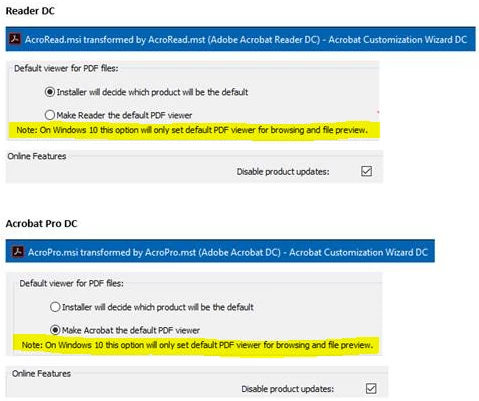
Below is a screen shot working on both Adobe Reader DC and Acrobat Pro DC in the Customization Wizard:

You can see my bullet selections made on each. I may change Reader to the other bullet selection, but for now this is working. For Acrobat Pro, I have the bullet selection to make it default since everyone has Reader anyway. If I deploy Pro I want it to be default over Reader for them.

Anyway, as for the statement, it is highlighted in yellow. It sure seems like a simple statement to understand. I think that's the problem, but it just isn't clear to me "browsing and file preview".

Thank you!


Hi,

This looks like a reference to the browser plug in for Edge.

"Windows 10 includes a new web browser called Microsoft Edge, in addition to Internet Explorer 11. Currently, the Microsoft Edge browser does not support the Acrobat PDF plug-in. Internet Explorer 11, along with other major Windows browsers, continues to support the Acrobat PDF plug-in." Is Adobe Creative Cloud compatible with Windows 10?

1 reply

alisterblack
Community Manager
Community Manager
March 7, 2018

Hi,

The documentation in the Acrobat Enterprise Toolkit pages says the following in the section regarding the default PDF viewer.

'Windows 10 environments require using DISM and GPO configuration.'

'Setting the Default PDF Viewer — Enterprise Administration Guide

shokdamonky
Participating Frequently
March 8, 2018

Hello alisterblack,

I appreciate your reply. The Customization Wizard will allow setting the default viewer in the MST it creates. I've also tested the defaultapps.xml file export, import, as well as setting it in a GPO as your mentioned in testing that method.

But my question is specifically what does this statement mean: "Note: On Windows 10 this option will only set default PDF viewer for browsing and file preview".

This is statement is shown In the Customization Wizard, where after calling up your MSI, then selecting Generate Transform from the Transform dropdown, then under the Installation Options, and finally in the in the Default viewer for PDF files section.

Thank you!

alisterblack
Community Manager
alisterblackCommunity ManagerCorrect answer
Community Manager
March 12, 2018

Hello alisterblack,

Below is a screen shot working on both Adobe Reader DC and Acrobat Pro DC in the Customization Wizard:

You can see my bullet selections made on each. I may change Reader to the other bullet selection, but for now this is working. For Acrobat Pro, I have the bullet selection to make it default since everyone has Reader anyway. If I deploy Pro I want it to be default over Reader for them.

Anyway, as for the statement, it is highlighted in yellow. It sure seems like a simple statement to understand. I think that's the problem, but it just isn't clear to me "browsing and file preview".

Thank you!


Hi,

This looks like a reference to the browser plug in for Edge.

"Windows 10 includes a new web browser called Microsoft Edge, in addition to Internet Explorer 11. Currently, the Microsoft Edge browser does not support the Acrobat PDF plug-in. Internet Explorer 11, along with other major Windows browsers, continues to support the Acrobat PDF plug-in." Is Adobe Creative Cloud compatible with Windows 10?