


BCC.Helpdesk
Participating Frequently
April 9, 2017
Answered

AUSST Stuck on Processed 144 out of 511

  • April 9, 2017
  • 3 replies
  • 5696 views

Hi,

I am having an issue with our Adobe Update Server where I have run the tool with a --fresh install.

Everything appears to be working until it gets to "Processed 144 out of 511 item" where it hangs.

Below is the last entries in the AdobeUpdateServerSetupTool.log file.
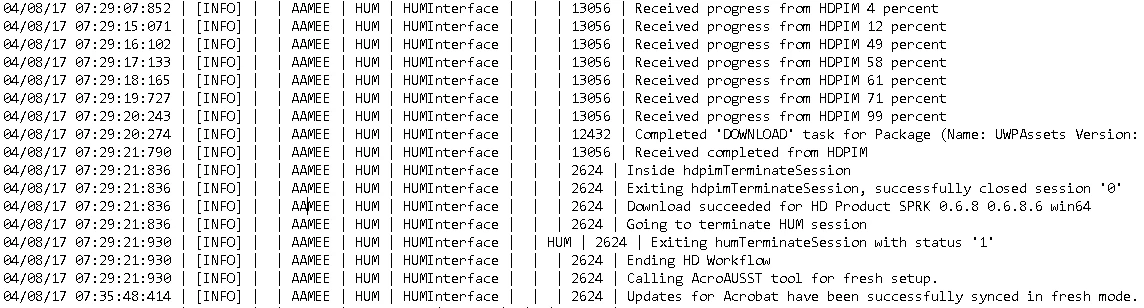
Below is the last entries in the AdobeAcrobatUpdateServerSetupTool.log file.

Thanks for any assistance!

    This topic has been closed for replies.
    Correct answer rpandita

    Dropbox - AdobeUpdateServerSetupTool.log

    Dropbox - AdobeAcrobatUpdateServerSetupTool.log


    Hi Helpdesk.IT

    Logs return the error code 9, which means that the file was not found.

    Please test this.

    Open acrobat , click on help - updates and let us know if that updates acrobat or not.

    ~Rohit

    3 replies

    Inspiring
    May 10, 2017

    I ran into what I believe is the same issue. Except this one was getting stuck on item 4. I did several --fresh runs but always had the same result of getting stuck on item 4.

    I finally got it working (it's still downloading but has made terrific progress) by deleting the entire web site and starting new from there.

    alisterblack
    Community Manager
    Community Manager
    April 12, 2017

    For these cases we would need to have the complete log.

    The best route is to open a support case and include the log file.

    To contact support please use one of the following options.

    Creative Cloud for Enterprise - from the Admin Console go to the support tab to open a case. Phone and chat options are also available here.

    Creative Cloud for Teams - from the CCT Admin Console go to the Help tab for chat and phone options.

    Alternatively please Contact Customer Care

    BCC.Helpdesk
    Participating Frequently
    April 12, 2017

    Hi alisterblack.

    ​Already called Customer care team for Creative Cloud for teams. They advised they could not provide phone support for AUSST and issues with AUSST were handled through the forums. I will try again via the Chat option in the CCT Admin Console.

    Thanks.

    its3485836
    Participating Frequently
    April 24, 2017

    Indeed, a setup.zip file downloads.

    It has worked previously, but seemed to stop all of a sudden (the server update, not that file download)


    Quick update to this. It appears to have got past 144, but gave an error code 9 updating Acrobat, which was seemingly where it was getting stuck before.

    its3485836
    Participating Frequently
    April 11, 2017

    Same thing is happening to me, except ours crashes at 144. Cleared, re-downloaded and performed a fresh sync and it still crashes in the same spot