


Participating Frequently
June 3, 2017
Answered

Cannot get current Acrobat DC patch to deploy as part of silent MSI install

  • June 3, 2017
  • 1 reply
  • 6870 views

Hello,

In Feb 2017 I was able to successfully build a silent MSI install of Acrobat DC (AcroRdrDC1502320053_en_US) using the Customization Wizard and deploy the app via ManageEngine Desktop Central. My users could access the self server portal and fire up the install - and it would install perfectly - following all my specific customizations.

Now - I want to do the same with the current DC track installer (AcroRdrDC1700920044_en_US)

I expanded the exe archive using the correct command line (per the Enterprise admin guide) and I end up with the 6 key files. I then fire up the Customization Wizard and load up the acroread.MSI file from the new archive I just expanded. Then within the Customization Wizard - I choose Transform->Load Transform to get the settings previously built in Feb 2017. This loads correctly and I save the Package and deploy the files to the specific folder within my DesktopCentral environment

But when a user runs the install from the portal - the end result is not Version 2017.009.20044 - I get the old "unpatched" 2015 version that cam within the archive.

The Setup.ini file looks right - pointing the right patch within and my new transform file that was created:

[Startup]

RequireMSI=3.0

CmdLine=/sall /rs

[Product]

PATCH=AcroRdrDCUpd1700920044.msp

msi=AcroRead.msi

CmdLine=TRANSFORMS="AcroRead.mst"

But - I cannot get this package to actually install the latest patch?

What am I doing wrong here?

Appreciate any insights.

Cheers,

Bruce
This topic has been closed for replies.
Correct answer Steve Cordero

Steve,

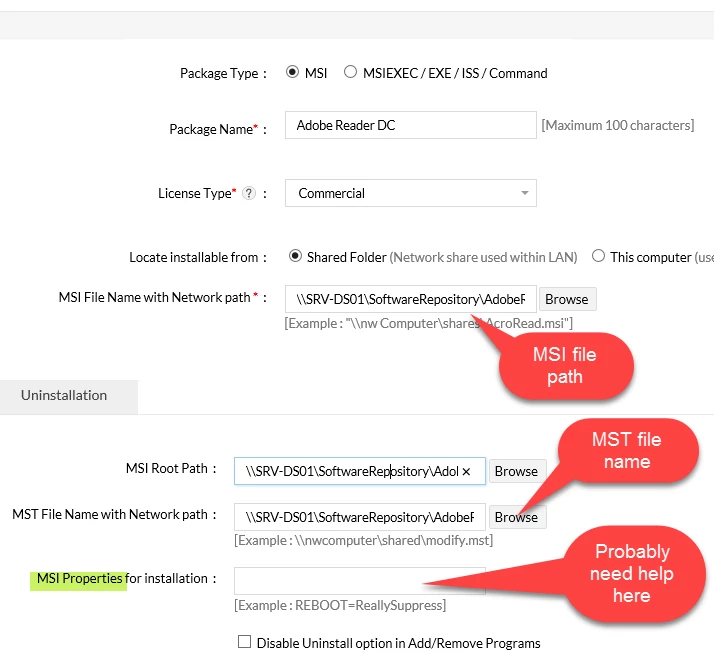
Much thanks for the update. I have attached a screen cap of what the install package looks like with Desktop Central:

Nothing is really exposed as far as what DesktopCentral is doing. But I am betting I need something within that MSI properties field. Note that MST file is already accounted for. So it may be as easy as adding this:

PATCH="\\SRV-DS01\SoftwareRepository\AdobeReaderDC\AcroRdrDCUpd1700920044.msp" /L*v

into that Properties field?

Again - when I built this package the first time - I do not recall ever putting anything into this field. Let me know what you think

Cheers!

B


You need to add the line with the correct path below to the "MSI Properties for installation:" field.

PATCH="C:\\<PATH_TO_THE_FILE>\AcroRdrDCUpd1700920044.msp"

1 reply

Adobe Employee
June 5, 2017

What is the command line that get's executed by your users when they install?

Participating Frequently
June 5, 2017

Steve,

I will need to see exactly how Desktop Central parses it's config file. There are a number of things going on when I set up a config file - it's not as cut and dry as a single command line that one would assume would be associate with a typical install

That said - my first package worked perfectly using the same method (unpack archive, use customization tool etc) and then create an install config using the files within Desktop Central.

Also - very odd - when I was reading the enterprise documentation on the Customization tool - it clearly stated that the AcroRead.msi file was updated as part of the customization process. If that is true - I would have expected to see the acroread.msi Modified Date to have changed when I view this file in Windows explorer. But even tho I specifically select/load this msi file into the Customization tool, make some changes and click the Save icon - the modified date of that msi remains unchanged. In my case - it has a file date of April 2015 or something similar.

I will report back when Ic an cobble together the actual execution commands that are being used by Desktop Central.

Cheers,

B

Adobe Employee
June 5, 2017

Bruce,

There reason I ask is two fold.

1.  If it's executing just the MSI file then it needs to use the "PATCH" Property in that command line.  The MSI commands do NOT execute the modifications in the Setup.ini file.

2. If it's executing the Setup.exe then for some reason the patch file that is in the installation files is not getting run or fails.  Then I would recommend running a verbose log command to see where it is failing.

There are two syntaxes that you can use depending on which method you use:

MSI Example

msiexec.exe /i   "C:\\<PATH_TO_THE_FILE>\AcroPro.msi" TRANSFORMS="C:\\<PATH_TO_THE_FILE>\AcroPro.mst" PATCH="C:\\<PATH_TO_THE_FILE>\AcroRdrDCUpd1700920044.msp" /L*v "C:\\<PATH_TO_THE_FILE>\AcroProInstall.log"

Setup Example

Setup.exe /l /sAll