



Exit
  • Global community
    • Language:
      • Deutsch
      • English
      • Español
      • Français
      • Português
  • 日本語コミュニティ
  • 한국 커뮤니티
0

Creative Cloud Uninstaller "can't uninstall creative cloud for desktop"

Community Beginner ,
Mar 30, 2020 Mar 30, 2020

Trying to do this silently, but of course it won't - because reasons. I included a screenshot to show there's no other adobe apps installed.
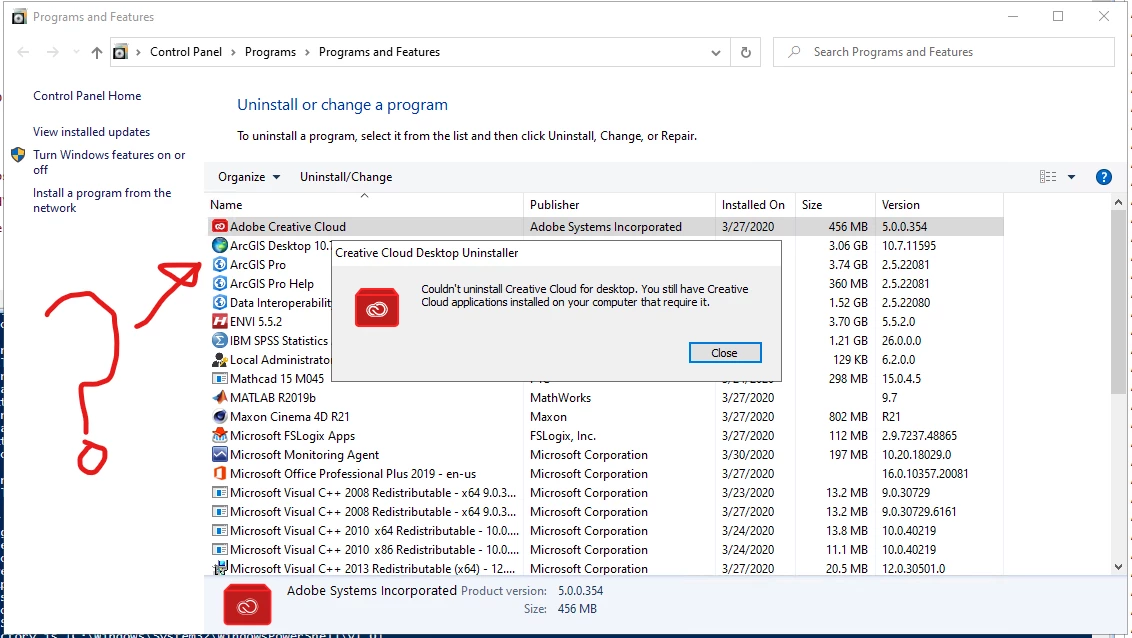
 

Annotation 2020-03-30 110307.png


On a side note - I had to script a good number of creative cloud apps because the main installer doesn't remove them either. I would give adobe my next months salary if they actually made an uninstaller that actually did just that (removed all the components - not just like 90% of them).

TOPICS
Deploy and package apps , Enterprise
1.8K
Translate
Report
Community guidelines
Be kind and respectful, give credit to the original source of content, and search for duplicates before posting. Learn more
community guidelines

correct answers 1 Correct answer

Adobe Employee , Mar 31, 2020 Mar 31, 2020

Hello, 

  1. We generally recommend the admin to create uninstaller package using the creative cloud packger to remove/uninstall CC apps. Please check this help document: https://helpx.adobe.com/in/enterprise/package/help/create-uninstall-package.html.
  2. You can also use creative cloud cleaner tool to remove the installed CC apps. Kindly check the complete document: https://helpx.adobe.com/in/creative-cloud/kb/cc-cleaner-tool-installation-problems.html.


Hope, this will fix your issue.

Translate
Adobe Employee ,
Mar 31, 2020 Mar 31, 2020

Hello, 

  1. We generally recommend the admin to create uninstaller package using the creative cloud packger to remove/uninstall CC apps. Please check this help document: https://helpx.adobe.com/in/enterprise/package/help/create-uninstall-package.html.
  2. You can also use creative cloud cleaner tool to remove the installed CC apps. Kindly check the complete document: https://helpx.adobe.com/in/creative-cloud/kb/cc-cleaner-tool-installation-problems.html.


Hope, this will fix your issue.

Translate
Report
Community guidelines
Be kind and respectful, give credit to the original source of content, and search for duplicates before posting. Learn more
community guidelines
Adobe Employee ,
Apr 01, 2020 Apr 01, 2020
LATEST

Hello,
You can use the Creative Cloud desktop uninstaller to uninstall the desktop client.
https://helpx.adobe.com/in/creative-cloud/help/uninstall-creative-cloud-desktop-app.html#uninstall_w...

As mentioned in the last comment you can also use the Creative cloud cleaner tool to uninstall multiple applications.

https://helpx.adobe.com/in/creative-cloud/kb/cc-cleaner-tool-installation-problems.html#Removeallors...

You can use the xml method as well which is only for Enterprise customers. Reference video  (https://www.youtube.com/watch?v=iRbludtPQd8)

Thanks,

Nikhil Gupta

Translate
Report
Community guidelines
Be kind and respectful, give credit to the original source of content, and search for duplicates before posting. Learn more
community guidelines