


Participating Frequently
June 2, 2017
Answered

Disabling the option to sync files to Cloud

  • June 2, 2017
  • 2 replies
  • 4779 views

Hi there,

I have a query with regard to the the option to sync files to Cloud.
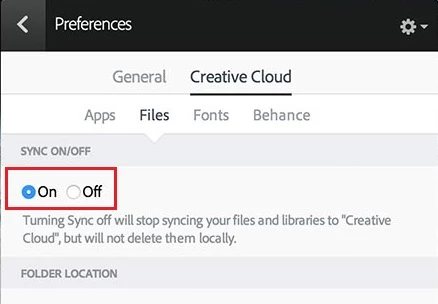
Is there a way to permanently disable the option to sync on or off (make it grayed out, maybe) so that users won't have the ability to change it? Is there a registry key that controls these options?

Thanks!

    This topic has been closed for replies.
    Correct answer alisterblack

    by the way, could I still open a case even if we haven't purchased licenses yet? We need to check first if what we want is possible.

    Thanks!


    If you go to Contact Customer Care it will direct you to the support channels that are available.

    2 replies

    Participating Frequently
    June 9, 2017

    Hi there,

    Just wanted to check if my query below is possible.

    Thanks!

    alisterblack
    Community Manager
    Community Manager
    June 13, 2017

    Hi Lucy,

    There are some options for doing this but they are not part of the standard packaging options and can cause issues elsewhere with your products. I would advise to open a case with our support teams to discuss further.

    To contact support please use one of the following options.

    Creative Cloud for Enterprise - from the Admin Console go to the support tab to open a case. Phone and chat options are also available here.

    Creative Cloud for Teams - from the CCT Admin Console go to the Help tab for chat and phone options.

    Alternatively please Contact Customer Care

    Participating Frequently
    June 14, 2017

    thank you!

    kglad
    Community Expert
    Community Expert
    June 2, 2017

    do you have an enterprise or team license?

    Participating Frequently
    June 2, 2017

    hi kglad!

    we are currently thinking of getting team licenses for 3 of our users but we want to double check first if it is possible to disable the file sync options.

    Thanks!

    kglad
    Community Expert
    Community Expert
    June 2, 2017