


New Participant
September 14, 2017
Answered

How to use Channel IDs with Rum?

  • September 14, 2017
  • 2 replies
  • 1470 views

How do I use Channel IDs to update using RUM?

We are currently on CC 2014 but if I wanted to specify only to update InDesign CC 2014 on that particular computer will this work?

sudo RemoteUpdateManager --channelIds='CC (2014)--10.0--osx10--AdobeInDesignCC2014-10.0'

The channel IDs listed for CC products on this page has space between CC and (2014) so I wasn't sure if CC was part the channel ID.
Channel IDs for use with Adobe Remote Update Manager

    This topic has been closed for replies.
    Correct answer rpandita

    Hi Tak10 ,

    Can you please make sure that you are running the lastet version of RUM. - Remote Update Manager update

    I tried testng oit onn my windows 10 machine and it sees to be working.

    ~Rohit

    2 replies

    Tak10Author
    New Participant
    October 9, 2017

    I was able to resolve this problem.

    The script to update InDesign CC2014 as follows.

    sudo RemoteUpdateManager --channelIds="AdobeInDesignCC2014-10.0"

    rpandita
    Community Manager
    Community Manager
    September 15, 2017

    Hi Tak10

    Greetings.

    Hope these links help -

    Channel IDs for use with Adobe Remote Update Manager

    For the products listed in this page, use the --productVersion parameter instead of --channelIds.

    All the other details are mentioned in this link - Use Adobe Remote Update Manager

    ~Rohit

    Tak10Author
    New Participant
    September 15, 2017

    I did look at that link.

    Channel ID for CS 6 InDesign is this:

    CS6--8.0--osx10--AdobeInDesignCS6-8.0

    Which doesn't have any spaces in between so there is no issue.

    But the Channel ID for CC 2014 is this:

    CC (2014)--10.0--osx10--AdobeInDesignCC2014-10.0

    There is a space between 'CC' and '(2014)' so it fails. I attempted to do the following by placing them in a single and double quotation.

    sudo RemoteUpdateManager --channelIds="CC (2014)--10.0--osx10--AdobeInDesignCC2014-10.0"

    This runs the RUM but it doesn't update the particular product indicated in the channel.

    rpandita
    Community Manager
    rpanditaCommunity ManagerCorrect answer
    Community Manager
    September 22, 2017

    Hi Tak10 ,

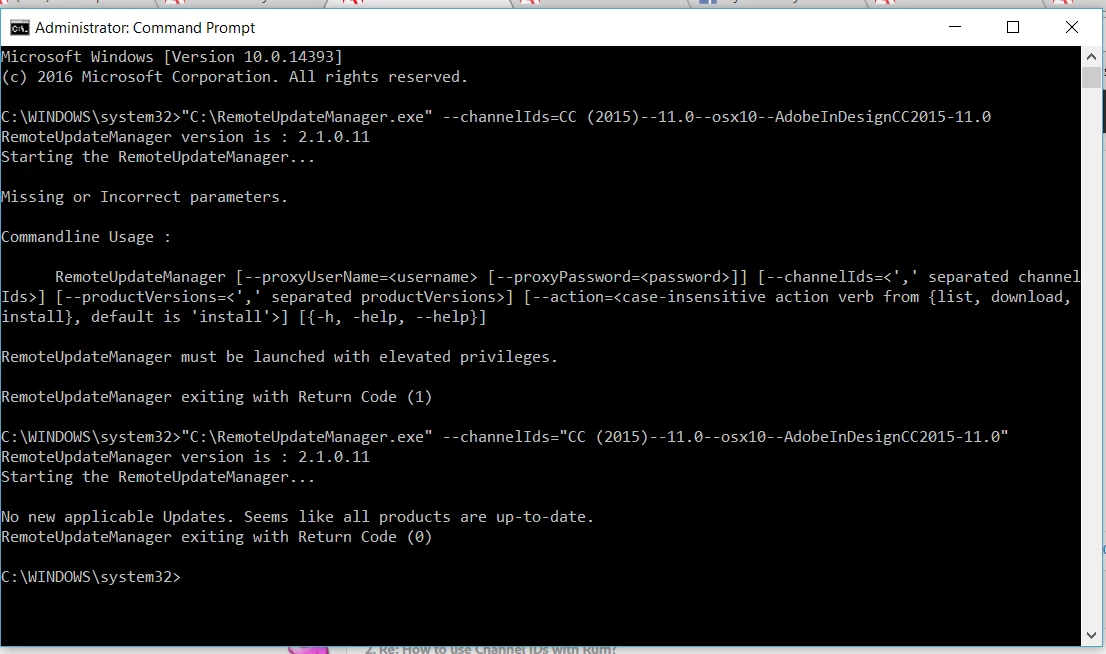
    Can you please make sure that you are running the lastet version of RUM. - Remote Update Manager update

    I tried testng oit onn my windows 10 machine and it sees to be working.

    ~Rohit