


AndrewC88
Participating Frequently
August 3, 2018
Answered

Licensing/Activating Acrobat on Shared Computers

  • August 3, 2018
  • 1 reply
  • 3414 views

We're considering purchasing enterprise subscriptions of Acrobat for users in our organization, but I have some concerns about shared computers.

We have several conference rooms with shared computers that users use for meetings and presentations. Users may log on to multiple shared computers a day as they move around the office for meetings.

Since Acrobat is now subscription-based, can we activate Acrobat on these shared computers so users are not prompted to sign in to Adobe on different devices? We don't want these devices to count towards the users' device activation count or they'll constantly be signed out of their personal (non-shared) computer.

If I'm going about this all wrong or there's a better way to do this, please mention it!

For comparison, with our Office 365 subscriptions when one user activates the Office applications on a particular computer, the Office apps are activated for all users who log on to that computer. We have dedicated subscriptions to activate Office on those computers.
This topic has been closed for replies.
Correct answer alisterblack

So, there is no business option to license the device rather than the user?

Our conference room computers are similar to a lab computer -- they're not assigned to a particular user and only used periodically.

(We are not looking to avoid licensing costs for these computers but rather the inconvenience of having to sign in/out of the software on the different devices.)


Device licenses are only available for educational customers.

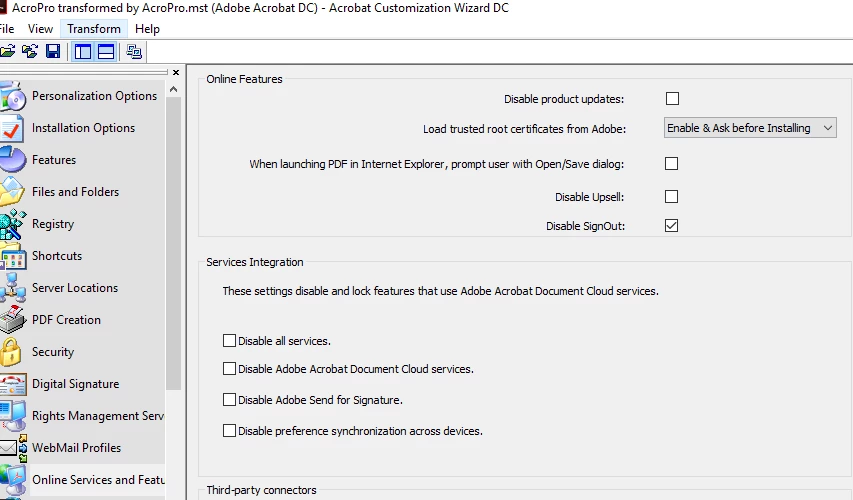
For these machines you could have a dedicated Adobe ID signed in and ask staff not to sign in with their own ID. You can actually disable Sign Out using the Acrobat Customization Wizard.

Welcome to the Wizard — Acrobat Customization Wizard DC for Windows

1 reply

alisterblack
Community Manager
Community Manager
August 6, 2018

Hi,

You can be signed in to two devices at the same time but cannot use them both simultaneously.

The best advice would be to have the users sign in with their own credentials to the shared machine, but sign out when they are finished. This will not sign them out of their own device.

AndrewC88
AndrewC88Author
Participating Frequently
August 7, 2018

Is there no other way to activate Acrobat? We might have to look into buying serials for these computers.

I highly doubt users are going to remember to sign out of Adobe software before they log off the machines.

AndrewC88
AndrewC88Author
Participating Frequently
August 7, 2018

We do provide 'device licenses' for educational lab environments which license the device rather than the user, these are for education only however.


So, there is no business option to license the device rather than the user?

Our conference room computers are similar to a lab computer -- they're not assigned to a particular user and only used periodically.

(We are not looking to avoid licensing costs for these computers but rather the inconvenience of having to sign in/out of the software on the different devices.)