


September 25, 2014
Answered

Post Installation/Deployment Software License Agreement Suppression Acrobat X Pro

  • September 25, 2014
  • 2 replies
  • 10636 views

I just stated with a new organization and we recently [successfully] deployed Adobe Acrobat X Pro (10.1.0.534).  However, we're receiving reports (from users and IT staff alike) that when launching the application, it runs for 30 seconds or so, quits then prompts the user to accept the Adobe Software License Agreement before they can actually use the application.  Having just walked into the door, I can't confirm it was packaged with the Customization Wizard, but that is looking less & less likely.

So, having deployed this to about 2000 clients, how can we go about suppressing (read: accepting) this Acrobat Software License Agreement at an enterprise level?  (We'll figure out how, I just want to know what setting needs to be in place to eliminate this prompt.)
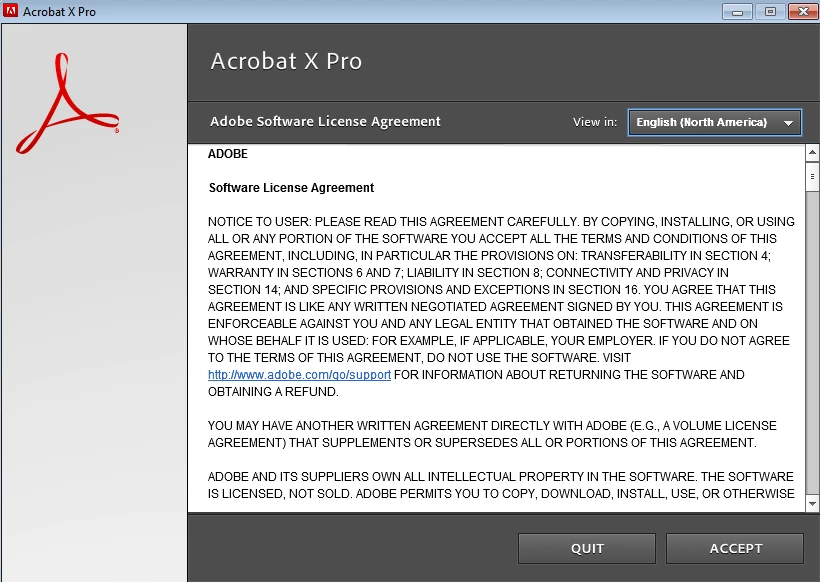
In the past (e.g.: Acrobat 7, 8 & I think 9) we were able to suppress this via a registry like:

  • reg add "HKEY_LOCAL_MACHINE\SOFTWARE\Adobe\Adobe Acrobat\VERSION\AdobeViewer" /v Registered /t REG_DWORD /d 00000002 /f >>!_BatchLog! 2>>&1
  • reg add "HKEY_LOCAL_MACHINE\SOFTWARE\Adobe\Adobe Acrobat\VERSION\AdobeViewer" /v EULA /t reg_dword /d 00000001 /f >>!_BatchLog! 2>>&1
  • reg add "HKEY_CURRENT_USER\Software\Adobe\Adobe Acrobat\VERSION\AdobeViewer" /v EULA /t reg_dword /d 00000001 /f >>!_BatchLog! 2>>&1

But I believe either in 9 or X (10.x) EULA changed to EULAAcceptedForBrowser and with this being a 64-bit version of Windows 7, I figured it would be in one of a few places:

  1. HKEY_CURRENT_USER\Software\Adobe\Adobe Acrobat\10.0
  2. HKEY_LOCAL_MACHINE\SOFTWARE\Adobe\Adobe Acrobat\10.0
  3. HKEY_LOCAL_MACHINE\SOFTWARE\Wow6432Node\Adobe\Adobe Acrobat\10.0

I'm seeing EULAAcceptedForBrowser in the AdobeViewer key in locations 1 & 3 above so I exported both AdobeViewer keys & imported it elsewhere, but its still prompting.

So, on a whim, I added the three bulleted keys above and when launched, it worked fine.  Yay!

After about 30 seconds or so, it behaves exactly as I described above: The application launches, you can work in it, but after at most 30 seconds, the application closes and launches the licensing agreement (PDApp.exe) again.  What.  The.  Heck.

So, experts out there, what are we missing?  How can we get this resolved without doing in place reinstalls or uninstalling/installing?  We have to keep user interruption and fatigue to a minimum, and another 'deployment' is just not an option.

This topic has been closed for replies.
Correct answer

There are two other ways that you can attempt to do this.

1.  Use the EULA_ACCEPT property at install time: 

http://www.adobe.com/devnet-docs/acrobatetk/tools/AdminGuide/properties.html

Installation    9.0 & later    EULA_ACCEPT    YES prevents the EULA from appearing the first time the viewer is invoked. For 10.1.4, see the release notes.

2.  Use APTEE after installation for the applications already installed

4   Installation Workflows — Enterprise Administration Guide

adobe_prtk --tool=Type1Exception --accept --serial=<serialNum> --responsecode=responseCode --leid=DriverLEID

2 replies

Correct answer
September 26, 2014

There are two other ways that you can attempt to do this.

1.  Use the EULA_ACCEPT property at install time: 

http://www.adobe.com/devnet-docs/acrobatetk/tools/AdminGuide/properties.html

Installation    9.0 & later    EULA_ACCEPT    YES prevents the EULA from appearing the first time the viewer is invoked. For 10.1.4, see the release notes.

2.  Use APTEE after installation for the applications already installed

4   Installation Workflows — Enterprise Administration Guide

adobe_prtk --tool=Type1Exception --accept --serial=<serialNum> --responsecode=responseCode --leid=DriverLEID

October 10, 2014

Thanks for the reply Sabian Zildjian.

While the information you shared will likely prove helpful to others who find this post, it doesn't quite fit the bill.

  1. Item one in your reply isn't an option because the application is already installed & deployed.  This requires repackaging Acrobat (and correctly I might add!) then re-deploying it.  That's not something we're willing to do at the moment.
  2. Item two would be nice to use except (from the page itself): "The Adobe Provisioning Toolkit Enterprise Edition is a command-line tool that helps you track and manage serialization of Adobe®Creative Suite® products that you have deployed using the Adobe Application Manager Enterprise Edition."  Well, (a) this isn't CS5/5.5/6 or part of a CS bundle and (b) it wasn't deployed (or packaged) using AMEE.  The command line utility requires the application LEID which can be found here (http://www.adobe.com/go/aptee_leid), and again, its for CS products; there's nothing there for Acrobat.

Again, good information here, but unless I'm missing something, this isn't going to work for the current situation.

EnterpriseHelp
Community Manager
Community Manager
October 20, 2014

Thanks again Ben for the reply!  I don't care what those other people say about you, you're alright in my book.  (Just kidding!  Obviously no one's saying anything about you, but you are alright in my book!  Thanks for hanging in there.)

I won't be able to do an install on a clean machine for a while, but from what I've seen, I'm not hopeful the problem won't exist there.  But I will try when I can come up for air.

Sorry about the sparse details above on how this was 'distributed'.  Was rushing out the door and just spewed out some babble.  The reference machine was built as follows:

  1. Windows 7 Enterprise 64-bit installed & patched
  2. Office 2010 installed & patched
  3. Various applications installed, including Acrobat.
      How was Acrobat installed?  A simple batch file with 2 lines:
      1. \\path\to\Adobe\Acrobat Pro X\setup.exe
      2. msiexec /update "\\path\to\Adobe\Acrobat Pro X\AcrobatUpd1010.msp" /qb
      Very straight forward with zero customizations.

From there, sysprep the machine & capture a WIM.  So Acrobat Pro X is baked into the gold image.

Without a shadow of a doubt, the creation of prov.xml was not done prior to sysprep.

Maybe I'm missing something, but I generated the prov.xml on the 13th (see above) but only using the CS6 version of the adobe_prtk, which is the only version that supports the commands from the link you sent:

adobe_prtk --tool=VolumeSerialize --generate --serial= --leid= [--regsuppress=ss] [--eulasuppress] [--locales=limited list of locales in xx_XX format or ALL>] [--provfilepath=]


So this is what happens when runing the above with the CS5/5.5 version of the adobe_prtk.exe:

C:\Adobe Provisioning Toolkit Enterprise Edition>adobe_prtk.exe --tool=VolumeSerialize --generate --serial=uuuu-vvvv-wwww-xxxx-yyyy-zzzz --leid=AcrobatPro-AS1-Win-GM --regsuppress=ss --eulasuppress --locales=ALL --provfilepath=C:\windows\prov.xml


        Copyright 2010 Adobe Systems Incorporated
        All rights reserved.
usage:
        adobe_prtk --tool=MakeReplacementSN --old=oldSN --new=newSN
        Returns a pseudo serial number
        Pseudo SN can be used with the ReplaceSN tool to replace an existing serial number with this new serial number.

        adobe_prtk --tool=ReplaceSN --serialize=LEID --serial=SN
        This is to apply a serial number to the specified product.
        LEID is the licensing identifier, SN is the serial number.
        adobe_prtk --tool=ReplaceSN --reserialize=LEID --replacement=PseudoSN
        This is to replace serial information of an existing serialized product with new serial information contained in the specified pseudoSerial.
        adobe_prtk --tool=ReplaceSN --unserialize=LEID [ --locale=locale ]
        This is to remove all existing non-trial serializations applied to the product with the given LEID.
        Specifying the --locale argument removes serialization for that specific locale.

Return Code = 1

We know that doesn't work.

So now the same with the CS6 version of the prtk:

C:\Adobe Provisioning Toolkit Enterprise Edition CS6>adobe_prtk.exe --tool=VolumeSerialize --generate --serial=uuuu-vvvv-wwww-xxxx-yyyy-zzzz --leid=AcrobatPro-AS1-Win-GM --regsuppress=ss --eulasuppress --locales=ALL

        Copyright 2012 Adobe Systems Incorporated
        All rights reserved.
Return Code = 0

As expected, the prov.xml is created in the same directory as the utility.

So now its time to create a permanent activation exception for Acrobat on the machines:

C:\Adobe Provisioning Toolkit Enterprise Edition CS6>adobe_prtk --tool=VolumeSerialize --provfile="C:\Program Files (x86)\Adobe\Acrobat 10.0\Acrobat\prov.xml" --stream

        Copyright 2012 Adobe Systems Incorporated
        All rights reserved.
Return Code = 25

C:\Adobe Provisioning Toolkit Enterprise Edition CS6>adobe_prtk --tool=VolumeSerialize --stream

        Copyright 2012 Adobe Systems Incorporated
        All rights reserved.
Return Code = 25

According to this document that means "If no product is installed on the target machine or enigma data of serial number could not be decoded".

To me, its clearly a case of using the wrong version of adobe_prtk.exe.  But as we can see from the CS5 version of the utility itself (above) and the CS5 documentation, no such commands exist to generate the prov.xml and volume serialize:


Syntax For Creative Suite 5.5 and Creative Suite 5

    adobe_prtk --tool=ReplaceSN --serialize=LEID --serial=SN
    adobe_prtk --tool=ReplaceSN --unserialize=LEID [--locale=locale]
    adobe_prtk --tool=ReplaceSN --reserialize=LEID --replacement=pseudoSN
    adobe_prtk --tool=MakeReplacementSN --old=oldSN --new=newSN

Log details for CS5:

2014-10-17 21:51:54 [3740]  Adobe PRTK: __OOBELIB_LOG_FILE__
2014-10-17 21:51:54 [3740]  Adobe PRTK: *** Adobe PRTK tool START ***
2014-10-17 21:51:54 [3740]  Adobe PRTK: Adobe PRTK tool VolumeSerialize invoked
2014-10-17 21:51:54 [3740]  Adobe PRTK: Unsupported tool name specified through tool command-line argument
2014-10-17 21:51:54 [3740]  Adobe PRTK: Return code 1
2014-10-17 21:51:54 [3740]  Adobe PRTK: *** Adobe PRTK tool END ***

Log details for CS6:

2014-10-17 21:25:57 [18712]  PCDService: PCD Service in non-threaded mode
2014-10-17 21:25:57 [18712]  OPMWrapper: Failed in getting value for key in OPMGetValueForKey
2014-10-17 21:25:57 [18712]  OOBELib: Failed to get Proxy username in OPM DB
2014-10-17 21:25:57 [18712]  AXFBLicensing: Failed to load axlib.dll, trying again
2014-10-17 21:25:57 [18712]  AXFBLicensing: Failed to load axlib.dll, trying again with axlib in ACF
2014-10-17 21:25:57 [18712]  AXFBLicensing: Failed to load axlib.dll from ACF
2014-10-17 21:25:57 [18712]  OOBELib: Received Params for Online Validation : Driver : AcrobatPro-AS1-Win-GM, Caller : 3
2014-10-17 21:25:57 [18712]  OOBELib: received LEID : AcrobatPro-AS1-Win-GM
2014-10-17 21:25:57 [18712]  OOBELib: Supported Locales : ALL
2014-10-17 21:25:57 [18712]  OOBELib: OOBELib ValidateSerialOnline
2014-10-17 21:25:57 [18712]  OOBELib: Validate using Driver LEID : AcrobatPro-AS1-Win-GM, App LEID : , SN : 970786721452622579289964
2014-10-17 21:25:57 [18712]  OOBELib: Failed to get system default proxy in setProxyCredentialsForIALSession
2014-10-17 21:25:57 [18712]  OOBELib: Failed to set proxy credentials for IAL session while validating serial number
2014-10-17 21:25:57 [18712]  OOBELib: HTTPCommunicationAgent::processMessage is https://lm.licenses.adobe.com/aes/aes/v1/serialInfo (extURL=)
2014-10-17 21:25:58 [18712]  OOBELib: HTTP Request Status code 200.
2014-10-17 21:25:58 [18712]  OOBELib: HTTPCommunicationAgent- Return Code:[0] response size-[3024] time taken-[1112.32]ms.
2014-10-17 21:25:58 [18712]  OOBELib: Validate Serial status-[0] took-[1122.04]ms.
2014-10-17 21:25:58 [18712]  OOBELib: OOBELib No associated locales returned by IAL
2014-10-17 21:25:58 [18712]  OOBELib: checking LEID AcrobatPro-AS1-Win-GM
2014-10-17 21:25:58 [18712]  OOBELib: LEID : AcrobatPro-AS1-Win-GM qualifies for install
2014-10-17 21:25:58 [18712]  OOBELib: IAL Serial Number Attributes LOCALE:ALL OEMID:1 OEMREL:1 PRODATTR:8193 PRODPLAT:2
2014-10-17 21:25:58 [18712]  OOBELib: SN validated for AAMEE mode
2014-10-17 21:25:58 [18712]  OOBELib: OOBELib stat = 0
2014-10-17 21:25:59 [18712]  Adobe PRTK: Successfully validated serial number
2014-10-17 21:25:59 [18712]  OOBELib: OOBELibImpl::CommitPCD STARTED
2014-10-17 21:25:59 [18712]  ServiceLoader: looking for library C:\Adobe Provisioning Toolkit Enterprise Edition\adobe_upgrade.dll
2014-10-17 21:25:59 [18712]  ServiceLoader: Failed to find adobe_upgrade.dll
2014-10-17 21:25:59 [18712]  ServiceLoader: Symbol AULOpenSession can't be found in library adobe_upgrade.dll because the library has not been added to the loader
2014-10-17 21:25:59 [18712]  OOBELib: OOBELib CommitPCD : Using backed-up Enigma data
2014-10-17 21:25:59 [18712]  PCDService: Failed to get enigma data from hive : 769
2014-10-17 21:25:59 [18712]  PCDService: Failed to read value for key [LeidLocaleForSNValidation] in hive [970786721452622579289964{|}BACKUP] from cache : 769
2014-10-17 21:25:59 [18712]  PCDService: Failed to remove key [VPASS] in hive [970786721452622579289964]from cache : 769
2014-10-17 21:25:59 [18712]  ServiceLoader: Symbol AULCloseSession can't be found in library adobe_upgrade.dll because the library has not been added to the loader
2014-10-17 21:25:59 [18712]  OOBELib: OOBELibImpl::CommitPCD ENDED
2014-10-17 21:25:59 [18712]  OOBELib: Closing AdobeIALClient 1.0 Release (build 1.0.6.3) session.
2014-10-17 21:25:59 [18712]  OOBELib: *************OOBELib Session Ends*************
2014-10-17 21:25:59 [18712]  Adobe PRTK: Return code 0
2014-10-17 21:25:59 [18712]  Adobe PRTK: *** Adobe PRTK tool END ***
2014-10-17 21:31:12 [13788]  Adobe PRTK: *** Adobe PRTK tool START ***
2014-10-17 21:31:12 [13788]  Adobe PRTK: Adobe PRTK tool VolumeSerialize invoked
2014-10-17 21:31:12 [13788]  Adobe PRTK: File for Exception C:\Program Files (x86)\Adobe\Acrobat 10.0\Acrobat\prov.xml
2014-10-17 21:31:12 [13788]  OOBELib: *************OOBELib Session Starts*************
2014-10-17 21:31:12 [13788]  OOBELib: Version 6.2.0.43,6.2

2014-10-17 21:31:12 [13788]  PCDService: PCD Service in non-threaded mode
2014-10-17 21:31:12 [13788]  OPMWrapper: Failed in getting value for key in OPMGetValueForKey
2014-10-17 21:31:12 [13788]  OOBELib: Failed to get Proxy username in OPM DB
2014-10-17 21:31:12 [13788]  AXFBLicensing: Failed to load axlib.dll, trying again
2014-10-17 21:31:12 [13788]  AXFBLicensing: Failed to load axlib.dll, trying again with axlib in ACF
2014-10-17 21:31:12 [13788]  AXFBLicensing: Failed to load axlib.dll from ACF
2014-10-17 21:31:12 [13788]  OOBELib: OOBELib LoadActivationGrace Started.
2014-10-17 21:31:12 [13788]  SLCoreService: Starting up SLCore 2.0 Release (build 2.0.1.360321).
2014-10-17 21:31:12 [13788]  SLCoreService: Service construction took 0.0 ms and succeed.
2014-10-17 21:31:12 [13788]  PCDService: Failed to read value for key [PayloadCode] in hive [AcrobatPro-AS1-Win-GM] from master : 5
2014-10-17 21:31:12 [13788]  OOBELib: Product locale combination not installed on the machine. Cannot load the activation grace
2014-10-17 21:31:12 [13788]  SLCoreService: Shutting down SLCore 2.0 Release (build 2.0.1.360321).
2014-10-17 21:31:12 [13788]  SLCoreService: Service destruction took 0.0 ms and succeed.
2014-10-17 21:31:12 [13788]  Adobe PRTK: Cannot load the license for a product that is not installed in the specifc locale
2014-10-17 21:31:12 [13788]  OOBELib: OOBELibImpl::CommitPCD STARTED
2014-10-17 21:31:12 [13788]  ServiceLoader: looking for library C:\Adobe Provisioning Toolkit Enterprise Edition\adobe_upgrade.dll
2014-10-17 21:31:12 [13788]  ServiceLoader: Failed to find adobe_upgrade.dll
2014-10-17 21:31:12 [13788]  ServiceLoader: Symbol AULOpenSession can't be found in library adobe_upgrade.dll because the library has not been added to the loader
2014-10-17 21:31:12 [13788]  OOBELib: SN not validated in this session
2014-10-17 21:31:12 [13788]  OOBELib: No SN to be remembered
2014-10-17 21:31:12 [13788]  OOBELib: User hasn't registered
2014-10-17 21:31:12 [13788]  ServiceLoader: Symbol AULCloseSession can't be found in library adobe_upgrade.dll because the library has not been added to the loader
2014-10-17 21:31:12 [13788]  OOBELib: OOBELibImpl::CommitPCD ENDED
2014-10-17 21:31:12 [13788]  OOBELib: *************OOBELib Session Ends*************
2014-10-17 21:31:12 [13788]  ServiceLoader: using logging service now
2014-10-17 21:31:12 [13788]  PCDService: PCD Service in non-threaded mode
2014-10-17 21:31:12 [13788]  Adobe PRTK: Checking if the product is installed
2014-10-17 21:31:12 [13788]  PCDService: Failed to read value for key [PayloadCode] in hive [ ] from master : 5
2014-10-17 21:31:12 [13788]  Adobe PRTK: Unable to locate adobecode for  , treating as not installed
2014-10-17 21:31:12 [13788]  Adobe PRTK: Product is not installed on the machine
2014-10-17 21:31:12 [13788]  Adobe PRTK: Return code 25
2014-10-17 21:31:12 [13788]  Adobe PRTK: *** Adobe PRTK tool END ***
2014-10-17 21:32:46 [10348]  Adobe PRTK: *** Adobe PRTK tool START ***
2014-10-17 21:32:46 [10348]  Adobe PRTK: Adobe PRTK tool VolumeSerialize invoked
2014-10-17 21:32:46 [10348]  Adobe PRTK: No file specified for offline exception, trying default
2014-10-17 21:32:46 [10348]  Adobe PRTK: No file specified, falling back to default .\prov.xml
2014-10-17 21:32:46 [10348]  OOBELib: *************OOBELib Session Starts*************
2014-10-17 21:32:46 [10348]  OOBELib: Version 6.2.0.43,6.2

2014-10-17 21:32:46 [10348]  PCDService: PCD Service in non-threaded mode
2014-10-17 21:32:46 [10348]  OPMWrapper: Failed in getting value for key in OPMGetValueForKey
2014-10-17 21:32:46 [10348]  OOBELib: Failed to get Proxy username in OPM DB
2014-10-17 21:32:46 [10348]  AXFBLicensing: Failed to load axlib.dll, trying again
2014-10-17 21:32:46 [10348]  AXFBLicensing: Failed to load axlib.dll, trying again with axlib in ACF
2014-10-17 21:32:46 [10348]  AXFBLicensing: Failed to load axlib.dll from ACF
2014-10-17 21:32:46 [10348]  OOBELib: OOBELib LoadActivationGrace Started.
2014-10-17 21:32:46 [10348]  SLCoreService: Starting up SLCore 2.0 Release (build 2.0.1.360321).
2014-10-17 21:32:46 [10348]  SLCoreService: Service construction took 0.0 ms and succeed.
2014-10-17 21:32:46 [10348]  PCDService: Failed to read value for key [PayloadCode] in hive [AcrobatPro-AS1-Win-GM] from master : 5
2014-10-17 21:32:46 [10348]  OOBELib: Product locale combination not installed on the machine. Cannot load the activation grace
2014-10-17 21:32:46 [10348]  SLCoreService: Shutting down SLCore 2.0 Release (build 2.0.1.360321).
2014-10-17 21:32:46 [10348]  SLCoreService: Service destruction took 0.0 ms and succeed.
2014-10-17 21:32:46 [10348]  Adobe PRTK: Cannot load the license for a product that is not installed in the specifc locale
2014-10-17 21:32:46 [10348]  OOBELib: OOBELibImpl::CommitPCD STARTED
2014-10-17 21:32:46 [10348]  ServiceLoader: looking for library C:\Adobe Provisioning Toolkit Enterprise Edition\adobe_upgrade.dll
2014-10-17 21:32:46 [10348]  ServiceLoader: Failed to find adobe_upgrade.dll
2014-10-17 21:32:46 [10348]  ServiceLoader: Symbol AULOpenSession can't be found in library adobe_upgrade.dll because the library has not been added to the loader
2014-10-17 21:32:46 [10348]  OOBELib: SN not validated in this session
2014-10-17 21:32:46 [10348]  OOBELib: No SN to be remembered
2014-10-17 21:32:46 [10348]  OOBELib: User hasn't registered
2014-10-17 21:32:46 [10348]  ServiceLoader: Symbol AULCloseSession can't be found in library adobe_upgrade.dll because the library has not been added to the loader
2014-10-17 21:32:46 [10348]  OOBELib: OOBELibImpl::CommitPCD ENDED
2014-10-17 21:32:46 [10348]  OOBELib: *************OOBELib Session Ends*************
2014-10-17 21:32:46 [10348]  ServiceLoader: using logging service now
2014-10-17 21:32:46 [10348]  PCDService: PCD Service in non-threaded mode
2014-10-17 21:32:46 [10348]  Adobe PRTK: Checking if the product is installed
2014-10-17 21:32:46 [10348]  PCDService: Failed to read value for key [PayloadCode] in hive [ ] from master : 5
2014-10-17 21:32:46 [10348]  Adobe PRTK: Unable to locate adobecode for  , treating as not installed
2014-10-17 21:32:46 [10348]  Adobe PRTK: Product is not installed on the machine
2014-10-17 21:32:46 [10348]  Adobe PRTK: Return code 25
2014-10-17 21:32:46 [10348]  Adobe PRTK: *** Adobe PRTK tool END ***

It seems like your trying to hack a broken install to avoid redeploying. Again without a test on a clean machine we can't know anything. The instructions work for the general population. So:

  • We resolved the registry pref eula setting confusion, so it's not that.
  • Use the right aptee tool for your product.
  • The logs above suggest the problem is serialization-related rather than EULA-related
  • Follow the instructions at 4   Installation Workflows — Enterprise Administration Guide. If you're imaging an OS, you have to follow the licensing instructions or you're dead in the water.
  • Test on a clean machine and post back.
EnterpriseHelp
Community Manager
Community Manager
September 25, 2014

The reg prefs haven't changed over time and are documented correctly in the Pref Ref.

If you don't see any mismatch wit the doc, export your registry and paste it here.

Ben

October 10, 2014

Thanks for the reply brogers_1.

That page will no doubt serve others who stumble across this page.

Now, for the record, if one searches for "EULA" on the page you linked, it will take them to AdobeViewer (PDF Viewer Settings) page here: http://www.adobe.com/devnet-docs/acrobatetk/tools/PrefRef/Windows/AdobeViewer.html?zoom_highlight=EULA

And that confirms that Acrobat uses 'EULAAcceptedForBrowser'.  Although the path isn't specified there, its presumably:

  1. On a 64-bit machine:
    1. HKEY_LOCAL_MACHINE\SOFTWARE\Wow6432Node\Adobe\Adobe Acrobat\10.0\AdobeViewer
    2. HKEY_CURRENT_USER\SOFTWARE\Wow6432Node\Adobe\Adobe Acrobat\10.0\AdobeViewer
  2. On a 32-bit machine:
    1. HKEY_LOCAL_MACHINE\SOFTWARE\Adobe\Adobe Acrobat\10.0\AdobeViewer
    2. HKEY_CURRENT_USER\SOFTWARE\Adobe\Adobe Acrobat\10.0\AdobeViewer

Since this is a 64-bit machine, here's an export of the former registry location:

Windows Registry Editor Version 5.00

[HKEY_LOCAL_MACHINE\SOFTWARE\Wow6432Node\Adobe\Adobe Acrobat\10.0\AdobeViewer]

"EULAAcceptedForBrowser"=dword:00000001

"bLaunched"=dword:00000001

[HKEY_CURRENT_USER\SOFTWARE\Wow6432Node\Adobe\Adobe Acrobat\10.0\AdobeViewer]

"EULAAcceptedForBrowser"=dword:00000001

"bLaunched"=dword:00000001

Despite having set that, when I launch Acrobat, I get the Software License Agreement screen.

To be sure I even went as far as adding the above settings to the 32-bit location, but the problem persists.

So, if I'm missing something, kindly point it out!