


Participating Frequently
March 27, 2019
Answered

Remote Update Manager Failing on Client Machines

  • March 27, 2019
  • 1 reply
  • 3429 views

Hi there, I am new to the Adobe Update Server & Remote Update Manager game so help & patience would be greatly appreciated...

I have yet to successfully update client machines in our environment since creating/deploying Adobe Update Server. 

Below is a copy of the command line & RemoteUpdateManager.log from a failing client machine, any help would be greatly appreciated!!!

Thanks,

Derek

****Begin Command Line****

C:\Program Files (x86)\Common Files\Adobe\OOBE_Enterprise\RemoteUpdateManager>RemoteUpdateManager.exe --action=list

RemoteUpdateManager version is : 2.2.0.3

Starting the RemoteUpdateManager...

**************************************************

**************************************************

RemoteUpdateManager exiting with Return Code (1)

****Begin Log File****

03/27/19 07:34:09:626 | [INFO] |  | AAMEE | Utilities | RemoteUpdateManager |  |  | 6068 |

03/27/19 07:34:09:626 | [INFO] |  | AAMEE | Utilities | RemoteUpdateManager |  |  | 6068 | ##################################################

03/27/19 07:34:09:626 | [INFO] |  | AAMEE | Utilities | RemoteUpdateManager |  |  | 6068 | ##################################################

03/27/19 07:34:09:626 | [INFO] |  | AAMEE | Utilities | RemoteUpdateManager |  |  | 6068 | Launching the RemoteUpdateManager...

03/27/19 07:34:09:627 | [INFO] |  | AAMEE | Utilities | RemoteUpdateManager |  |  | 6068 | RemoteUpdateManager version is : 2.2.0.3

03/27/19 07:34:09:641 | [INFO] |  | AAMEE | Utilities | RemoteUpdateManager |  |  | 6068 | **************************************************

03/27/19 07:34:09:641 | [INFO] |  | AAMEE | Utilities | RemoteUpdateManager |  |  | 6068 | Initializing AcrobatUpdateHelper...

03/27/19 07:34:09:642 | [INFO] |  | AAMEE | Utilities | RemoteUpdateManager |  |  | 6068 | **************************************************

03/27/19 07:34:09:646 | [INFO] |  | AAMEE | Utilities | RemoteUpdateManager |  |  | 6068 | Starting ARM CheckForUpdate...

03/27/19 07:35:35:095 | [INFO] |  | AAMEE | Utilities | RemoteUpdateManager |  |  | 6068 | No updates available for [AdobeARM]

03/27/19 07:41:38:713 | [INFO] |  | AAMEE | Utilities | RemoteUpdateManager |  |  | 6068 | ARM CheckForUpdates failed for [Acrobat]. ARM Exit Code = [140000]

03/27/19 07:41:38:714 | [INFO] |  | AAMEE | Utilities | RemoteUpdateManager |  |  | 6068 | **************************************************

03/27/19 07:41:38:716 | [INFO] |  | AAMEE | Utilities | RemoteUpdateManager |  |  | 6068 | **************************************************

03/27/19 07:41:38:716 | [INFO] |  | AAMEE | Utilities | RemoteUpdateManager |  |  | 6068 | Initializing UpdaterCore Library...

03/27/19 07:41:39:313 | [INFO] |  | AAMEE | Utilities | RemoteUpdateManager |  |  | 6068 | UpdaterCore library initialized successfully.

03/27/19 07:41:39:317 | [INFO] |  | AAMEE | Utilities | RemoteUpdateManager |  |  | 6068 | The FFC override url derived from redirection file is ...(http://rvssqaus01/ACC/ACC/services/ffc/products/ffc.xml)

03/27/19 07:41:39:350 | [INFO] |  | AAMEE | Utilities | RemoteUpdateManager |  | HDPIM | 6068 | Inside hdpimCreateSession

03/27/19 07:41:39:350 | [INFO] |  | AAMEE | Utilities | RemoteUpdateManager |  | HDPIM | 6068 | Entering into 'createHDPIMSession'

03/27/19 07:41:39:350 | [INFO] |  | AAMEE | Utilities | RemoteUpdateManager |  | HDPIM | 6068 | new session '{46FD510A-27B8-4EDB-B1FE-F19D4CA0C44B}' created

03/27/19 07:41:39:350 | [INFO] |  | AAMEE | Utilities | RemoteUpdateManager |  | HDPIM | 6068 | Exiting hdpimCreateSession, new session ID is '{46FD510A-27B8-4EDB-B1FE-F19D4CA0C44B}'

03/27/19 07:41:39:350 | [INFO] |  | AAMEE | Utilities | RemoteUpdateManager |  |  | 6068 | **************************************************

03/27/19 07:41:39:350 | [INFO] |  | AAMEE | Utilities | RemoteUpdateManager |  |  | 6068 | Starting UpdaterCore CheckForUpdate...

03/27/19 07:42:00:857 | [ERROR] |  | AAMEE | Utilities | RemoteUpdateManager |  |  | 6068 | UpdaterCore failed for CFU errorCode(220) curRefId((null)) errorCodeString(U41M1C220)

03/27/19 07:42:00:858 | [INFO] |  | AAMEE | Utilities | RemoteUpdateManager |  |  | 6068 | **************************************************

03/27/19 07:42:01:097 | [INFO] |  | AAMEE | Utilities | RemoteUpdateManager |  | HDPIM | 6068 | Inside hdpimTerminateSession

03/27/19 07:42:01:097 | [INFO] |  | AAMEE | Utilities | RemoteUpdateManager |  | HDPIM | 6068 | Exiting hdpimTerminateSession, successfully closed session '0'

03/27/19 07:42:01:101 | [INFO] |  | AAMEE | Utilities | RemoteUpdateManager |  |  | 6068 | ##################################################

03/27/19 07:42:01:101 | [INFO] |  | AAMEE | Utilities | RemoteUpdateManager |  |  | 6068 | Ending the RemoteUpdateManager Return Code (1)
03/27/19 07:42:01:101 | [INFO] |  | AAMEE | Utilities | RemoteUpdateManager |  |  | 6068 | ##################################################

03/27/19 07:42:01:101 | [INFO] |  | AAMEE | Utilities | RemoteUpdateManager |  |  | 6068 | ##################################################

03/27/19 07:42:01:101 | [INFO] |  | AAMEE | Utilities | RemoteUpdateManager |  |  | 6068 |

This topic has been closed for replies.
Correct answer alisterblack

It should be noted that this is for an Acrobat only install of Adobe Creative Cloud

I have another user who I am attempting to update all CC apps on & that is failing as well.  Please let me know if you would like that info too. 

Thanks,

Derek


Hi,

Thanks for the feedback.

What version of AUSST are you using?

If you try to check for updates from within Acrobat (so not using RUM) what is the result?

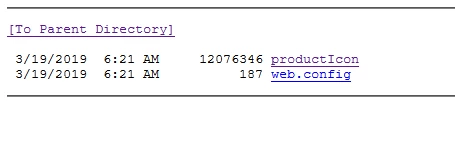
I can see 'ping request could not find host' for ffc.xml and productIcon paths - let's try browsing to that path from a client machine instead.

A very common problem is that MIME types are not set up correctly and if these don't show up then that would be the area to look at.

If you need someone to help directly you can open a case with support via your Admin Console.

1 reply

alisterblack
Community Manager
Community Manager
March 27, 2019

Hi.

Error code 220 indicates the Update server is not accessible.

Can you check the step Verify your AUSST server setup in this document.

Use the Adobe Update Server Setup Tool (AUSST)

DerekPAAuthor
Participating Frequently
March 27, 2019

Thanks alisterblack,

Following "Verify your AUSST server setup"

1.

2. --root specification = --root="D:\updates\Adobe\ACC"

3. I am lost on what, specifically, i should be able to download here?

4. the .overrides file is present on the client machine in both locations -

     a) ProgramData\Adobe\AAMUpdater\1.0\ 

     b) Program Files (x86)\Common Files\Adobe\UpdaterResources

As for pinging, I get the following(note - never changed the port number, so i assumed the default of 80):

Below is the .overrides file, please let me know if anything else is needed, thanks again for your help!

****Contents of overrides file****

<Overrides>

<Application appID="webfeed">

<Domain>http://rvssqaus01</Domain>

<URL>/ACC/webfeed/oobe/aam10/win/</URL>

</Application>

<Application appID="updates">

<Domain>http://rvssqaus01</Domain>

<URL>/ACC/updates/oobe/aam10/win/</URL>

</Application>

<Application appID="webfeed20">

<Domain>http://rvssqaus01</Domain>

<URL>/ACC/webfeed/oobe/aam20/win/</URL>

</Application>

<Application appID="updates20">

<Domain>http://rvssqaus01</Domain>

<URL>/ACC/updates/oobe/aam20/win/</URL>

</Application>

<Application appID="FFCProducts">

<Domain>http://rvssqaus01</Domain>

<URL>/ACC/ACC/services/ffc/products/ffc.xml</URL>

</Application>

<Application appID="FFCIcons">

<Domain>http://rvssqaus01</Domain>

<URL>/ACC/ACC/services/ffc/icons/productIcon</URL>

</Application>

<Application appID="FFCValidation">

<Domain>http://rvssqaus01</Domain>

<URL>/ACC/ACC/services/ffc/validation/</URL>

</Application>

<Application appID="FFCPackages">

<Domain>http://rvssqaus01</Domain>

<URL>/ACC/ACC/services/ffc/packages/</URL>

</Application>

<Application appID="CDNProducts">

<Domain>http://rvssqaus01</Domain>

<URL>/ACC/ACC/products/</URL>

</Application>

<Application appID="AcroFamily">

<Product MacAppId="com.adobe.ARMDCHelper">

<manifest>http://rvssqaus01/ACC/Acrobat/arm-manifests/mac</manifest>

<updates>http://rvssqaus01/ACC/Acrobat</updates>

</Product>

<Product WinAppId="WinARM">

<manifest>http://rvssqaus01/ACC/Acrobat</manifest>

<updates>http://rvssqaus01/ACC/Acrobat</updates>

</Product>

<Product MacAppId="ARM">

<manifest>http://rvssqaus01/ACC/Acrobat/arm-manifests/mac</manifest>

</Product>

<Product MacAppId="com.adobe.acrobat.dc" WinAppId="AcrobatDC">

<manifest>http://rvssqaus01/ACC/Acrobat</manifest>

<updates>http://rvssqaus01/ACC/Acrobat</updates>

</Product>

<Product MacAppId="com.adobe.acrobat.2015" WinAppId="Acrobat2015">

<manifest>http://rvssqaus01/ACC/Acrobat</manifest>

<updates>http://rvssqaus01/ACC/Acrobat</updates>

</Product>

<Product MacAppId="com.adobe.acrobat.2017" WinAppId="Acrobat2017">

<manifest>http://rvssqaus01/ACC/Acrobat</manifest>

<updates>http://rvssqaus01/ACC/Acrobat</updates>

</Product>

<Product MacAppId="com.adobe.acrobat.servicesupdater.dc" WinAppId="ServicesUpdater/DC/AcroManifest.msi">

<manifest>http://rvssqaus01/ACC/Acrobat</manifest>

<updates>http://rvssqaus01/ACC/Acrobat</updates>

</Product>

<Product MacAppId="com.adobe.acrobat.servicesupdater.dc" WinAppId="ServicesUpdater/DC/AcroManifest2.msi">

<manifest>http://rvssqaus01/ACC/Acrobat</manifest>

<updates>http://rvssqaus01/ACC/Acrobat</updates>

</Product>

<Product MacAppId="com.adobe.acrobat.servicesupdater.2015" WinAppId="ServicesUpdater/2015/AcroManifest.msi">

<manifest>http://rvssqaus01/ACC/Acrobat</manifest>

<updates>http://rvssqaus01/ACC/Acrobat</updates>

</Product>

<Product MacAppId="com.adobe.acrobat.servicesupdater.2015" WinAppId="ServicesUpdater/2015/AcroManifest2.msi">

<manifest>http://rvssqaus01/ACC/Acrobat</manifest>

<updates>http://rvssqaus01/ACC/Acrobat</updates>

</Product>

<Product MacAppId="com.adobe.acrobat.servicesupdater.2017" WinAppId="ServicesUpdater/2017/AcroManifest2.msi">

<manifest>http://rvssqaus01/ACC/Acrobat</manifest>

<updates>http://rvssqaus01/ACC/Acrobat</updates>

</Product>

<Product MacAppId="com.adobe.reader.dc" WinAppId="ReaderDC">

<manifest>http://rvssqaus01/ACC/Acrobat</manifest>

<updates>http://rvssqaus01/ACC/Acrobat</updates>

</Product>

<Product MacAppId="com.adobe.reader.2015" WinAppId="Reader2015">

<manifest>http://rvssqaus01/ACC/Acrobat</manifest>

<updates>http://rvssqaus01/ACC/Acrobat</updates>

</Product>

<Product MacAppId="com.adobe.reader.2017" WinAppId="Reader2017">

<manifest>http://rvssqaus01/ACC/Acrobat</manifest>

<updates>http://rvssqaus01/ACC/Acrobat</updates>

</Product>

<Product MacAppId="com.adobe.reader.servicesupdater.dc" WinAppId="ServicesUpdater/DC/RdrManifest.msi">

<manifest>http://rvssqaus01/ACC/Acrobat</manifest>

<updates>http://rvssqaus01/ACC/Acrobat</updates>

</Product>

<Product MacAppId="com.adobe.reader.servicesupdater.dc" WinAppId="ServicesUpdater/DC/RdrManifest2.msi">

<manifest>http://rvssqaus01/ACC/Acrobat</manifest>

<updates>http://rvssqaus01/ACC/Acrobat</updates>

</Product>

<Product MacAppId="com.adobe.reader.servicesupdater.2015" WinAppId="ServicesUpdater/2015/RdrManifest.msi">

<manifest>http://rvssqaus01/ACC/Acrobat</manifest>

<updates>http://rvssqaus01/ACC/Acrobat</updates>

</Product>

<Product MacAppId="com.adobe.reader.servicesupdater.2015" WinAppId="ServicesUpdater/2015/RdrManifest2.msi">

<manifest>http://rvssqaus01/ACC/Acrobat</manifest>

<updates>http://rvssqaus01/ACC/Acrobat</updates>

</Product>

<Product MacAppId="com.adobe.reader.servicesupdater.2017" WinAppId="ServicesUpdater/2017/RdrManifest2.msi">

<manifest>http://rvssqaus01/ACC/Acrobat</manifest>

<updates>http://rvssqaus01/ACC/Acrobat</updates>

</Product>

</Application>

</Overrides>

DerekPAAuthor
Participating Frequently
March 27, 2019

It should be noted that this is for an Acrobat only install of Adobe Creative Cloud

I have another user who I am attempting to update all CC apps on & that is failing as well.  Please let me know if you would like that info too. 

Thanks,

Derek