


Copy link to clipboard
Copied
Hi
Im trying to update a lab of Adobe 2018 CS installed PC's.
RUM 2.1.0.11 will return a list of needed updates but fails on most.
I updated a test target to RUM 2.2 . ( the latest I could get from the admin console) and it returns no updates needed.
Any advice?
Cheers,


 1 Correct answer

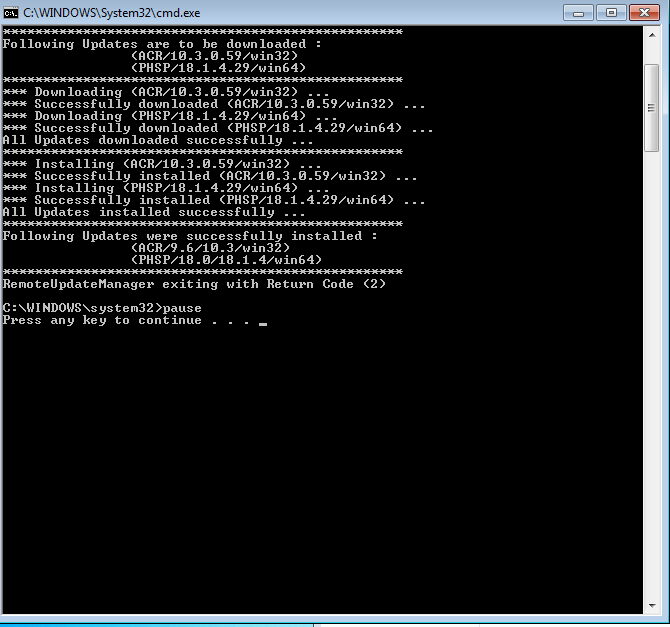
I worked with Adobe Support and we confirmed that updating the Core Components (or installing the Desktop App) would allow RUM to run correctly. The only remaining issue is that the Return Codes it gives are incorrect. Even though it shows that downloads and installs were successful, the Return Code given is for failure. This wouldn't be good if we are deploying the RUM command syntax via ConfigMgr or any other management tool.
He was reaching out to engineering to get further answers. Will u
...
 37
Replies
37
37
Replies
37

Copy link to clipboard
Copied
Any update?


Copy link to clipboard
Copied
I'm still waiting for further feedback from our engineering team. I will push for a response and keep this thread informed.
I would add that you can also open a support case, which will give you direct support within your timezone and with SLA response times.
To contact support please use one of the following options.
Creative Cloud for Enterprise - from the Admin Console go to the support tab to open a case. Phone and chat options are also available here.
Creative Cloud for Teams - from the CCT Admin Console go to the Help tab for chat and phone options.
Alternatively please go to https://helpx.adobe.com/contact.html
Copy link to clipboard
Copied
Hi acjuelich
Analysis of the additional logs you sent indicate that core components were not updated succesfully and RUM will therefore fail.
5/03/18 08:14:06:374 | [ERROR] | | ACC | LBS | LBSUtils | | | 1104 | Failed to launch LBS in elevated mode. LastError: 0
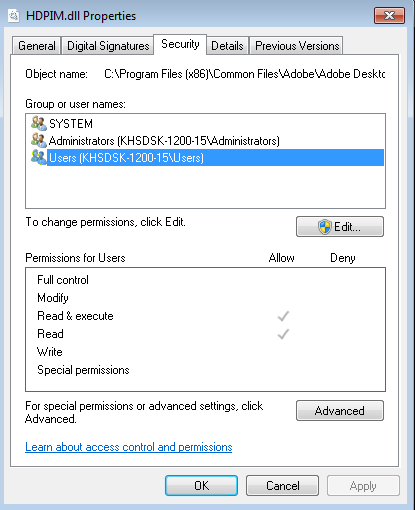
Could you please confirm if the path "C:\Program Files (x86)\Common Files\Adobe\Adobe Desktop Common\HDBox\HDPIM.dll" exist on the client system and have appropriate permissions. Please make sure that the core components are deployed successfully on the client system.
Copy link to clipboard
Copied
Yes, that Path and DLL does exist there.
I still get the 'Return Code 1' when running the latest RemoteUpdateManager (2.2.0.2)
Please advise.
Copy link to clipboard
Copied
Thanks,
From your description this is impacting one test machine. Can you confirm?
Copy link to clipboard
Copied
That's incorrect. I have components of the Creative Cloud Suite installed on 200 machines and I have some variation of issues on all of them.
Copy link to clipboard
Copied
Thanks for clarifying. I have discussed with our engineering team.
They have asked to check the following.
- We need to rule out any permissions related cause. On each client device ensure that there is at least read only access for the path "C:\Program Files (x86)\Common Files\Adobe\Adobe Desktop Common\HDBox\HDPIM.dll"
- The recommendation is to deploy the version of RUM built with the packager as there are co-dependencies with the core components created by Creative Cloud Packager (or a package built on the Admin Console). This is especially true if deploying with elevated privileges. If possible deploy a fresh package containing RUM and test.
If these steps are not successful then we will require debug logs gathered with the log collector tool - debug logs require specific additional steps which I will provide if needed. if needed we can arrange a remote session with our engineers.
Copy link to clipboard
Copied
You previously told me to try a newer version of RUM. I'm not going to deploy a new package of an Application I'm trying to update. That was supposed to be the benefit of the RUM tool.
I'll check the permissions and get back to you.
What do each of the return codes mean?
Thanks.
Copy link to clipboard
Copied
Hi,
I totally understand your point of view however core components need to be up to date for RUM to function correctly and if they are not updated on the client machines then an error would be the expected behaviour. I would suggest trying this on a single test machine as it would give our engineering team useful feedback. If the error occurs on that machine then we can gather the debug logs to see the cause.
Return codes can be found in the RUM documentation. Use Adobe Remote Update Manager
Thanks for your help.
Copy link to clipboard
Copied
Copy link to clipboard
Copied
I worked with Adobe Support and we confirmed that updating the Core Components (or installing the Desktop App) would allow RUM to run correctly. The only remaining issue is that the Return Codes it gives are incorrect. Even though it shows that downloads and installs were successful, the Return Code given is for failure. This wouldn't be good if we are deploying the RUM command syntax via ConfigMgr or any other management tool.
He was reaching out to engineering to get further answers. Will update as I know more.
Copy link to clipboard
Copied
Hi,
Thanks, great that we have confirmation on that. I will update the existing bug I have with engineering to confirm.
Copy link to clipboard
Copied
Hello,
Just PM'd you two log files that from two failed attempts to run RUM this morning.
thanks

-
- 1
- 2

Get ready! An upgraded Adobe Community experience is coming in January.
Learn more
 AdChoices