


Participating Frequently
March 27, 2013
Answered

Trusted Certificate Pop-up in Reader XI

  • March 27, 2013
  • 2 replies
  • 12843 views

I deployed Adobe Reader XI for Windows7 with Group Policy and the Customization Wizard.  

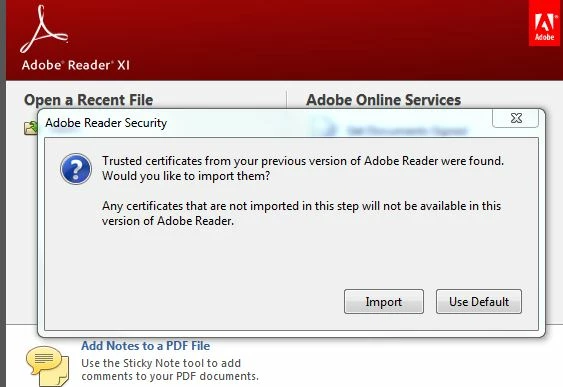
I notice an Adobe Reader Security pop up when I launch Reader.   Trusted certificates from your previous version of Adobe Reader were found.  Would you like to import them?... 

Is there anything I can do to the trasform file to not display this message to my users?   Not sure if it matters if they Import or Use Default is selected.

Our eviroment will be mixed with Reader XI and Acrobat 9 and X.

Thanks!
This topic has been closed for replies.
Correct answer EnterpriseHelp

Set the Adobe Acrobat Trust List preferences as described in the Preference Reference.

http://www.adobe.com/devnet-docs/acrobatetk/tools/PrefRef/Windows/index.html

hth,

Ben

2 replies

March 28, 2013

You can also run a script pre-install that removes all the *.acrodata files. This is where the customer collected certificates are stored.  If they don't exist then there is no dialog.  Also you can import a specific set of certificates via the Adobe Customization Wizard under Trusted Identities when you are building your deployment package.

EnterpriseHelp
Community Manager
Community Manager
March 28, 2013

I'm not sure this is true: "If they don't exist then there is no dialog. " Could be, but I've never heard of it.

However, acrodata files perform a number of functions for several features, so removing them is unwise. Also, they will just come back when a user exercizes certain features.

Better to just turn off the feature with the supported preference.

Ben

EnterpriseHelp
Community Manager
EnterpriseHelpCommunity ManagerCorrect answer
Community Manager
March 27, 2013

Set the Adobe Acrobat Trust List preferences as described in the Preference Reference.

http://www.adobe.com/devnet-docs/acrobatetk/tools/PrefRef/Windows/index.html

hth,

Ben