Participating Frequently
June 10, 2013
Answered

How to Remove Register Your Product With Customization Wizard?

  • June 10, 2013
  • 1 reply
  • 29146 views

Hi Folks,

I'm trying to deploy Acrobat XI Pro with Group Policy to Windows 7 64 bit desktops on our domain.

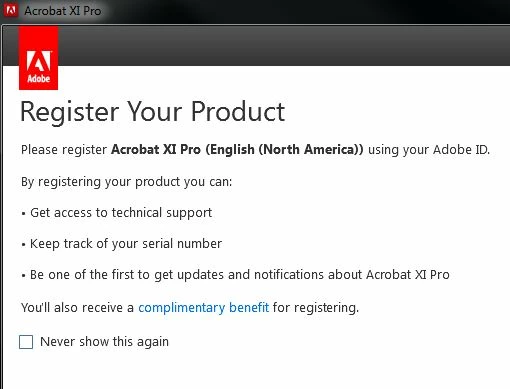
It appears the GPO installed it on my test box but Acobat launches a 'Register Your Product' splash screen when it starts.   Have I missed something in the Adobe Customization Wizard XI?   I've entered the serial number and surpressed the EULA option.


Thanks

Rice
This topic has been closed for replies.
Correct answer Anoop9178

Hi Rice,

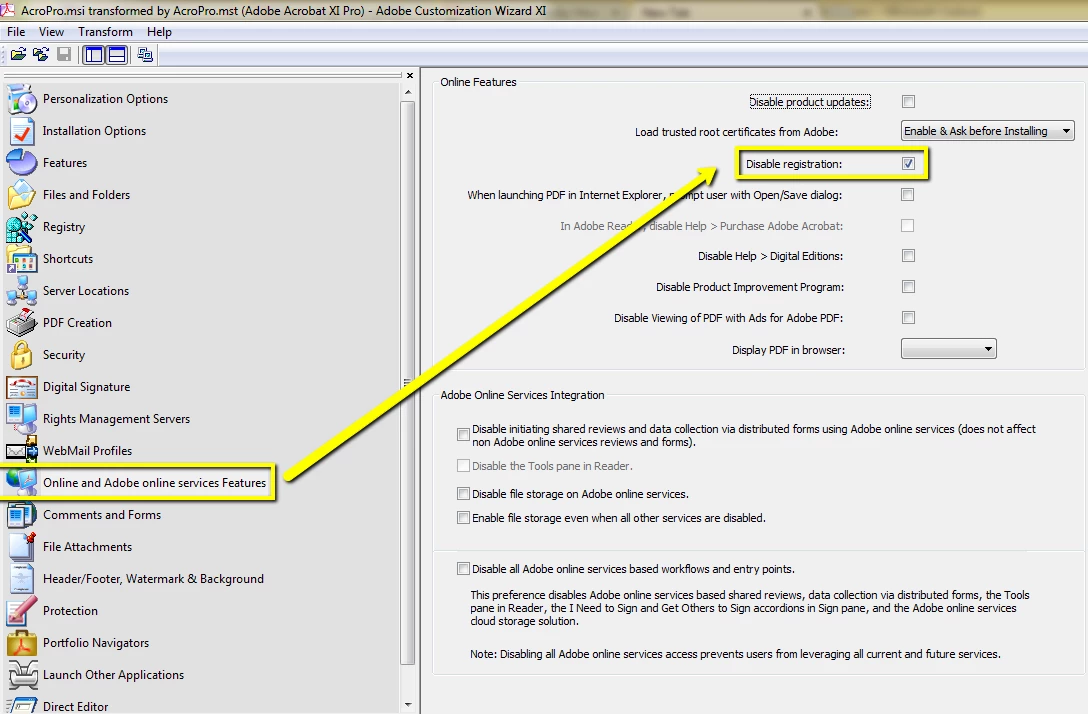
Yes, there is a option in Adobe Customization Wizard to disable Product Registration window.

Open the package in Customization Wizard then you need to go to "Online and Adobe Online services features" catagory then check the 'Disable registration' option.

1 reply

Anoop9178Community ManagerCorrect answer
Community Manager
June 10, 2013

Hi Rice,

Yes, there is a option in Adobe Customization Wizard to disable Product Registration window.

Open the package in Customization Wizard then you need to go to "Online and Adobe Online services features" catagory then check the 'Disable registration' option.

Participant
March 26, 2014

Is there a way to do this retrospectively via the Acrobat XI group policy template? I suspect not as I've gone through all the options. So if not in the template, can it be done via a registry change?

Thanks, Rob.

EnterpriseHelp
Community Manager
Community Manager
July 29, 2014

Yes. Look up the EULA pref here: Preference Reference for Acrobat and Adobe Reader

The GPO template for Reader also has this value, and of course you can add any preference to the template as you wish.

CATEGORY General
POLICY "Accept EULA"
#if version >= 3
EXPLAIN !!EXPLAIN9
#endif
KEYNAME "Software\Adobe\Acrobat Reader\11.0\AdobeViewer"
VALUENAME EULA