


Confirm Security dialog box appearing when saving as a PDF
I've been working with a translator to have a chapter in a manual translated. The translator said that he could handle FrameMaker files (we usually copied and pasted into Word), so I sent him both an FM and a MIF file of the chapter. For some reason, FrameMaker 2017 wouldn't open the FM file that he returned to me, so I opened the MIF file that he sent, saved that to a FM file, and placed that into the book.
I tried doing a Save As to get a PDF of the book three times. Each time, FrameMaker was busy as though it were printing a PDF, but the little Adobe Distiller menu never appeared, and the PDF never printed. The first few attempts, I closed FrameMaker after 45 minutes of waiting (the document has taken no more than 12 or 15 minutes in the past). Last night, I left FrameMaker running when I left, and it was still running when I returned this morning.
I tried to do some troubleshooting. When I went to print a different chapter, one that I created (this one has no links or images), a dialog box that I have never seen appeared.
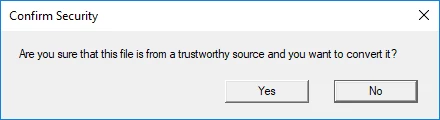
Any ideas as to why this appeared when I was trying to convert a chapter that I created and that no one else has touched?
 AdChoices