


kitNZME
Participant
October 26, 2018
Answered

How to disable the Welcome Screen in CC 2019?

  • October 26, 2018
  • 4 replies
  • 24954 views

Updated the 'big 3', and expected to have a lot of prefs go back to default, import most of them back and all is mostly ok.

Except for the Welcome Screen. I get them, but never been a big fan. Can't find the 'Don't show this' button at the bottom any more, nor in the Prefs. Anyone found where to disable this?
This topic has been closed for replies.
Correct answer ricardod1753133

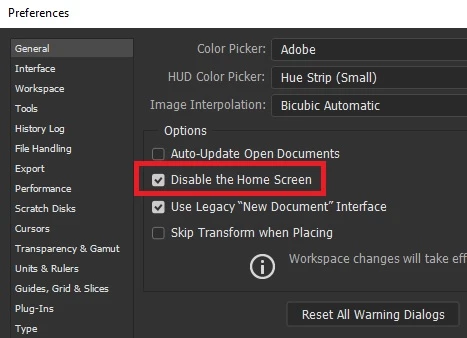
Go to Preferences > General > tick the box beside Disable the Home Screen.  See screenshot.


[Edited by moderator.]

4 replies

aeknauf
Participating Frequently
November 8, 2018

The question might have been answered but a bug in the big 3 stills causes the home screen to keep appearing regardless of whether the preference has been selected.  It was driving so mad I un-installed the whole of the CC 2019 apps and reverted by to 2018.

Participant
February 19, 2020

Hi I think I sussed this out. Besides setting the "General" Prefs. If you go to WINDOW, the WORKSPACE and change it to PHOTOGRAPHY. You never see the home screen again. Cheers!

Inspiring
April 3, 2020

What the actual quack, you are right. Thanks!

Participant
November 5, 2018

Are you all talking about this screen? I changed my preferences to match what you have here, but this still appears every time I open or close a file. Very annoying...

Erik Lingerfelt
Known Participant
October 25, 2019

As to this date, we all have to deal with it open. I just leave it aside while using WINDOW / APPLICATION FRAME unticked. I like floating windows. I'm oldschool. haha.
I had several problems in 2019 with this Home Screen. Ticking the "Disable Home Screen" does nothing, it still comes back after you close a few images. And the bug kicks in when I see one or more of my open files disapper from screen, then, If I close them all, the Home Screen is there. Gotta live with it for now.

richardm14908994
Participating Frequently
October 31, 2018

I can't believe I didn't see the option - thanks loads!

Also... hilarious that they are all worded differently across the suite. Bonkers.

AxelMatt
Community Expert
Community Expert
October 26, 2018

In which app you like to disable the Welcome screen?

My System: Intel i7-8700K - 64GB RAM - NVidia Geforce RTX 3060 - Windows 11 Pro 25H2 -- LR-Classic 15 - Photoshop 27 - Nik Collection 8 - PureRAW 5 - Topaz Photo
Participant
October 26, 2018

I would like to disable it in Ps Ai and Id

I assume they meant the same with "the big 3"

ricardod1753133
ricardod1753133Correct answer
Participant
October 27, 2018

Go to Preferences > General > tick the box beside Disable the Home Screen.  See screenshot.


[Edited by moderator.]