


Participant
February 17, 2016
Answered

How to recover a document that i replaced accidentally?

  • February 17, 2016
  • 2 replies
  • 7701 views

Hello, I saved a document (the same but with new notes) on my Adobe Cloud under the same name of another documents (the same with previous notes). So accidentally I replaced it and I lost all the notes I had taken the first time. Is there any way to get that original document back?

Thank you!
This topic has been closed for replies.
Correct answer Ken G. Rice

If the file is in your Creative Cloud Files folder and file syncing is running then you can restore to a previous version of a file.

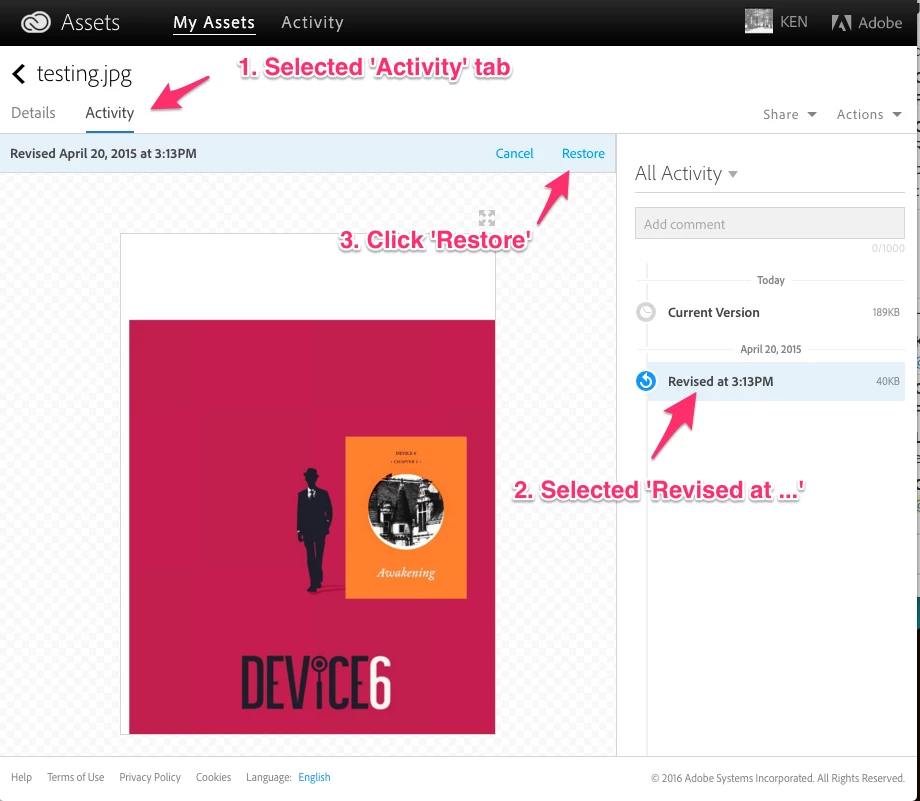
Sign in to the CC Assets site in a browser and go to https://assets.adobe.com/files. Select the file and select the Activity tab. Under All Activity on the right you should see the Current Version of the file, and past versions listed. Select the Revised at ... version you need and click the Restore link.

Versioning FAQ with more information is here: https://helpx.adobe.com/creative-cloud/help/versioning-faq.html.

2 replies

Ken G. Rice
Community Manager
Ken G. RiceCommunity ManagerCorrect answer
Community Manager
February 22, 2016

If the file is in your Creative Cloud Files folder and file syncing is running then you can restore to a previous version of a file.

Sign in to the CC Assets site in a browser and go to https://assets.adobe.com/files. Select the file and select the Activity tab. Under All Activity on the right you should see the Current Version of the file, and past versions listed. Select the Revised at ... version you need and click the Restore link.

Versioning FAQ with more information is here: https://helpx.adobe.com/creative-cloud/help/versioning-faq.html.

Rajashree Bhattacharya
Community Manager
Community Manager
February 19, 2016

I am very sorry that your files were deleted and can assure you that our Engineering team is actively analyzing this further to avoid this in the future.

The folders must be backed up, you can get it back from there.

Regards

Rajashree