


Copy link to clipboard
Copied
I am trying to download Photoshop CC through Adobe Creative Cloud
but it keeps telling me that the installation failed due to my insufficient disk space.
I changed Creative Cloud's file directory to another hard drive with a bigger space
but it would give me the same answer.
emptied the hard drive before and changed directory again, still same answer.
when i click "learn more", this is what shows up :
Exit Code: 133
-------------------------------------- Summary --------------------------------------
- 2 fatal error(s), 0 error(s), 0 warnings(s)
FATAL: Total size required for installation is '2839509011' bytes, but only '2631614464' bytes are available on the installation directory
FATAL: Error occured in install product workflow with error code 133 error message 2839509011#@#2631614464
-------------------------------------------------------------------------------------
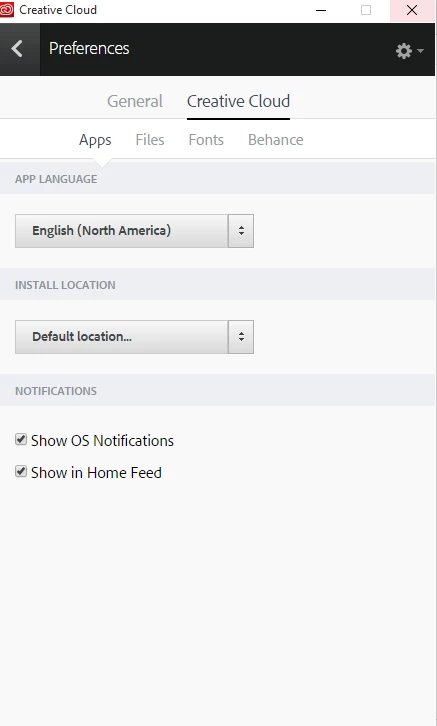
Hi Daniellec43908609,
Please check the FAQ section of this link : Download and install Adobe Creative Cloud apps
NOTE: We would suggest you to install your application on the primary drive, however you can configure the installation destination from within the Creative Cloud app preferences.
Please be aware that there will still be shared resources stored to your primary drive, In addition during the install process temporary files will also be created on your primary drive.
**** If you have alread
...Copy link to clipboard
Copied
Hi Daniellec43908609,
Please check the FAQ section of this link : Download and install Adobe Creative Cloud apps
NOTE: We would suggest you to install your application on the primary drive, however you can configure the installation destination from within the Creative Cloud app preferences.
Please be aware that there will still be shared resources stored to your primary drive, In addition during the install process temporary files will also be created on your primary drive.
**** If you have already installed apps you'll have to uninstall it and then make the location changes in Creative Cloud Desktop app after that reboot the machine and now install your apps again and it should install on new selected location.
Let us know if this helps.
Copy link to clipboard
Copied
Hi Bani,
I've been having the same issue with Premiere Pro and After Effects and while I'm aware that these programs will always store some data on the main drive, I doubt that this amounts to 12 GB's.
The file path is set correctly (to F:\PP), but it somehow still tries to completely install everything on C:\ as shown in the two screenshots (sorry, one is in german but should be pretty self-explanatory). The setup.exe was executed from the F.\ as well.
Hopefully there is an easy solution to this and i just completely overlooked something.
Copy link to clipboard
Copied
i think your screenshot shows there's only 6.47 gb free space on your f drive.
Copy link to clipboard
Copied
My F: drive has more than 500gb of free space. Look at the other screenshot.
Copy link to clipboard
Copied
the other screenshot says nothing about your f drive:
and says you have less than 7gb available in your c drive
you need sufficient space on the install drive space AND the os (c) drive. you appear to be lacking both.
Copy link to clipboard
Copied
Copy link to clipboard
Copied
(please don't attach screenshots. copy and paste them.)
i think:
this appears first and indicates you're trying to install in the PP folder of your F drive, but only have 6.47gb of free space.
then adobe probably tries to install on your c drive and this message appears:
is that correct?
Get ready! An upgraded Adobe Community experience is coming in January.
Learn more