


Participating Frequently
September 12, 2014
Question

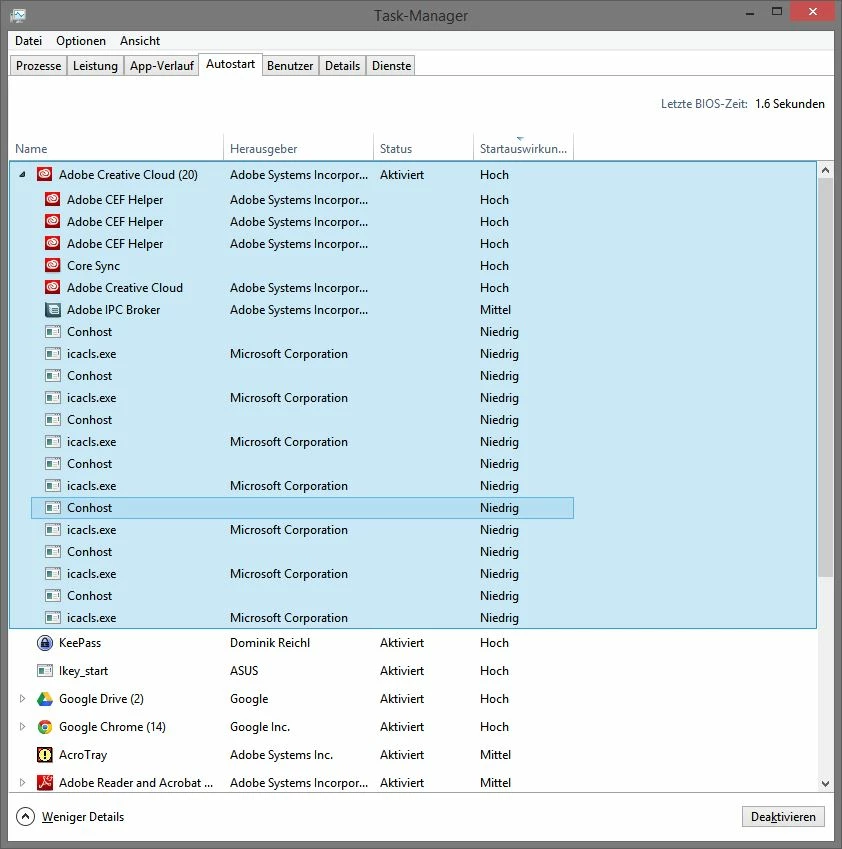
Multiple Adobe CEF Helper, Conhost, icalcs.exe in Windows 8.1 Autostart

  • September 12, 2014
  • 2 replies
  • 3396 views

While checking some autostart apps, that I could possibly deactivate, I found something strange.

There are multiple entries for "Adobe CEF helper", "Conhost" and "icacls.exe". All grouped under the Adobe Creative Cloud.


On my other machine, Conhost and icalcs.exe don't appear at all and Adobe CEF helper only once.


They do not noticeably create any errors, however, it's not feeling right. I don't know exactly when these entries appeared for first time. The device is pretty new and I just installed a bunch of work related software like Office 365, Adobe CC, Chrome, ...


When installing Filezilla, some bloatware/adware was automatically installed on the system (blame sourceforge, see download comments over there). Currently I'm testing Kaspersky Internet Security, 30 days trial. But I don't think none of them is to blame.


I would personally like to avoid reinstalling Adobe CC, because it lasts forever.

Q: What might have caused these entries? Should I correct it? And how should I correct it?

System: Windows 8.1 64bit on an fairly new ASUS GL550JK.

Thanks.
This topic has been closed for replies.

2 replies

Eirreann
New Participant
October 22, 2014

I'm guessing that this is a semi-normal occurrence... Ever since installing the Creative Suite, I've got three instances of the CEF Helper and Conhost open (checked both, they are clean).  So... don't know what's up with that *shrugs*

Participating Frequently
September 14, 2014

Update: I reinstalled the whole system and it still shows up.

Directly after the installation of Adobe CC, only Adobe CC showed up in the Autostart menu. Even after a restart still nothing (and the entry still had "boot time - no measured"). After the boot time was measured, same subentries as above appeared.

New Participant
October 11, 2014

I am having the same problem on windows 8.1 system.

Is this normal? to have multiple Conhost (8 I have) and 8 icacls.exe in my start up?

Is this causing any bad things in addition to just making my startup longer?

September 29, 2015

I have just found this as well and am going to be investigating more. ICACLS is the Windows command line command for updating NTFS permissions (ie access to files/folders on your system). Why Adobe would be hacking file/folder permissions at every logon I don't really know.