


Participating Frequently
November 16, 2017
Answered

Re: Must Constantly Reinstall/Repair Creative Cloud

  • November 16, 2017
  • 8 replies
  • 4236 views

Not answered. I'm having the same problem and I don't have any anti-virus software running. Running Creative Cloud on an oldish Mac. Not on a network and it was working fine until a recent Adobe update.  I've not added any other software or updated my OS. Now Creative Cloud has to be "repaired every few days. Considering how much we have to pay to access the software this is really rubbish and costing me time and money.
This topic has been closed for replies.
Correct answer Jeffrey_A_Wright

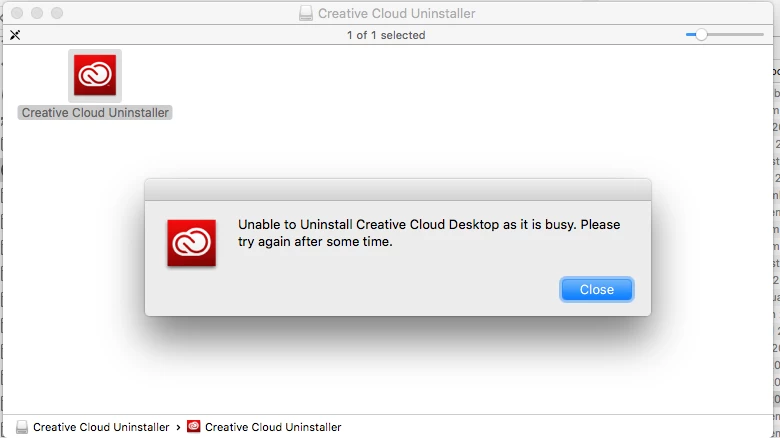
Now your Un-Install software isn't working now.  Not sure how I'm going to get this working now. I can't install a new version of CC and the old version won't uninstall. WTF

I've been using macs  / adobe since 1991.  In the old days you would just trash everything and re-install. You CC model doesn't make that possible. Its just made everything overly complicated for the average user whilst raping their wallets.


Do you normally have to go to step two in Adobe Creative Cloud, needed to resolve this problem, is missing or damaged  and download the CC Cleaner Tool Robbiewing.  I am sorry but you have not indicated previously what you were using to resolve the error.  Was the error typically resolved after launching repair mode?

8 replies

Participant
August 13, 2020

I have the same issue, since upgrading to macOS Catalina V 10.15.6. evrery couple of days I get the CC has found an error and needs to be repaired. Whats the easy fix?

Participating Frequently
January 17, 2020
Participant
December 17, 2019

I did everything as recommended on Adobe site - removed all CC apps and Creative cloud through windows 10 control panel then after restart used the adobe  cleanup tool to remove any traces.  Reinstalled everything after another restart and made use my antivirus and anti malware made exceptions to allow Adobe CC and every .exe in subdirectories through the firewall but it needs repair now after yet another restart with even higher frequency.  

Participating Frequently
December 17, 2019

Good to see our office is not the only ones with this issue.  I tried all the above too (uninstall all adobe programs and cc itself, ran the adobe uninstaller, ran the adobe clean up tool), thrice - And in addition, stopped all services associated with Adobe and proceeded to delete every folder and its subfolders with the name "adobe" in it including those from c:\program files, c:\program files(x86), c:\program files\common files, c:\program files(x86)\common files, c:\programdata, c:\users\<username>\appdata\(local, roaming, and locallow), all c:\users<username>\appdata\local\temp files, and all c:\windows\temp files.  Then rebooted again, checked Task Manager to make sure nothing Adobe is running, checked Services to make sure nothing Adobe is running, and then proceeded to reinstall Adobe CC................NADA!  .......but please continue troubleshooting with Robbiewing and Jodyar as I went through a week of troubleshooting on another thread here already with no solution, and have spent too much time on this already!

Participating Frequently
December 19, 2019

I am also having the very same issues. I am not on a company computer, have no IT department, have no antivirus/malware, have not installed any new software in a very long time. It seems like 50% of the time when my computer goes to sleep and then wakes up that's when I get the infamous message that it needs repaired. I have spent countless hours trying to troubleshoot this. I have even let 2 different CRs from Adobe remotely have access to my computer, both said issue fixed. Both times problem back within a day.


PLEASE someone needs to figure this problem out ASAP.


Participating Frequently
November 29, 2017

Yes I'm going to have uninstall the software then install again it to overcome the Error 86. It will probably work for a week or so before failing again. that seems to be the pattern. During this time NO additional or new software will have been installed. The only software that is updated is yours.

Jeffrey_A_Wright
Community Manager
Community Manager
November 29, 2017

Robbiewing can you please update the discussion with the exact step in Adobe Creative Cloud, needed to resolve this problem, is missing or damaged which allows you to resovle the error?  Error Code 86 indicates that there is a conflicting process so I am very curious to find out which specific step allows you to install the Creative Cloud desktop app.

Participating Frequently
November 29, 2017

Now your Un-Install software isn't working now.  Not sure how I'm going to get this working now. I can't install a new version of CC and the old version won't uninstall. WTF

I've been using macs  / adobe since 1991.  In the old days you would just trash everything and re-install. You CC model doesn't make that possible. Its just made everything overly complicated for the average user whilst raping their wallets.

Participating Frequently
November 20, 2017

Arrived at work this morning to find this message yet again. Seriously the problem is with you're software has we unistalled your software then re-installed CC on Friday. The computer wasn't used over the weekend. The Mac hasn't had any new software installed for a long time and it doesn't have any anti-virus software running.  Screenshot of the software that runs on start up attached. All the software running had been working fine with CC until recently. I thought your recent updates might have fixed the "repair" problem but no it remains.

Jeffrey_A_Wright
Community Manager
Community Manager
November 20, 2017

Thanks for the update Robbiewing.  To resolve Error Code 86 please complete the steps listed in Error Code 86 | Adobe Creative Cloud ?

Also I appreciate you including the screen shot.  I would recommend you temporarily discontinue to the use of Memory Clean as it seems to be a system optimizer.  You can find details of what this application does at Memory Clean for Mac - Download .  It may be this RAM flushing which is affecting the current state of the stability of the Adobe Creative Cloud desktop application Robbiewing?

Participating Frequently
November 29, 2017

OK Jeff I deleted the memory clean and we managed 9 days before the error occurred again?

Jeffrey_A_Wright
Community Manager
Community Manager
November 17, 2017

Robbiewing which steps in Adobe Creative Cloud, needed to resolve this problem, is missing or damaged  are allowing you to resolve the error?  How often do you need to repair the Adobe Creative Cloud desktop application?  What version of Mac OS are you using?

Participating Frequently
November 17, 2017

Yesterday after i left my message I downloaded your CC uninstaller, deleted CC and and reinstalled. Let see if that repairs the problem.

it was happening 2-3 times a week. using Mac OS 10.11.6 on Mid 2011 iMac.

Most of the time it repairs itself, but this was the third time that failed and I had to download the software.

Jeffrey_A_Wright
Community Manager
Community Manager
November 17, 2017

Ok thanks Robbiewing please do update this discussion if you face any additional difficulties.

Jeffrey_A_Wright
Community Manager
Community Manager
November 16, 2017

Branching to a new discussion.

Christine Urbanek
Participating Frequently
November 16, 2017

They took away my ability to comment yesterday. Back now. I guess that's what they do when you write what they don't want to hear or deal with. Nice.