


New Participant
April 28, 2015
Answered

“Setup” can’t be opened because it is from an unidentified developer on OS X Yosemite

  • April 28, 2015
  • 2 replies
  • 3269 views

I followed the instructions to ctrl click and open the app through the finder, but still getting same error.  Is there something different that needs to be done on Yosemite?
This topic has been closed for replies.
Correct answer Govardhan.V

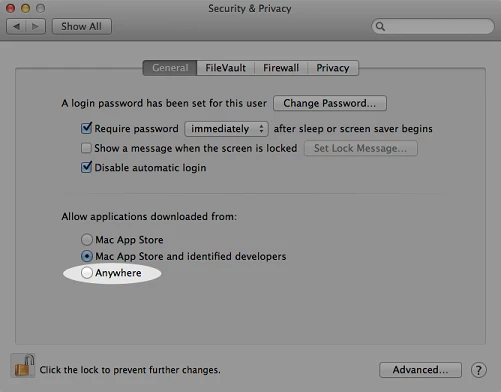
You can find Gatekeeper settings in System Preferences > Security & Privacy > General.

Set the Allow applications downloaded from to " Anywhere"   .

Then try to install Adobe application.

Once the installation is completed , you may revert back the settings to " Mac App store and Identified developer" .

2 replies

Govardhan.V
Govardhan.VCorrect answer
Participating Frequently
April 28, 2015

You can find Gatekeeper settings in System Preferences > Security & Privacy > General.

Set the Allow applications downloaded from to " Anywhere"   .

Then try to install Adobe application.

Once the installation is completed , you may revert back the settings to " Mac App store and Identified developer" .

New Participant
April 28, 2015

Thanks!  That worked!

Govardhan.V
Participating Frequently
April 28, 2015

You are most welcome

Govardhan.V
Participating Frequently
April 28, 2015