


Known Participant
April 7, 2019
Answered

Adobe Illustrator CS6 has stopped working

  • April 7, 2019
  • 3 replies
  • 3672 views

Hello guys, I was working on a A4 Booklet (Brochure) in Adobe Illustrator CS6 for days and hours, it's a heavy file its a 24 pages booklet A4 size 4x4 color and the file is almost 2.60 GB which is quite heavy. Sometimes it works fine but sometimes when I'm editing something for like 30-40 mins a message pops up saying that "Adobe Illustrator CS6 has stopped working" and all my unsaved data is gone and I have to repeat all the unsaved work again for 30-40 mins which is frustrating and again it happens the same message pop ups and its gone again then I have to repeat it again. So, is there any way that I can fix this issue? or is there any way I can recover my unsaved data when the Illustrator crashes like that? But sometimes for hours it's working perfect it never crashes but sometimes it crashes after minutes. I'm using Adobe Master Collection CS6 and the rest of the apps I haven't used because I only use Photoshop and Illustrator and sometimes InDesign but Photoshop and InDesign I'm not sure if it crashes since I'm not always using it but my main problem is the Illustrator.

The information of my PC is below.

I'm using Dell Alienware: ASM100 ٍIntel(R) Core(TM) i7-4770K CPU @ 3.50GHz

OS: Windows 8.1 Pro

Ram: 16GB (DDR3)

System Type: 64-bit OS Processor

HDD: 500GB (with 200GB+ available space)

Graphics: 2GB NVIDIA GeForce GPU

Regards!
This topic has been closed for replies.
Correct answer Jacob Bugge

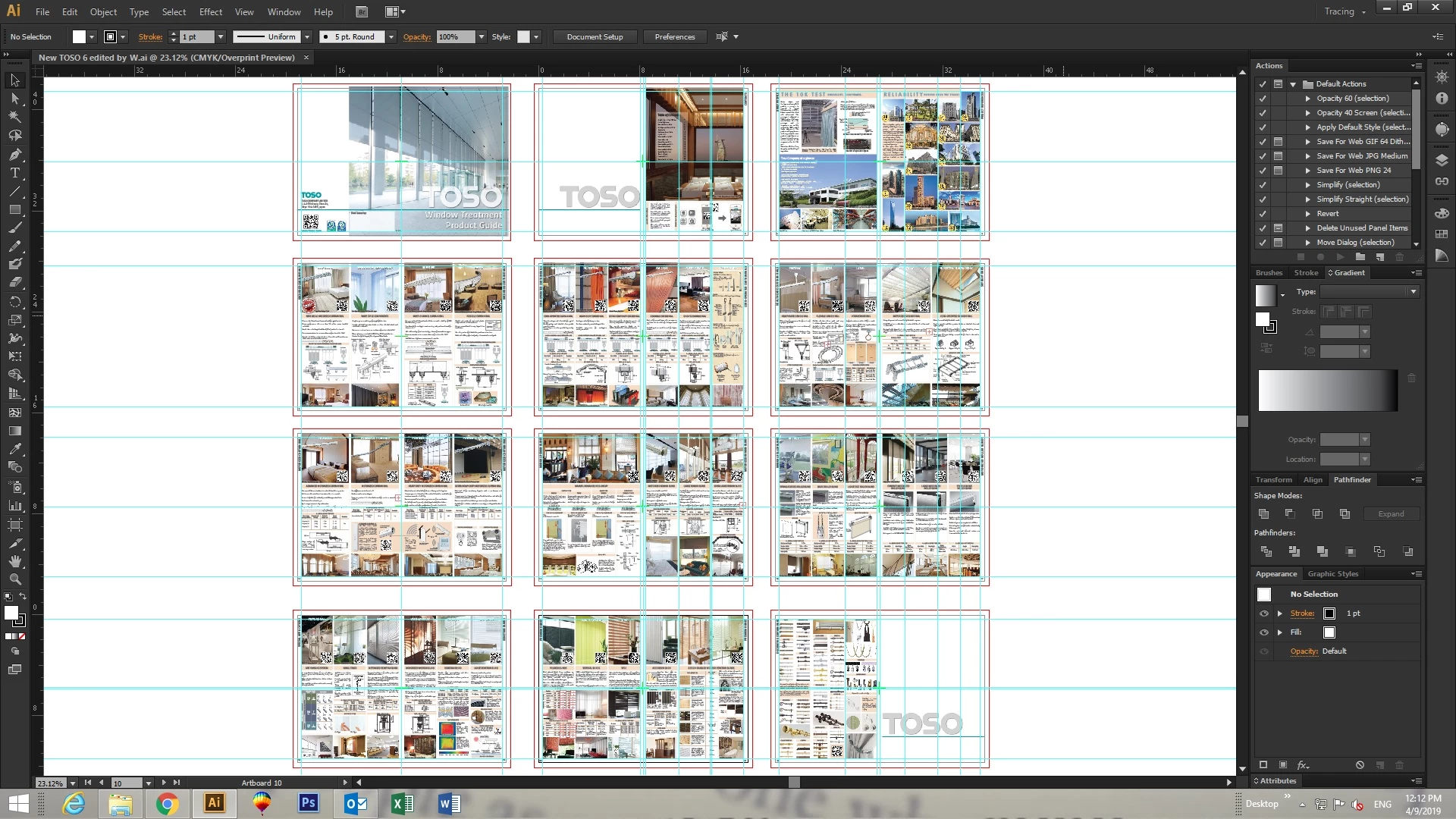
Below is the look of the booklet all the pages are visible there.


mystical,

I am (still) unconvinced that InDesign would be better (for this kind of booklet) with the mainly graphic content.

But, how about placing the images as Linked instead of embedded? I believe that may be the solution to both the size/complexity/saving time issue. And of course without PDF compatibility.

You should (still) Save A Copy as PDF regularly, of course, along with frequent different saving.

3 replies

Larry G. Schneider
Inspiring
April 7, 2019

A couple of questions. Are you saving the file as PDF Compatible? You could try saving with that turned off. Have you ever done a Save As and overwritten the existing file? This will remove a lot hidden history and could give you smaller file.

Known Participant
April 9, 2019

I have tried saving file as PDF compatible but when I open the file the next day it is the same but I haven't tried Save As yet let me try and see the result. Thanks!

Known Participant
April 7, 2019

Bill Silbert​ Thank you for the brief explanation. When I'm saving the file its takes so much time like probably around 10 mins and even opening takes a bit of time because I have so many things in this booklet that makes the file so heavy. I've had this problem with other files as well like lets say I had a poster of 90cm x 120cm where I had few photos and that file wasn't that heavy it was only 120mbs but I still had that problem with the Illustrator.

For InDesign actually I'm not really perfect in InDesign I just use it for Arabic typing only then I export it to Ai file other than that I can't so my only focus is Illustrator and CorelDraw.

other than that can I recover my unsaved files when this happens?

Bill Silbert
Braniac
April 7, 2019

I understand that InDesign is not something that you are currently adept at but I would stress that doing a project of this size which would, I assume entail using 24 artboards with images either embedded or linked is really pushing Illustrator to its utmost limits (which is why it takes so long to save). Learning the correct program to do something like this is essential if this is your livelihood. For example, in InDesign a 24 page booklet with images does not approach even close to the size of your Illustrator document. Saving is something that can be done in seconds rather than the incredible amount of time you are currently experiencing. Learning the correct program for the job can only make your life easier.

Known Participant
April 9, 2019

Are the images on your desktop or are they on a server? What kind of images are they?


The images are in my D drive in a folder of the same Booklet, it's JPEG Images. please have a look at the image below.

Bill Silbert
Braniac
April 7, 2019

Have you had this problem with any other files? I can appreciate that with a file as large as you describe that saving frequently would take up a bit of time but I think in this case that would be a "necessary evil". Illustrator files, in my experience, are not usually as massive as the one you describe. That is because a job like this should absolutely be done in InDesign which is a program designed to handle a 24 page booklet. It is a page layout program while Illustrator is essentially a drawing program that offers some design and layout features. I think that the problems you are having occur because you are taxing Illustrator's limits. So either save frequently or do the job in the appropriate program.