


agatab5527235
Participating Frequently
February 10, 2023
Answered

Can't move illustrator window on mac ventura

  • February 10, 2023
  • 17 replies
  • 15246 views

Hi,

I can't move my illustrator window, whenever i click on top bar to move it it shows window of a programe that is underneath it on my desktop. I reinstalled illustrator but it helped for like a second and then it happened again. 

I've updated my mac to ventura and I think it has sth to do with it. Anyone with similar issue?

(video in the attachment)
 

Correct answer Anshul_Saini

Hello All,


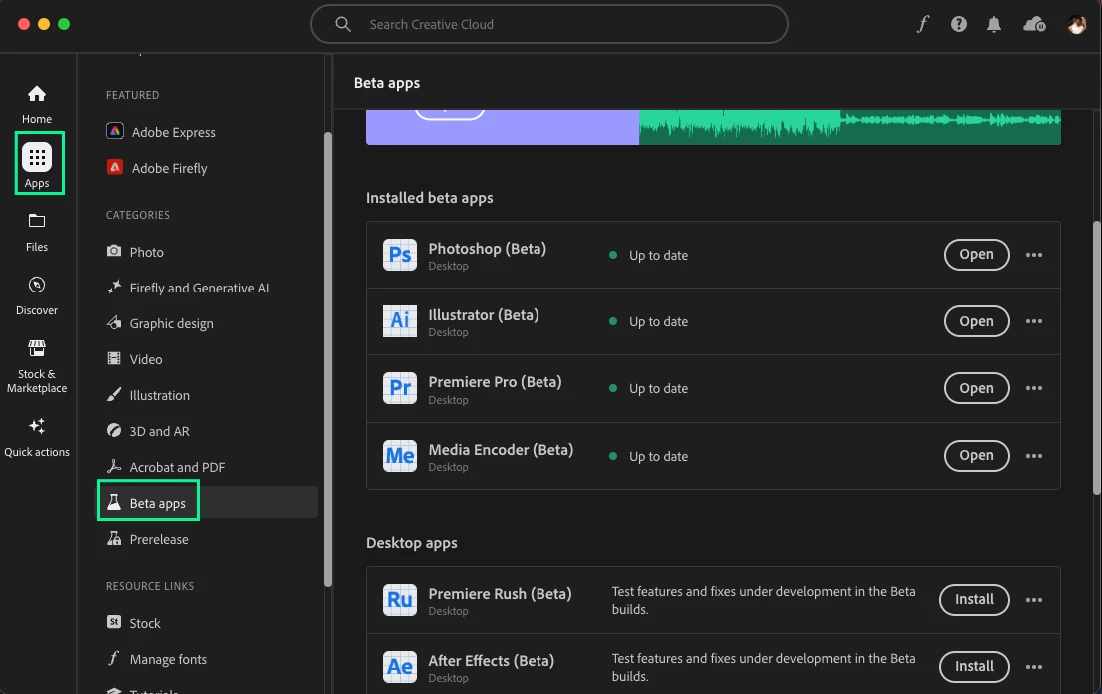
Thank you for your patience with this issue. We've been actively working on a possible fix, and we've just released the latest Beta build (version 28.1.87). Could you please give it a try and let us know if the problem is resolved with this version? Your feedback will help us ensure a smoother experience for you. Thanks for your understanding and cooperation!


Best,

Anshul Saini


#Marking it correct to highlight & notify you all.

17 replies

Participant
June 6, 2023

I am having a similar issue - it has been happening for some time now. This happens with Illustrator and Photoshop. Did you get a solution?

Participant
June 6, 2023

Not as far as I'm aware. Funnily enough I was lookinga gain to see if there was a solution this morning as it's so frustrating.  The link given to me above just takes you to a general Adobe help page where there is a Virtual Assistant you can chat with so didn't bother going any further than that.

Participant
June 6, 2023

It is a big irritant. Hopefully someone will look in here. TBH I didn't know how to describe the problem. 'Windows hiding'?

Mike_Gondek10189183
Community Expert
Community Expert
March 30, 2023

What happens if you restart and try to replicate this? One of your other open apps may be causing this.

richardw59677702
Participating Frequently
March 31, 2023

It's been doing this on the Macbook Pro for some months now (possibly since upgrading to Ventura). Only just got the Mac Studio and installed everything fresh, no transfering from the old Mac to the new one, and that does it too. Just tried restarting and it still does it with just Safari and Illustrator open. I was wondering if it was perhaps the Wacom driver as I use a tablet on each machine. Different tablets, so it may be the driver? I've been searching for a while for anyone with the same problem and this is the first other case I've come across where it's exactly the same.


Richard Wise
Visual Brand Director
INTO University Partnerships


[personal information removed by moderator]

Community Manager
April 4, 2023

Hello @richardw59677702,


We understand that encountering technical issues can be frustrating. Would you mind confirming if you are able to replicate this issue when running Illustrator under Safe Mode (https://support.apple.com/guide/mac-help/start-up-your-mac-in-safe-mode-mh21245/mac)?


Also, kindly confirm the exact version of the OS/Illustrator and share a screen recording of the problem (https://community.adobe.com/t5/illustrator-discussions/screen-record-an-issue-on-windows-amp-macos-for-sharing/td-p/12967727) so we can investigate this further.


Looking forward to hearing from you.


Thanks,

Anubhav

richardw59677702
Participating Frequently
March 30, 2023

By the way I'm not using Stage Manager with either machine.

Monika Gause
Community Expert
Community Expert
March 30, 2023

Is there more than one monitor connected?

How are they set up in the monitor preferences and does it change anything when you set up the primary monitor differently?

richardw59677702
Participating Frequently
March 30, 2023

With me it's just the one monitor of each machine

richardw59677702
Participating Frequently
March 30, 2023

I get exactly the same thing, it's driving me crazy! I get it on two machines (M1 max Macbook Pro running Ventura and M1 max Mac Studio running Ventura). Haven't noticed it with InDesign or Photoshop but definitely the latest version of Illustrator. I also use Wacom tablets on both machines but the tablet doesn't have to be plugged in for Illustrator to still do this when using the mouse or trackpad on the Macbook Pro. I really hope we get an answer to this soon!

Participating Frequently
April 17, 2023

Hi there,

Did you find a way to solve the issue? I have got the same problem, and it drives me crazy.


richardw59677702
Participating Frequently
April 18, 2023

Not yet. I have also found Photoshop is doing the same thing.


silk-m
Community Expert
Community Expert
March 11, 2023

Are you using Stage Manager?. If you're using it, try turning it off.
Applications that do not support full screen on macOS (such as Illustrator and Photoshop) behave strangely in Stage Manager. 
Perhaps, but it seems better not to use the Stage Manager unless full screen is supported.

Note). Maximizing Illustrator, Photoshop, etc. is different from full screen. Bridge is not supported either.

--Susumu Iwasaki
Community Manager
February 10, 2023

Hello @agatab5527235,


We understand that encountering technical issues can be frustrating. I hope the suggestions shared by Monika helped resolve the problem. If not, kindly try running Illustrator under a different administrator account (https://support.apple.com/guide/mac-help/add-a-user-or-group-mchl3e281fc9/mac). If you don't mind, could you please follow the steps and share your observations with us? We appreciate your time and effort in helping us resolve this issue.


Looking forward to your response.


Thanks,

Anubhav

agatab5527235
Participating Frequently
March 31, 2023

Hi,

I tried changing the account and it worked allright on other. Then when I switched to mu current it got fixed. But not sure how long will it last - it happened before that it was ok and then suddenly issue came back.


Monika Gause
Community Expert
Community Expert
February 10, 2023

I can't really see what's happening in your video. Can you please record this using Quicktime?


When you go to View > Application frame: is it turned on or off and does it make a difference when you change that?

agatab5527235
Participating Frequently
February 18, 2023

Hi, 

I tried it and it fixed a problem for one day but now it started again. Here is another video.

Community Manager
February 22, 2023

Hello @agatab5527235,


It appears that there may be some interference from other applications causing issues with Illustrator. To troubleshoot this, please try running Illustrator and your browser in Safe Mode (https://support.apple.com/guide/mac-help/start-up-your-mac-in-safe-mode-mh21245/mac) to see if the issue persists. If the problem does not occur in Safe Mode, it's likely that one of your third-party applications is causing the issue. You may need to selectively disable or uninstall these applications to resolve the problem. Please let us know if this helps, and feel free to reach out if you need further assistance.


Regards.