


New Participant
September 1, 2017
Answered

Can't open multiple AI files at once (sort of)

  • September 1, 2017
  • 2 replies
  • 2776 views

I'm having a similar problem to this, everything worked fine until about a week or two ago. While opening a file (ai, eps etc.) by double clicking and then opening another file, the second one won't open.

However, unlike the person from the previous thread, when I launch Illustrator first (without opening any file) it will work fine (multiple files open as expected) - so that's my workaround for now.

Windows 10 Pro 64 bit, ver 1703, OS build 15063.540

Illustrator ver 21.1.0

Recent Windows updates include: KB4034674, KB4034662, KB4025376, KB4025342

Restarts don't help

Adobe Cloud is running fine

  • What exact operating system version & illustrator     version are you on?
  • Did your OS recently get updated?
  • Did you restart your computer?
  • Is your Adobe Cloud running with no errors?
    This topic has been closed for replies.
    Correct answer Srishti Bali

    Hi Mike and Uzny,

    That post was regarding copy paste issue, not opening multiple files at one time.

    Here is the thread: Re: Illustrator CC 2017 21.1.0 crashes every time I copy any object

    However, the second/multiple file issue on windows is also a known error which has happened with multiple users and has been fixed in upcoming release.

    Please check this thread: Double Clicking Illustrator Files Does Nothing (seemingly)

    Try the following steps and share your results.

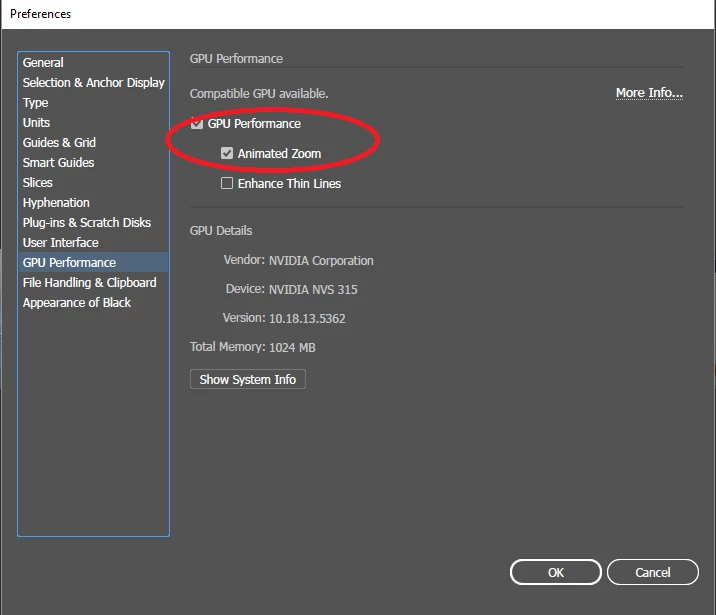
    Please check which graphic card you are using, it has been reported with NVidia Graphic cards on Windows OS.

    Please turn off GPU Performance from Edit > Preferences > uncheck Animated Zoom and GPU performance.

    It Should work fine after that but that's a temporary solution and it will be fixed in our upcoming release.

    Please do share your findings and observation on the discussion.

    Regards

    Srishti

    2 replies

    Mike_Gondek10189183
    Community Expert
    September 1, 2017

    Could not find that post, title must have different keywords.

    But found this and you can also try to reset your prefs as in this post

    But appears to be a recent influx of posts on this and win 10.

    Mike_Gondek10189183
    Community Expert
    September 1, 2017

    srishtib8795206​from Adobe had replied to a similar post about a know issue on this, and to roll back you system. I mentioned her as she is likely more up to date on windows  than myself, and may be able to tell you the exact versions and if 1703 is a problem.

    Srishti Bali
    Community Manager
    Srishti BaliCommunity ManagerCorrect answer
    Community Manager
    September 1, 2017

    Hi Mike and Uzny,

    That post was regarding copy paste issue, not opening multiple files at one time.

    Here is the thread: Re: Illustrator CC 2017 21.1.0 crashes every time I copy any object

    However, the second/multiple file issue on windows is also a known error which has happened with multiple users and has been fixed in upcoming release.

    Please check this thread: Double Clicking Illustrator Files Does Nothing (seemingly)

    Try the following steps and share your results.

    Please check which graphic card you are using, it has been reported with NVidia Graphic cards on Windows OS.

    Please turn off GPU Performance from Edit > Preferences > uncheck Animated Zoom and GPU performance.

    It Should work fine after that but that's a temporary solution and it will be fixed in our upcoming release.

    Please do share your findings and observation on the discussion.

    Regards

    Srishti

    UznyAuthor
    New Participant
    September 4, 2017

    Hi Srishti,

    That did the trick, thank you.