


- Home
- Illustrator
- Discussions
- Cannot open a certain .aic file in Illustrator
- Cannot open a certain .aic file in Illustrator

Copy link to clipboard
Copied
I had recently worked on (4 days ago) a specific file on Illustrator but have not touched since. It was before the new update and now when I go to open the file, either from the creative cloud or Illustrator itself, It doesn't respond. When it doesn't respond, the program doesn't freeze up, and I don't get a pop up message. The other thing is a project I had worked on about a month ago I can open, so it is only a problem with one specific file. I've looked through the fourm and seen similar porblems, but nothing exactly like mine. I should mention I am on Windows 10. If I can get any help on how I can open this file it would be greatly appreciated.


 3 Correct answers


This issue is fixed in AI 25.1 update available in Creative Cloud Desktop
Likes


Rama_ai's answer doesn't work, there's still a bug.
- Quick export the file as AI from the iPad
- Share via Airdrop or other means to get it to your Mac
- Open and save it from the Mac

For me, it worked to close Illustrator and open the file via the Creative Cloud app.
It will automatically open the file in Illustrator then.

Explore related tutorials & articles
 52
Replies
52
52
Replies
52


Copy link to clipboard
Copied
It is not. I'm on 26.0.3, and am having the exact same issue with the first (and possibly last) file I ever saved to cloud. I created the file yesterday, and saved to CC with the intention of working from different locations. While I can open the aic file on an elderly iMac, I can't open it on the PC I actually created it on. Very vexing.
Copy link to clipboard
Copied
Seems to be working for me now, after opening and saving from another computer, the first desktop was able to load the file again.

Copy link to clipboard
Copied
I'm not positive why this happens but I have the same problem, what I do is go on my creative cloud > Your Work > Cloud Documents > Click on the Document and then Duplicate. When you click the copy it should open. This is the only solution that I have found that works so far.

Copy link to clipboard
Copied
******************
Devon Christopher Adams
CONFIDENTIALITY NOTICE
This e-mail message, including any attachments, is for the sole use of the intended recipient and may contain confidential and privileged information.
Any unauthorized review, copy, use, disclosure, or distribution is prohibited.
If you are not the intended recipient, please contact the sender by reply e-mail and destroy all copies of the original message

Copy link to clipboard
Copied
I had the same problem. I logged out of Creative Cloud and logged back in again and the file then opened OK. I promptly saved it locally as an .AI file.

Copy link to clipboard
Copied
Sadly, this did not work for me. I am still unable to open .aic files.

Copy link to clipboard
Copied
Thank you! The fact that it is Feb 2022 and this is still a problem AFTER updating to the recent version is a travesty. Please get this together Adobe and stop saying this is resolved when it is clearly NOT!

Copy link to clipboard
Copied
This is what I did when I couldn't open an .aic file:
Open Creative Cloud>Files>Choose file>Download (under the 3 dots menu)
The file will download as an .ai file.
Now you should be able to open the file on Illustrator.
Copy link to clipboard
Copied
I tried this but only PNG files of each page was downloaded. Not sure why.

Copy link to clipboard
Copied
I called support, and uninstalled, then reinstalled Illustrator and the proleb is fixed.

Copy link to clipboard
Copied
I am having exact same problem with file I had created 4 days ago - after update this morning I can't open this particular file but can open all others.
I am on a mac with Monterey 12.3.1

Copy link to clipboard
Copied
Hi @colinbes,
I am really sorry to hear about the trouble you are facing. As this is happening with a specific file, would it be possible for you to share the link to the Cloud Document from this website https://assets.adobe.com/cloud-documents? If yes, please share the link here or via DM. I will check it on my end.
Also, when creating a shareable link of the file, please ensure that "save a copy" and "anyone with the link can view" are checked.
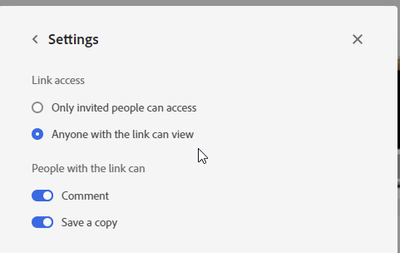
I will be looking forward to the link.
Thanks & Regards,
Anshul Saini
Copy link to clipboard
Copied
I then logged out of creative cloud and then logged back in and it now opens via creative-cloud files as well as open recents in Illustrator.
Internet Disclaimer
_________________
This message (including any attachments) contains confidential information intended for a specific individual and purpose, and may be protected by law.
If you are not the intended recipient, you should delete this message and are hereby notified that any disclosure, copying, or distribution of this message, or the taking of any action based on it, is strictly prohibited.
_________________
Copy link to clipboard
Copied
This morning I tried again to open the mentioned aic file in illustrator and it wouldn't open while others opened fine.
I then logged out of creative cloud and then logged back in and it now opens via creative-cloud files as well as open recents in Illustrator.
Copy link to clipboard
Copied
Thanks for confirming that, @colinbes. I assume local files are opening without any issue, but Cloud documents are not opening unless you log out or login again from the Creative Cloud. Have you recently changed your Adobe ID Password? Are you using a proxy or VPN? Are you connected to an office or personal internet?
We are here to help. We just need more information.
Thanks & Regards,
Anshul Saini
Copy link to clipboard
Copied
~C
Internet Disclaimer
_________________
This message (including any attachments) contains confidential information intended for a specific individual and purpose, and may be protected by law.
If you are not the intended recipient, you should delete this message and are hereby notified that any disclosure, copying, or distribution of this message, or the taking of any action based on it, is strictly prohibited.
_________________
Copy link to clipboard
Copied
Thanks for sharing the details. I would request you to confirm the following:
- Are you working on multiple machines like a work machine at the office and a different machine at home?
- Are you facing an issue with this specific file? Now the file is opening after signing out and back in, correct.
- Is it an intermittent issue for you?
Will be looking forward to your response.
Thanks & Regards,
Anshul Saini
Copy link to clipboard
Copied
I do work on two machines but haven't used illustrator on both machines - on main main machine I use most of the adobe products and on my other pretty much only InDesign where typically I don't save to cloud (somehow have never tried).
So in essence this file was created and edited on only one machine - a macbook pro running Monterey.
I am facing no issues at present - all is working well.
This was just a once off where I could not open a specific file after update.
Copy link to clipboard
Copied
Glad to hear that everything is working now. Please feel free to reach out if you run into this issue or have any other questions or issues in the future. We'd be happy to help.
Thanks & Regards,
Anshul Saini

Copy link to clipboard
Copied
Hello this is also my problem!
My AIC files are not downloadable and can't be opened in illustrator anymore. owever it worked just fine last night.


Copy link to clipboard
Copied
Did you read the complete thread? There should be a couple of tips.
Copy link to clipboard
Copied
Sorry to hear about your experience. Would you mind sharing a few details like:
- Are you getting any errors while downloading the files?
- Which exact version of Illustrator is installed on your device?
- Is this happening with a specific file or all?
- Would it be possible for you to share the link to the Cloud Document from this website https://assets.adobe.com/cloud-documents? If yes, please share the link here or via DM. I will check it on my end.
Also, when creating a shareable link of the file, please ensure that "save a copy" and "anyone with the link can view" are checked.

I will be looking forward to the link.
Thanks & Regards,
Anshul Saini
Copy link to clipboard
Copied
Hi- I have the same issue here in April 2024.
How is this still happening.
I'm an Adobe user since 2001, but am plagued with issues like this & crazy high subscription prices.
Seriously considering ditching the lot 😞

Copy link to clipboard
Copied
Hello @anthonys54549157,
Sorry to hear about your experience. Would you mind trying to revert to an older version of the cloud document (https://adobe.ly/3U1Avzj) to check if it helps? If the problem persists, kindly share a link to the file (https://adobe.ly/3QvuOsL) so that we can check it on our end.
Note: While sharing the link, kindly ensure it is set to Public and the option for Save a Copy is enabled.
Looking forward to hearing from you.
Thanks,
Anubhav
Copy link to clipboard
Copied
Hi Anubhav,
Thanks for your message.
However, after hours of struggling I found a workaround.
Lots of us on here are working on confidential client projects and cannot set anything to public, I'm afraid, nor share with Adobe.
There are reports of these problems going back 2 years now. No personal criticism of you here, but Adobe should have found solutions to this. We're paying top dollar for CC. I had to reinstall all programs twice today and the server hung up each time, taking forever. Full day of work gone. It's unacceptable from Adobe. I'd appreciate it if you communicate this internally.
Thanks,
Anthony


Get ready! An upgraded Adobe Community experience is coming in January.
Learn more
 AdChoices