



Disposition_Dev
Legend
January 6, 2015
Answered

Create artboard around group, unless there's a clipping path, then create the artboard around the clipping path

  • January 6, 2015
  • 2 replies
  • 2294 views

Hello again everyone.

I've been able to work out a bunch of this code from other people's questions, but i've hit a snag in my if/else clause structure.. I need to make an artboard around each top level groupItem on layer[0]. That part is cake.. unless there's a clipping mask. Visible bounds don't work when there's a clipping mask. So i built some for loops that cycle through the pathItems to search for the clipping mask and return the visibleBounds of said mask. However, i can't seem to work out how to structure the if clause in a way that will create the artboard around the clipping mask if there is one.

I'm successfully finding the visibleBounds of the mask and creating the appropriate artboard, but it's ALSO creating an artboard around the visible bounds of the entire group. How would i structure an if clause to determine whether an artboard was made around the clip path already and thus, not create a second artboard around the visible bounds of the whole groupItem? i imagine i'd need some kind of function to determine whether createdArtboardAroundClip = true and if so, skip this group..

Thanks all.

here's the code:

var aB = docRef.artboards;

var docLayers = docRef.layers;

var layer1 = docLayers[0];

var groupLevel1 = layer1.groupItems;

for (a = 0; a < groupLevel1.length; a++){

    var groupLevel2 = groupLevel1.groupItems;

    var vB = groupLevel1.visibleBounds


    for (b = 0; b < groupLevel2.length; b++){

        var paths = groupLevel2.pathItems;


        for (c = 0; c < paths.length; c++){

            if (paths.clipping == true){

                var clipBounds = paths.visibleBounds;

                aB.add(clipBounds);

                break;

                }

            }

        }

    aB.add(vB);

    }
This topic has been closed for replies.
Silly-V
Legend
January 6, 2015

hey, you can probably use the continue keyword in the for loop once you've set up a flag to let you know if something's already been created.

Disposition_Dev
Legend
January 7, 2015

pixxxel schubser

here's that screenshot.

Silly-V

could you elaborate on that a little more? i think i understand what the continue keyword does, but i don't really know how to set up a flag or use said flag/continue combination to do what i'm looking for here..

what i had in mind was to push the parent index to an array if an artboard was created around the clip mask.. something like this

var dontMakeAB = [];

for (loop through top level groups){

     for(loop through group items within top level groups){

          var paths = groupLevel2.pathItems

          for (c=0; c< paths.length; c++){

               if (pathsclipping == true){

                    var clipBounds = paths.visibleBounds;

                    aB.add(clipBounds);

                    dontMakeAB.push(paths.parent.index)

but i already know that's not really going to work because it's calling out the parent of 'paths' which is <Clip Group> in the screenshot above. I don't know how to go back farther to get the "groupLayer1[index]" and at that point.. how to use that index to negate a future artboard..

am i way off base here? pixxxel it seems like your solution is much more elegant.. but i just don't understand how it works at all. (in fact, when i copied that into my code, it didn't work.. but that could just be because i was unsure where to put it or how to use it).

EDIT***

or what about a function to determine simply weather the clipping mask exists instead of building that if clause into the for loop? example:

var ifClipped = function(){

     loop through path items in each 2nd level group

     if paths have clipping masks

          make global variable for bounds of clip mask

          return true

     else

          return false

}

for (loop through top level groups){

     for (loop through group items within top level groups){

               if (ifClipped){

                    make artboard at bounds of global clip mask variable created in the function

                    }

               else {

                    make artboard at bounds of top level group

Disposition_Dev
Legend
January 7, 2015

Your variable has to be outside the for-loop:

var flag = false;

for(var i=0; i<doc.layers.length; i++){

     if(doc.layers.name == 'Special Name'){

          flag = true;

     }

     if(flag == false){

          // do the thing

     }

};

Is this correct?


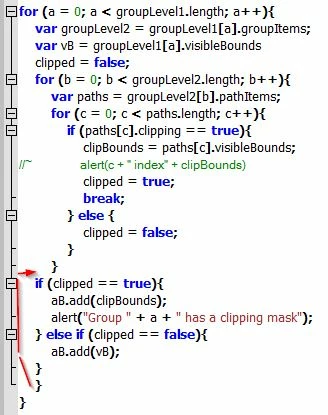
that looks right.. the problem i'm having is that the if clause you wrote above will be nested inside a couple of for loops. i set up my flag as "clipped" to make it easier for me to identify. so if clipped == true, then i want it to create an artboard around the visible bounds of the clip mask. that part works great. but then i hit a snag when it comes to applying the artboards to the objects wherein clipped == false. i can't do that task within that for loop or it creates an artboard around every 2nd level group (i end up with several artboards around each piece of art.. one for each sub group within groupLevel1). and i can't do that task outside of the for loop without creating an additional artboard around that artwork (one artboard around the clipping mask and then another around the visual bounds of the group).

sorry, i know i'm not explaining this right.. but i don't know how else to word it. see the attached screenshot. the red box is the one i need. i am currently able to create this artboard with this snippet (inside of the for loops):

for (c = 0; c < paths.length; c++){

            if (paths.clipping == true){

                var clipBounds = paths.visibleBounds;

//~                 alert(c + " index" + clipBounds)

                aB.add(clipBounds);

                break;

                }

            }

This part of the code works great and creates the artboard i want (the red one in the screenshot). problem is, if there is no clipping mask found, then no artboard is created (hence, line 21 of the code i originally posted). but creating artboards with bounds vB at that point in the loop negates the search for the clipping mask because it creates each artboard around the visible bounds of each top level group (even the ones that already got an artboard applied to the clipping mask, so any art that includes a clipping mask gets two artboards, represented by the red and blue squares in screenshot).

now. the logical thing to do is to put an else statement to create an artboard around "groupLevel1" if (paths.clipping == false).

for (c = 0; c < paths.length; c++){

            if (paths.clipping == true){

                var clipBounds = paths.visibleBounds;

//~                 alert(c + " index" + clipBounds)

                aB.add(clipBounds);

                break;

                }

            else {

                aB.add(vB);

                break;

But that creates an artboard around "groupLevel1" every time it loops through.. so if there are 5 groupItems inside of "groupLevel1" i get 5 artboards at that size and location.

pixxxelschubser
Community Expert
Community Expert
January 6, 2015

Hi williamadowling,

try this for your "firstlevel groups" on your layer 1

var docRef = app.activeDocument;

var aB = docRef.artboards;

//var aB_0 = aB[docRef.artboards.getActiveArtboardIndex()];

var docLayers = docRef.layers;

var layer1 = docLayers[0];

var groupLevel1 = layer1.groupItems;

for (a = 0; a < groupLevel1.length; a++){

    //var groupLevel2 = groupLevel1.groupItems;

    if(groupLevel1.pathItems[0].clipping == false) {

        var vB = groupLevel1.visibleBounds;

        } else {

            var vB = groupLevel1.pathItems[0].visibleBounds;

            }

        aB.add(vB);

        }

    //aB_0.remove();

Here is my layers hierarchy:

Have fun

Disposition_Dev
Legend
January 6, 2015

can you explain that a little? i don't really understand what's going on there.

i want to avoid looking at a specific index **groupLevel1.pathItems[0].clipping** because the clipping mask could be anywhere within that group.

can i loop through the indexes for the pathItems of groupLevel1?

pixxxelschubser
Community Expert
Community Expert
January 6, 2015

I've added a screenshot of my own layers hierarchy to my previous posting at this moment.

Can you show me the same of yours, please?