New Participant
January 28, 2010
Answered

hyperlinks in Ai

  • January 28, 2010
  • 18 replies
  • 374112 views

hello

i'm creating a .pdf from an Illustrator file.

the file has several web addresses which need to be hyperlinked for web use

i'm clueless, i have no web experience

all my work in the past has been print design

is this a novice or expert project?

if novice, please help!
Correct answer Anshul_Saini

Hi Everyone,


Over the years, retaining hyperlinks in exported PDF files has been a top user request. With Illustrator v27.6 and newer, you can now create & preserve your hyperlinks when exporting your artwork as PDF files.

For a comprehensive guide on how to create hyperlinks within Illustrator, I recommend checking out this in-depth YouTube tutorial:


Here are the steps:

  1.  Open the "Attributes" panel from the "Window" menu
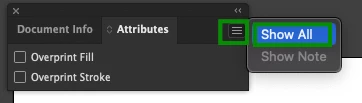
  2.  Click on the Hamburger menu > Show All
  3.  Select the object you want to assign the hyperlink on
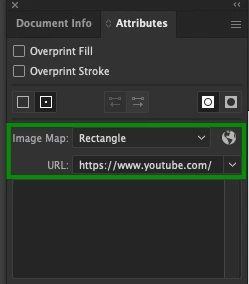
  4.  Then, in "Attributes," choose "Image Map" > Rectangle and insert your website address in the "URL" field
  5.  Save/ export the file as PDF.


Please feel free to reach out if you have further questions or need assistance.


Best,

Anshul Saini

18 replies

Anshul_Saini
Community Manager
Anshul_SainiCommunity ManagerCorrect answer
Community Manager
March 7, 2024

Hi Everyone,


Over the years, retaining hyperlinks in exported PDF files has been a top user request. With Illustrator v27.6 and newer, you can now create & preserve your hyperlinks when exporting your artwork as PDF files.

For a comprehensive guide on how to create hyperlinks within Illustrator, I recommend checking out this in-depth YouTube tutorial:


Here are the steps:

  1.  Open the "Attributes" panel from the "Window" menu
  2.  Click on the Hamburger menu > Show All
  3.  Select the object you want to assign the hyperlink on
  4.  Then, in "Attributes," choose "Image Map" > Rectangle and insert your website address in the "URL" field
  5.  Save/ export the file as PDF.


Please feel free to reach out if you have further questions or need assistance.


Best,

Anshul Saini

New Participant
August 8, 2024

Creating hyperlinks via Attributes panel as explained above worked for me. But is there a way to remove the links again? Is there a menu somewhere showing where exactly the attributes have been placed in the document?

Community Manager
August 8, 2024

Hello @Florian270839803cvn,

Thanks for reaching out. I understand that this functionality is important to you. Would you mind creating a UserVoice for this feature request (https://adobe.ly/3WvXsfa) and adding your comments there? Doing this will help us prioritize this request, and you will be notified of any updates.


Feel free to reach out if you have more questions or need assistance. We'd be happy to help.


Thanks,

Anubhav

Todd_Morgan
Brainiac
June 16, 2020

Oh wait... that's pretty much what MaherSinjary said... but you don't need to create a "Click Here" if you already have elements on your design that need to be hyperlinked.

Todd_Morgan
Brainiac
June 16, 2020

If you want any image or point in your doc to have a url link, create text layer with the url. Then tranform/scale the text box to fit over that area you want to be the link, and make the text Opacity to 0. PDF will see it and the link will be there, but you won't see that actual text. I've done it this way for logos - create text later and drag corner so layer "fills" the logo - doesn't matter if the text is scaled disproportionately... try it and see.

CorySouthpaw
Participating Frequently
January 18, 2018

For me the solution was simple!  No slices or HTML or even knocking objects to 0% opacity.  Had to separate the URL into it's OWN text box.  So the URL was completely by itself.   It cannot be contained in the same box with any other text.   After that my PDF worked fine!   Did not see this mentioned anywhere so figured I'd share as it's still top hits on Google.  (see image for visual)

Jongware
Brainiac
August 7, 2018

Cory, I am sure that this only suddenly/magically works for you because your Acrobat is set to recognize the text as an URL.

See this image for a visual in Acrobat Reader:

If that is not the case, please explain how you managed to paste an URL in a box on its own and make it an active hyperlink.

CorySouthpaw
Participating Frequently
August 7, 2018

You don't believe in Magic?!  The subject is a PDF from Illustrator, so Adobe Reader was never even involved outside of opening the PDF for me.  Just now I exported a file from my source artwork to show you. Only modifying URLs for privacy.

I also should have mentioned I'm working in RGB within Illustrator, I'm assuming that's definitely a factor. Also you do have to hover slightly for a split second, but they work for me.   High-quality PDF export directly from AI, opening in Reader. 

https://www.dropbox.com/s/8jy2p1dx4f9496c/hyperlinks.in.Ai.pdf?dl=0

PJ 123
New Participant
October 12, 2017

Unfortunately, no joy here.  I'm taking the Illustrator CS6 file and printing to pdf.  The ai has shadowed text.  When I create the links in pdf, the shadow slides over and looks awful.  If you don't have any text effect, I'd suggest creating the links in the pdf, which works very well.

Edited to add: I got it to work by creating an invisible rectangle vs adding the link to the shadowed text.

New Participant
August 16, 2017

I have tried all of these options and nothing is working. Every time I export as a pdf and click where the link (with 0% occupancy) should be, nothing happens.   The text also has an attribute with the URL linked. I've tried putting them on the same layer as well as different layers...

I do not have the fancy version of acrobat so it won't allow me to edit or do anything to the pdf. Just view it.

Any other suggestions?

Benji-11
Inspiring
May 27, 2017

I tried a lot to make a hyperlink in Illustrator CC. I spent more than 2 hours to realize that what is the problem that my the hyperlink in pdf file doesn't work. It made me so tired, I'm going to add my hyperlinks in Acrobat.

Monika Gause
Brainiac
May 27, 2017

benjaminb30776065  schrieb

It made me so tired, I'm going to add my hyperlinks in Acrobat.

That is actually a good idea.

Illustrator is not designed to do this kind of stuff. There are only workarounds, which are based on deprecated functions.

sishamIAGD
Brainiac
April 28, 2016

If what mapusoft asked for in the first place is as simple as creating a PDF and it has the (full) web addresses for example www.google.co.uk when you save you document as the PDF and the text hasn't been outlined then Acrobat will automatically pick up the URL.

Simple test for you would be to create a new .ai doc and write a www.google.co.uk and nothing else, save that doc as a PDF and then once opened in Acrobat hover over the URL and you will see that the hyperlink is active.

This only becomes a problem when you want to make hyperlinks for images and text that aren't the full URL. Then you can try some of the other suggestions posted in this thread.

Larry G. Schneider
Inspiring
April 28, 2016

There can be a problem if the end user has disabled the automatic feature in Acrobat. It is still more correct to do it in Acrobat to make sure that it works.

New Participant
April 28, 2016

Hello there,

There is another solution.

Type "Google" and copy it. Then outline it and then paste in front that last copied item . Then type it "www.google.com" and give it 0 transparency. now save it in pdf and that's it.

New Participant
January 24, 2015

Simply you need to create 2 layers.

1. Your URL just copy & paste it in Illustrator then give it 0% transparent.

2. Create another layer for example: Click Here and put it above the URL layer, then save as PDF it will work

Good luck.

New Participant
April 15, 2016

MaherSinjary YOU ARE A GENIOUS!